Payments
All modules
Capture or void an authorized payment
Payments · 5 of 5 · 3 min read
An authorized payment places a hold on the customer's funds at the payment provider. The funds are not yet transferred. From here you can capture the authorized amount, in full or in part. Alternatively, you can void the authorization and release the held funds.
When to capture and when to void
An authorized transaction does not yet count as a collection. The outstanding balance of the order or invoice remains unchanged until the transaction is confirmed.
- If the goods or service are delivered in full, capture the full authorized amount.
- If you deliver only part of it, capture only the corresponding amount.
- If the order does not proceed, void the authorization: the held funds are released.
An authorized transaction prevents a second payment for the same order. A new charge would bill the customer twice.
Capturing or voiding an authorization requires the Payment Manager group. The two buttons appear only on authorized (authorized) transactions and only if the provider supports manual capture, such as Stripe in the example.
Finding the authorized transaction
Transactions are found in the Transactions tab of the Payment Settings page. For the list filters and columns see Track payment transactions.
- In the Payments module menu open Providers. The Payment Settings page opens.
- Click the Transactions tab.
- Find the authorized transaction, for example
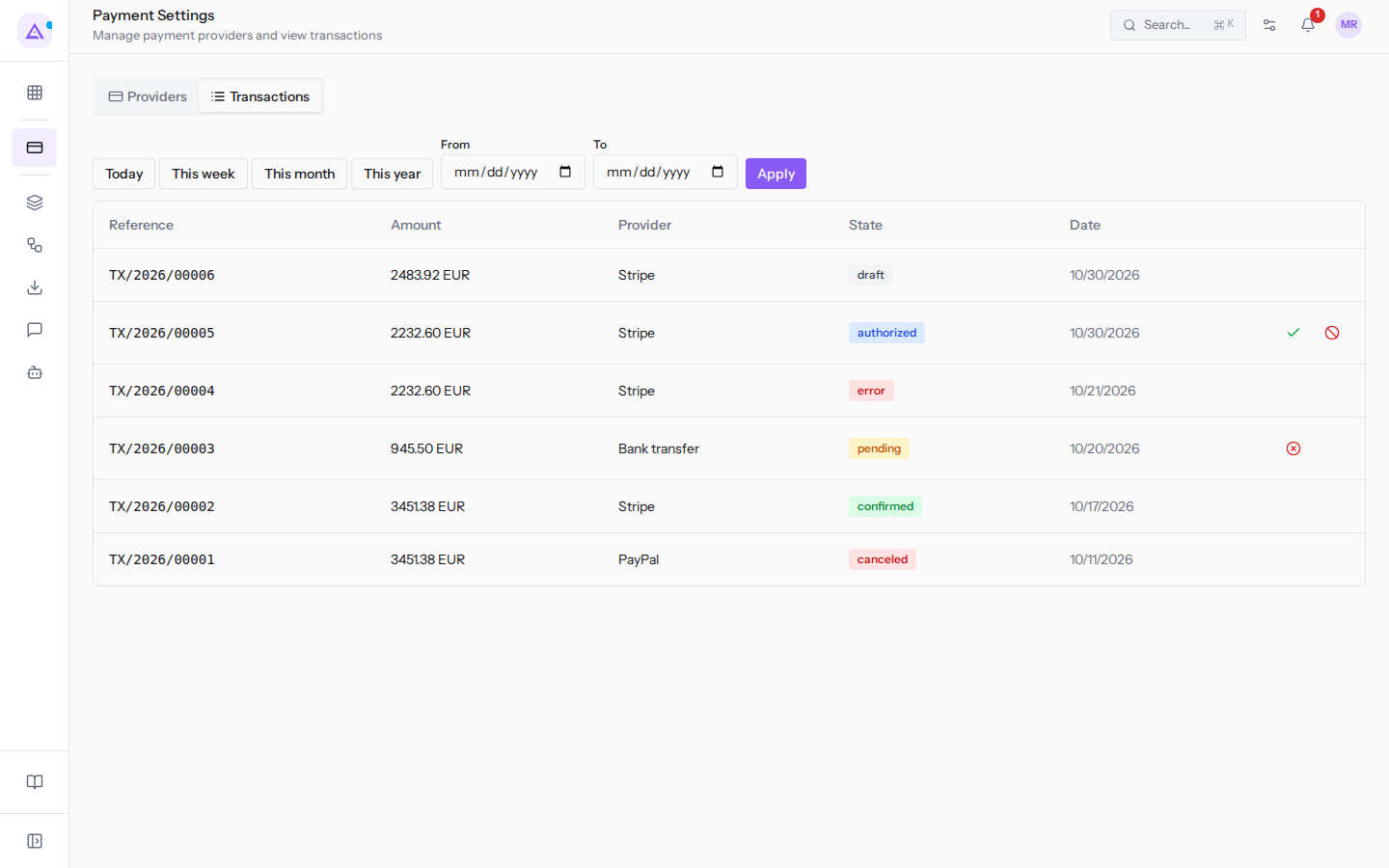
TX/2026/00005from Verdi Costruzioni S.p.A. on S00002, 2232.60 EUR with Stripe. The State column showsauthorized. If needed, narrow the list with Today, This week, This month, or This year. Alternatively fill in the From and To fields and click Apply.
Capturing the payment
Capture transfers the authorized funds. You can capture the full amount or only part of it.
- In the authorized transaction row click the green checkmark icon (Capture). The Capture payment dialog opens.
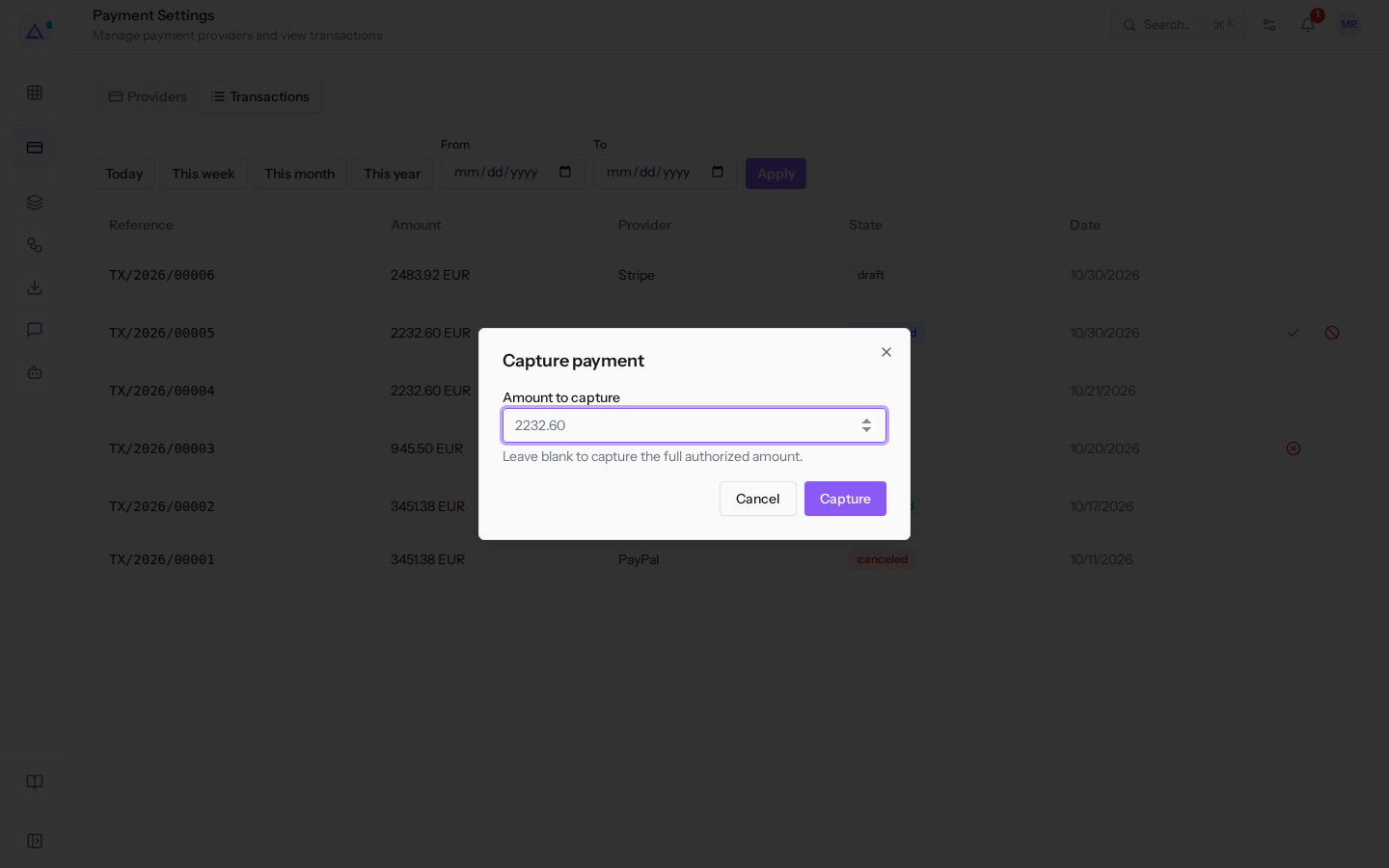
- In the Amount to capture field, which shows the authorized amount in grey (
2232.60), enter an amount for a partial capture, or leave it empty to capture everything. - Click Capture to confirm. To close the dialog without capturing click Cancel.
The transaction becomes confirmed. After a partial capture its amount becomes the captured amount, and the remainder of the authorization is released. An amount greater than the authorized amount is rejected, with an English-language message («Capture amount exceeds the authorized amount.»).
Voiding the authorization
Voiding releases the held funds. Nothing is captured.
- In the authorized transaction row click the red blocked-circle icon (Void).
- The confirmation prompt «Void this authorization? The held funds will be released.» appears.
- Confirm to void the authorization.
To configure providers and check which ones are active see Configure payment providers.
See it on your company, not on a slide deck.
In 30 minutes we map the software you use today.We show you how much work and how much margin Archimedes gives back.
Show me on my business →What industry are you in?
One tap — it lets us prepare the demo around your world.
What tools do you use today?
Pick the ones you recognise — or just type them. It helps us show you how they migrate.
Last step: your details.
We reply within one working day — and right after, if you like, you pick the demo slot yourself.
We couldn't send your request. Try again, or write to us at [email protected].
By sending, you agree to your data being processed so we can get back to you about the demo. Privacy notice.
Preview form — nothing is sent from this page.
Want to schedule the demo now?
Your call: book the slot you prefer yourself, or we'll call you to arrange it.
Live availability, 30 minutes, instant confirmation. The calendar opens in a new tab.
Lock in your slot ↗We'll get back to you within one working day — and we'll join the call already knowing your world.
The calendar is open in another tab: pick a slot and the demo is booked. Can't see it? Reopen it ↗
Preview page: nothing was sent.
Our calendar is live: take the slot that suits you and the demo is booked. 30 minutes, instant confirmation, no waiting.
Lock in your slot ↗