Marketing
All modules
Marketing
Marketing · 1 of 10 · 5 min read
The Marketing module describes who the organisation writes for and in what voice. On this basis it prepares content with AI assistance, for example a LinkedIn post, an X thread, a blog article introduction, or a newsletter.
What it's for
The module manages four archives:
- Personas: the typical audience profiles you write for. A persona describes a type of customer, not a real person. It includes role, industry, company size, pain points, goals, objections, and the places they frequent.
- Voice profiles: the voice you write with. Each profile has a language, pillars, theses, text examples, and prohibited phrases. You can have more than one, and only one is the default.
- Papers: scientific papers sourced from arXiv. Each one receives a score from 0 to 100 against the voice profile and the active personas, along with a recommendation on the angle, persona, and fact to use.
- Content drafts: texts written by the Ghostwriter for a channel. Each draft has a status and a score from 0 to 10 measuring how AI-written the text sounds.
The Ghostwriter is the AI agent that writes the drafts. It works in conversation with Ari or as an autonomous agent that starts every day. It writes with the default voice profile unless a different one is requested.
Who can use it
To use the module you need to belong to one of the two Marketing groups. Each menu entry appears only to users who have access to the corresponding data.
- Marketing User group: views and edits personas, voice profiles, papers, and drafts. Creates personas, voice profiles, and drafts. Cannot delete anything and cannot create papers manually.
- Marketing Manager group: has full access, including deletion.
Menu entries
The Marketing menu has five entries.
Personas
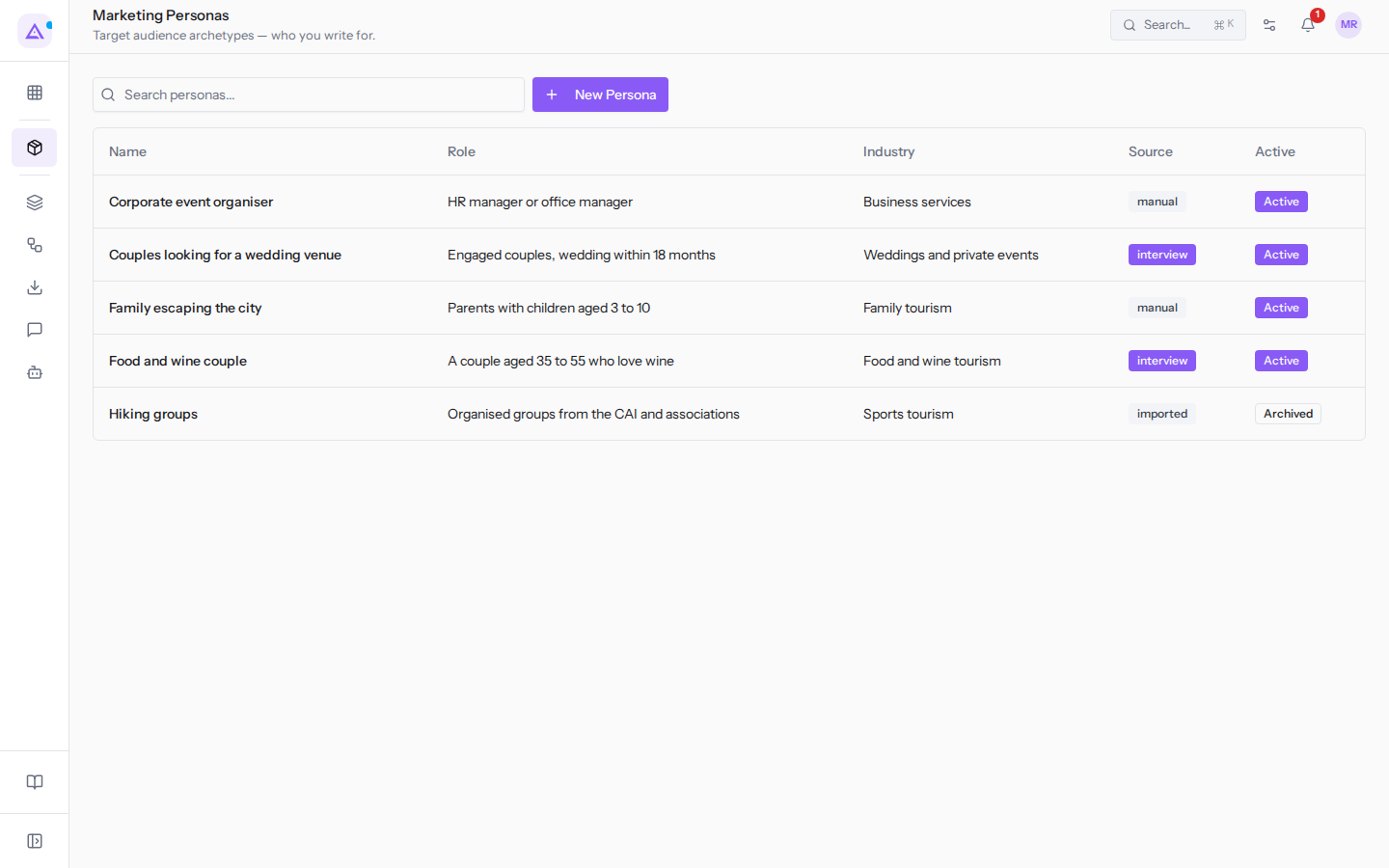
In the Personas entry (Marketing › Personas) you find the list of personas, for example Food and wine couple, with search. A persona can be active or archived: archived ones remain in the list but do not count toward paper score calculations. You create one manually or through a guided interview with Ari, which can produce multiple personas at once. For details read Describing your audience with personas, Creating a persona, and Viewing and editing a persona.
Voice Profile
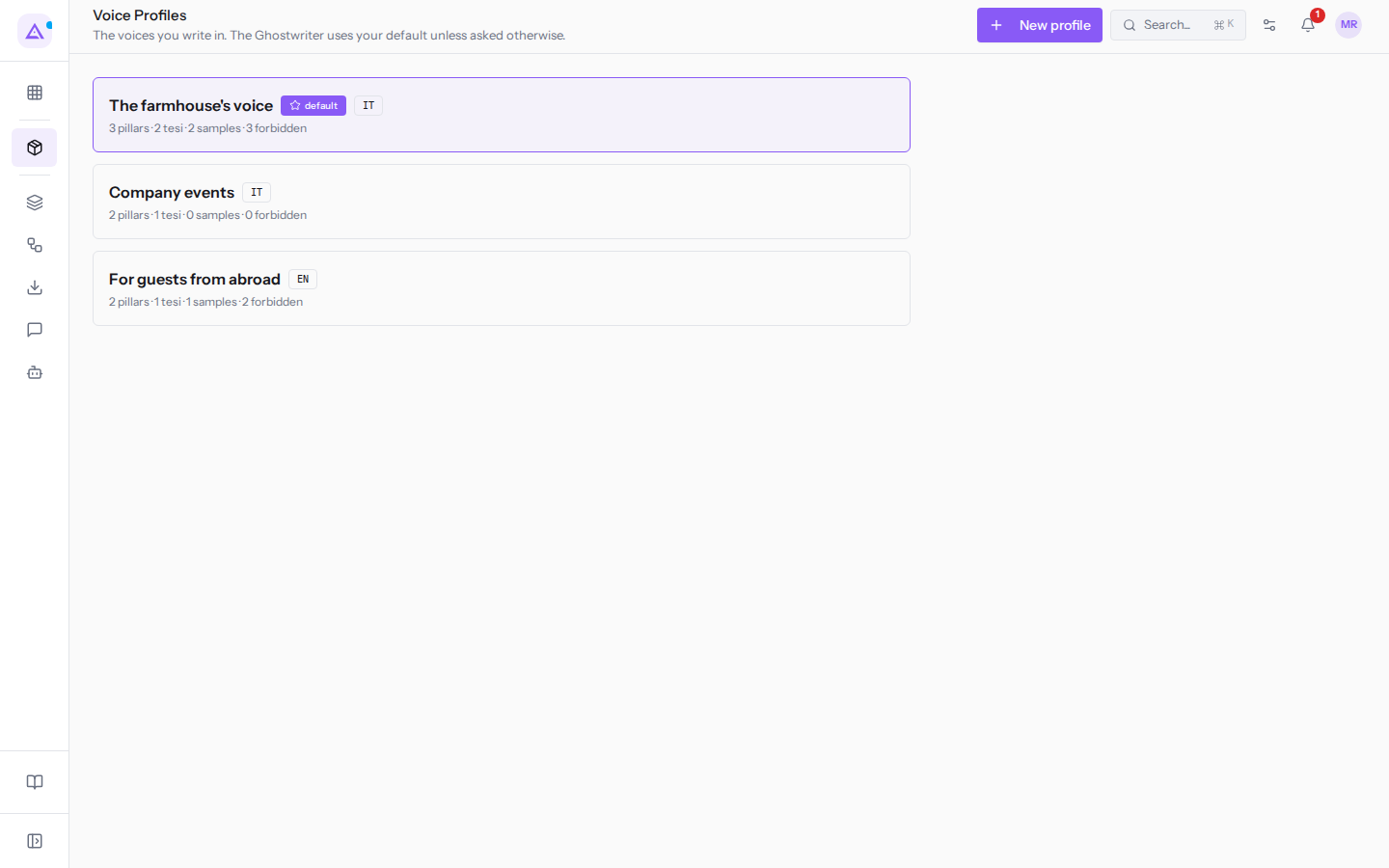
In the Voice Profile entry you find the organisation's voice profiles. For example The farmhouse's voice, the default profile, in Italian. For each profile the list shows how many pillars, theses, examples, and prohibited phrases it contains. See Setting up voice profiles and Managing a voice profile.
Papers
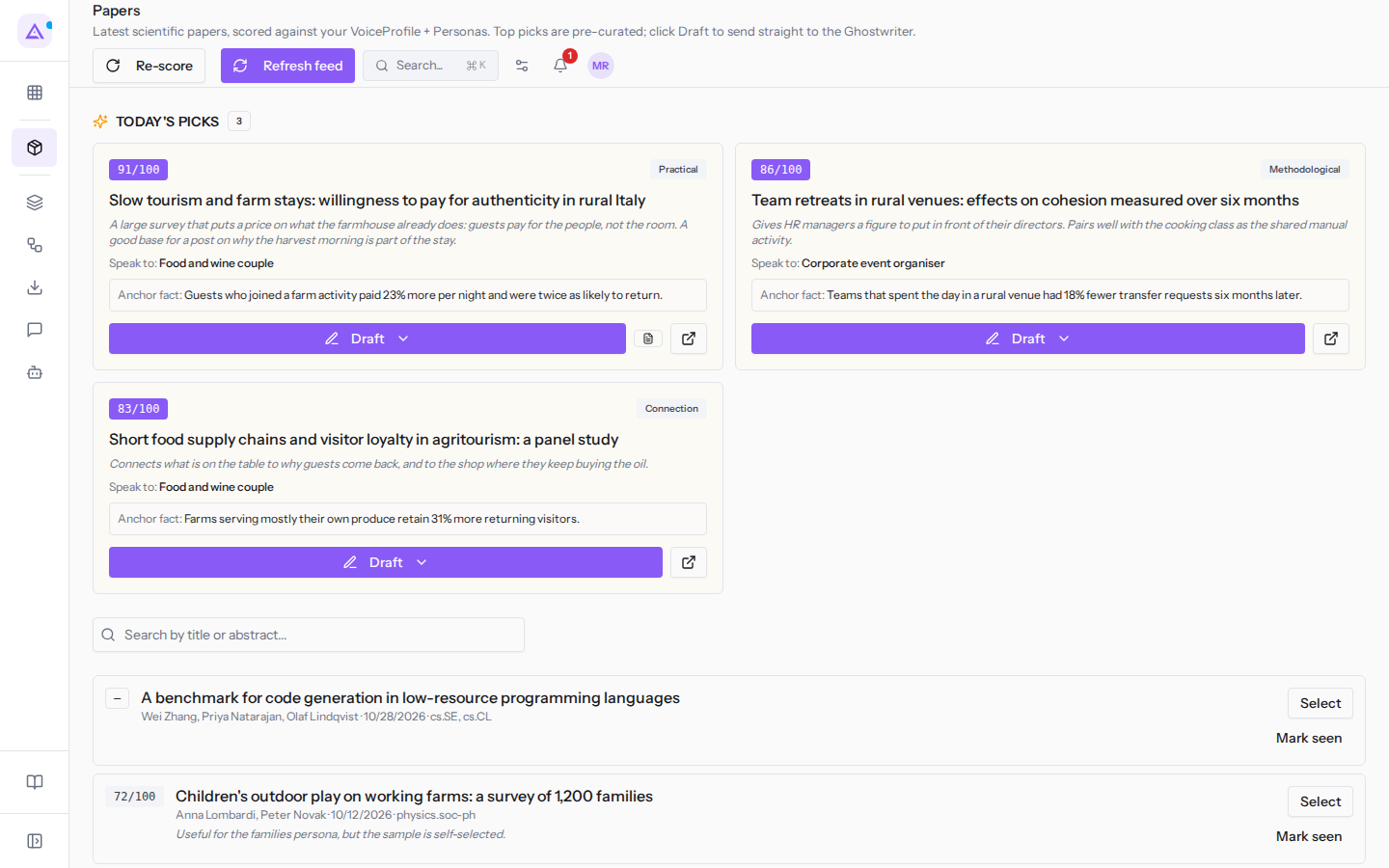
In the Papers entry you find the scientific papers with their scores. At the top, up to 5 papers with a score of 80 or above appear. Below is the full list, with search by title or abstract. From here you update the feed, recalculate scores, and have a draft written from a paper. See Choosing the research papers to start from and Reading a paper and its recommendation.
Content Drafts
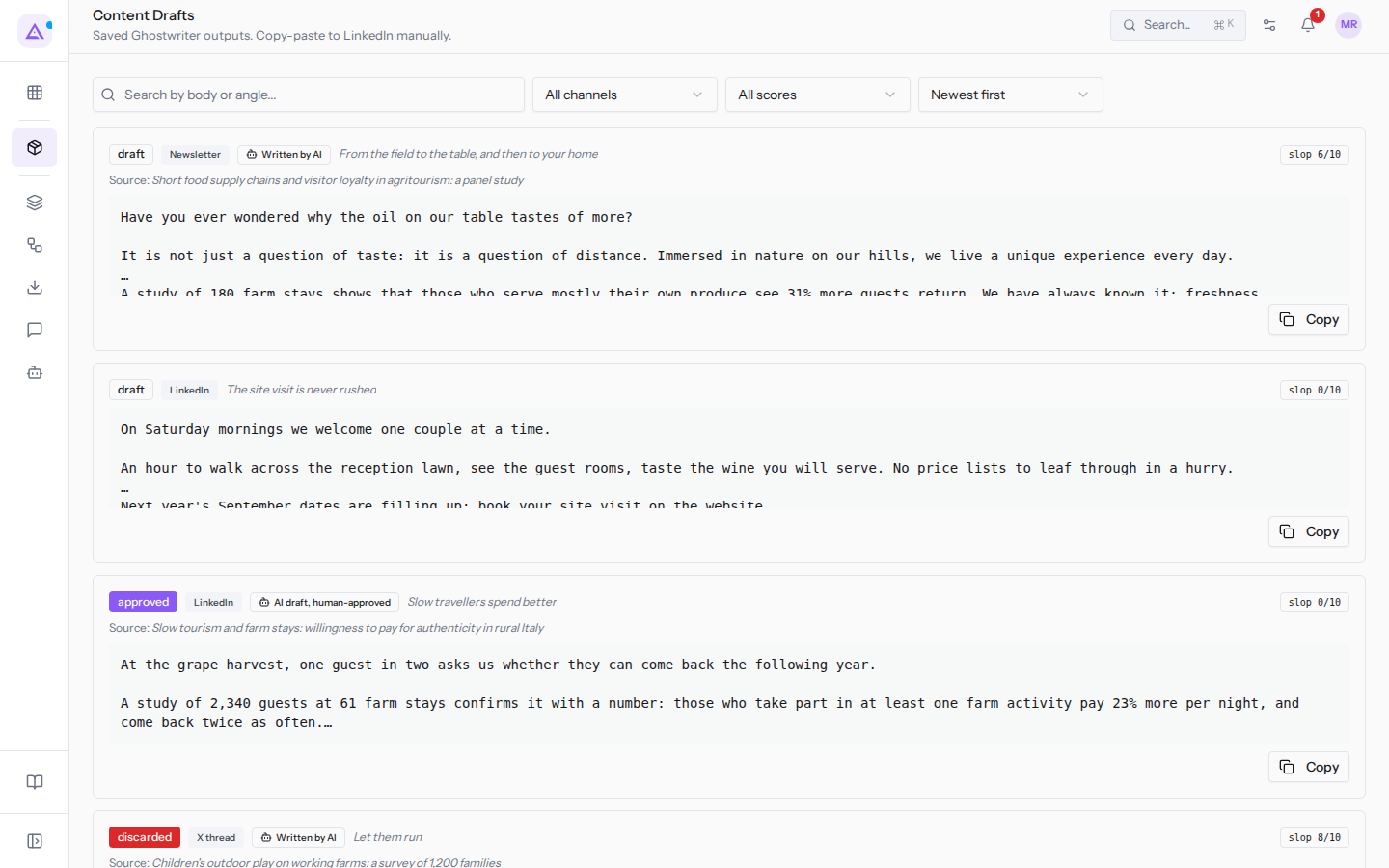
In the Content Drafts entry you find the texts saved by the Ghostwriter. You can search by text or angle, filter by channel (All channels) and by score (All scores), and change the sort order (Newest first). See Finding the drafts written by the Ghostwriter and Reviewing, approving and publishing a draft.
Campaigns
The Campaigns entry is not part of the module: it opens the campaigns in the Email module and appears only to users who have access to email campaigns.
Workflow
- Define your personas, manually or through the guided interview with Ari.
- Set up one or more voice profiles and choose the default one.
- Update the papers feed. The module downloads new papers from arXiv, skips any already present, and assigns them a score.
- Choose a paper and have a draft written for a channel. If the full PDF text has not yet been extracted, the module extracts it first (10–30 seconds). It then opens Ari in Ghostwriter mode with the request ready.
- Review the draft: read it, approve it, mark it as posted, copy it, or delete it.
A draft's statuses move in one direction only: from draft to approved with Approve, from approved to posted with Mark posted. The status discarded indicates a discarded draft.
Important: paper scores depend on the voice profile and personas in effect at the time of calculation. If you change the voice or personas, trigger a recalculation. Otherwise scores and featured papers remain as they were.
Note: if you change the default profile, the tone of all drafts written afterwards will change.
Connections with other modules
- Email: the Campaigns entry leads to the Email module's campaigns. If the Email module is active, from a draft's detail page you can send it as a campaign. Without the Email module the action does not appear.
- Website: if the module is active, you can turn a published website article into two content drafts, one for LinkedIn and one newsletter. You need write permission on website publications and create permission on drafts.
- Ari: draft writing and persona interviews go through the conversation with Ari. Drafts written by the autonomous agent link back to the run that produced them.
The autonomous Ghostwriter agent does not install itself. Its default values are: daily execution, at most 3 iterations, confidence threshold 65, and at most 200,000 tokens per day. Personas and their linked data are retained for 36 months from the last activity.
See it on your company, not on a slide deck.
In 30 minutes we map the software you use today.We show you how much work and how much margin Archimedes gives back.
Show me on my business →What industry are you in?
One tap — it lets us prepare the demo around your world.
What tools do you use today?
Pick the ones you recognise — or just type them. It helps us show you how they migrate.
Last step: your details.
We reply within one working day — and right after, if you like, you pick the demo slot yourself.
We couldn't send your request. Try again, or write to us at [email protected].
By sending, you agree to your data being processed so we can get back to you about the demo. Privacy notice.
Preview form — nothing is sent from this page.
Want to schedule the demo now?
Your call: book the slot you prefer yourself, or we'll call you to arrange it.
Live availability, 30 minutes, instant confirmation. The calendar opens in a new tab.
Lock in your slot ↗We'll get back to you within one working day — and we'll join the call already knowing your world.
The calendar is open in another tab: pick a slot and the demo is booked. Can't see it? Reopen it ↗
Preview page: nothing was sent.
Our calendar is live: take the slot that suits you and the demo is booked. 30 minutes, instant confirmation, no waiting.
Lock in your slot ↗