Field record book (QdC)
All modules
Field record book (QdC)
Field record book (QdC) · 1 of 15 · 3 min read
The field record book (QdC) brings together field operations, farm records, monitoring and plans. Its register retains operations and makes signed records read-only.
Note: these screens currently use Italian interface labels. The instructions preserve the names shown on screen; the screenshots show the same controls.
Preparing the farm records
Configure the farm holder and the person responsible for the register, record estates and cadastral parcels, and create the plots you work on. Then complete the operators, suppliers and contractors, and equipment and calibration details.
Settings store the farm configuration. In this version, the organic, stock and dose fields do not automatically apply product restrictions, stock movements or dose suggestions in the operation form.
Recording and signing operations
Open Operazioni to create a draft with its type, date, plots and operators.
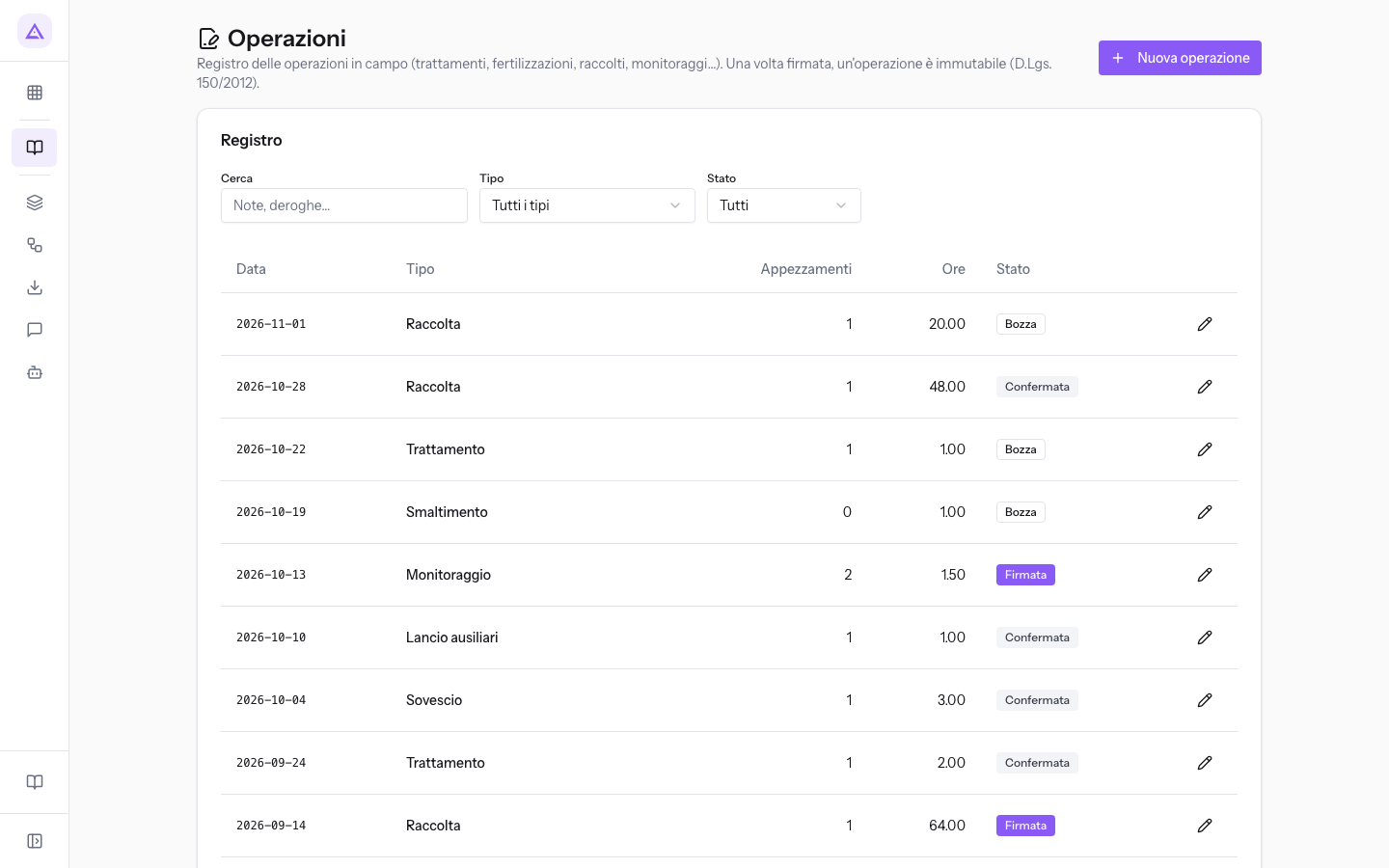
The workflow is Bozza (draft), Confermata (confirmed), then Firmata (signed). Drafts can be edited and, with the necessary permission, deleted. Confirmed records remain editable, but their form no longer offers Elimina. Signed records are read-only.
Before signing, the check reports errors and warnings. It reads current product authorisation status and compares expiry dates and threshold validity with the operation date. A product marked as revoked blocks signing; other checks can leave warnings. Being able to sign does not prove that every necessary detail is recorded.
See Recording a field operation and Confirming and signing operations. Check the data before signing: there is no return to an editable state.
Monitoring and planning
- Rainfall and plot photos: daily readings and images. Submitting the same plot/date again updates the existing rainfall reading rather than adding the amounts.
- Traps and inspections: installed devices and field observations, including catches.
- Intervention thresholds: pest rules for a period and group of plots. The check looks for an applicable rule; it does not automatically compare observed catches with the threshold value.
- Fertilisation and irrigation plans: annual requirements, inputs and planned water volumes.
Keeping documents and checking findings
Archive documents with their type and validity. Retain older certificates when uploading renewals: an expired historical document can still appear in the findings.
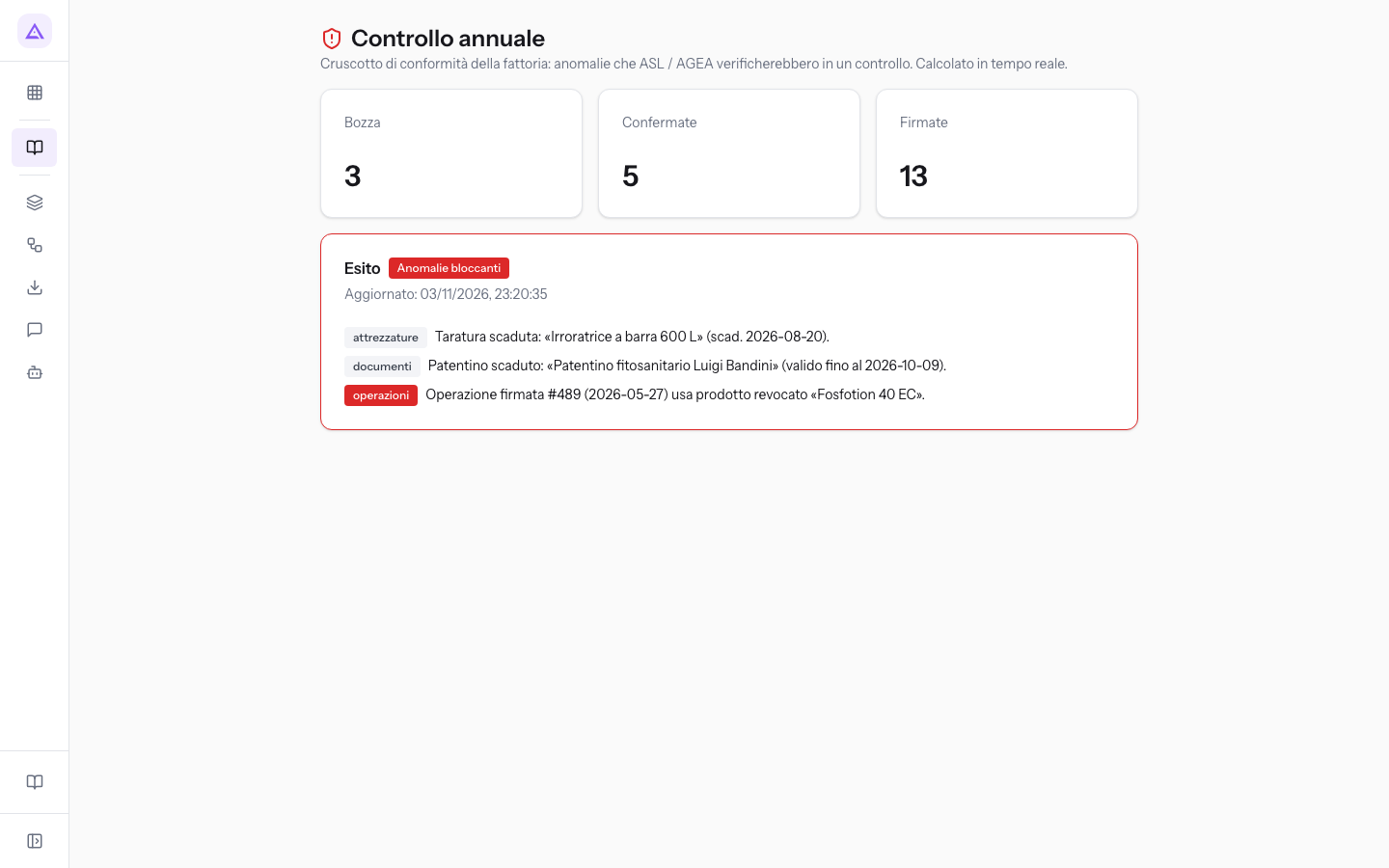
The annual check and product catalogue show statuses and findings. The dashboard has no year filter: it summarises retained records and compares expiry dates with today. Conforme means these checks found no blocking finding; it is not an assessment of every possible requirement.
Use Calcola botte to calculate treatment volumes. The calculator does not create an operation or save its result.
Who uses QdC
- Utente QdC: views data and records or edits operations, rainfall and traps; cannot sign or delete records.
- Responsabile compilazione registro: also has confirmation and signing actions and manages the farm records and plans assigned to this group.
- Manager QdC: also manages deletions and Impostazioni.
The farm holder, suppliers and contractors are contacts; operators are employees; equipment records are accounting assets; agrochemicals are products. Keep these source records current because the checks read them.
See it on your company, not on a slide deck.
In 30 minutes we map the software you use today.We show you how much work and how much margin Archimedes gives back.
Show me on my business →What industry are you in?
One tap — it lets us prepare the demo around your world.
What tools do you use today?
Pick the ones you recognise — or just type them. It helps us show you how they migrate.
Last step: your details.
We reply within one working day — and right after, if you like, you pick the demo slot yourself.
We couldn't send your request. Try again, or write to us at [email protected].
By sending, you agree to your data being processed so we can get back to you about the demo. Privacy notice.
Preview form — nothing is sent from this page.
Want to schedule the demo now?
Your call: book the slot you prefer yourself, or we'll call you to arrange it.
Live availability, 30 minutes, instant confirmation. The calendar opens in a new tab.
Lock in your slot ↗We'll get back to you within one working day — and we'll join the call already knowing your world.
The calendar is open in another tab: pick a slot and the demo is booked. Can't see it? Reopen it ↗
Preview page: nothing was sent.
Our calendar is live: take the slot that suits you and the demo is booked. 30 minutes, instant confirmation, no waiting.
Lock in your slot ↗