Directory
All modules
What the supplier directory is and how it is organized
Directory · 2 of 13 · 6 min read
The directory is the list of businesses that the organization shows on its public site. From the back office, you fill in one listing for each business. The public site shows one page for each published listing, with a filtered search and a map.
In the demo, the directory collects suppliers for weddings at the farm stay: florists, photographers, wineries and musicians. The listings are called supplier / fornitori, and the quality badge is Recommended by us.
The Directory menu
The module has an entry in the main menu, Directory, with these sub-items:
- Directory › Listings: the list of all listings, with the subtitle Every business in the public directory. From here you create, open, publish and archive listings.
- Directory › Services and amenities: the catalogue of service types and amenities that listings choose from.
- Directory › Directory settings: the name of the listings, the public address, the badge name, the language and the landing page copy.
The last two items are in the SETTINGS group of the menu and appear only to directory managers.
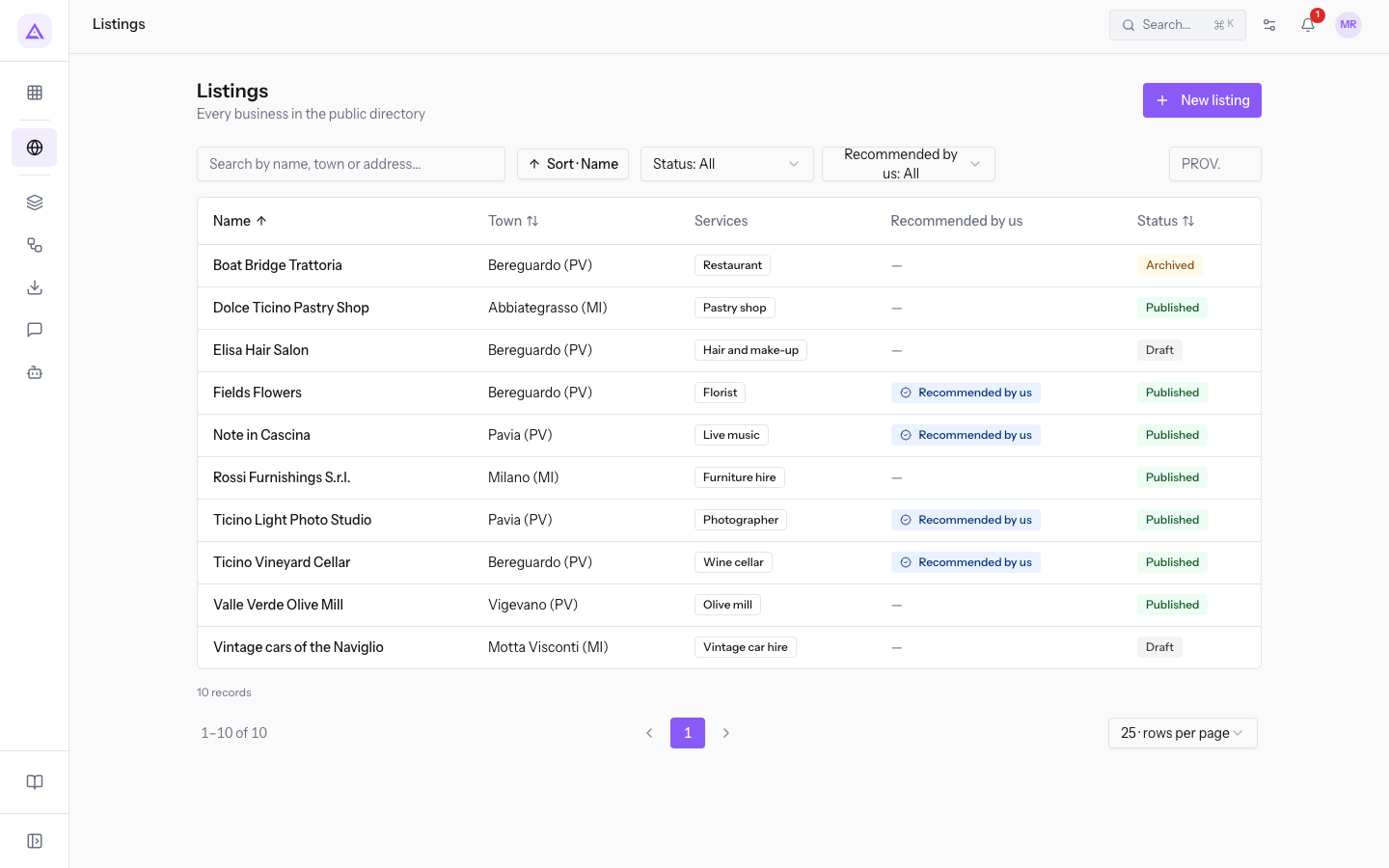
The Listings list has the columns Name, Town, Services, Recommended by us and Status. You can search with Search by name, town or address…, filter by Status, by Recommended by us and by province in the PROV. box, and create a listing with New listing.
The listing
A listing describes a business: in the demo, a supplier. For example, Fiori di Campo in Bereguardo (PV), or Note in Cascina in Pavia (PV).
A listing collects:
- the general details: Name (required), Status and Description;
- the address and location: Address, Postal code, Town (required), Province as a two-letter code, and Latitude and Longitude in decimal degrees. The Region is calculated from the province;
- the contacts: Phone, Email, Website and External reference, a code that links the listing to an external source (
GUIDA2025-14for Acconciature Elisa); - the catalogue entries in Services and amenities;
- the Opening hours, with zero or more intervals per day, including past midnight;
- the photos, where the first one is the Cover.
An incomplete listing can still be published, but on the public site it appears reduced:
- without coordinates, it does not appear on the map or in the “near me” searches;
- without hours, the public site shows them as not available;
- without photos, the public site shows a placeholder.
The public page address is created from the town and the name at the first save. It does not change if you rename the listing, so links already published stay valid.
The statuses of a listing
Each listing has one of these three statuses. Only published listings are visible on the public site.
- Draft: the starting status of every new listing. The listing does not appear on the public site. In the demo,
Vintage cars of the Navigliois a draft to complete, whileAcconciature Elisais ready to publish. - Published: the listing has a page on the public site. In the demo, there are seven published listings, for example
Fiori di CampoandOlive mill Valle Verde. - Archived: the listing leaves the public site but stays in the app with its data. In the demo,
Boat Bridge Trattoriais archived because it closed.
To change the status, use the buttons Publish, Archive and Back to draft: Archive appears only on published listings, and Back to draft only on archived ones. Choose the status based on the situation:
- If the listing is new or still incomplete, leave it in Draft.
- If the data is complete and checked, press Publish.
- If the business has closed or you no longer want to show it, press Archive: the listing leaves the public site and its data stays.
- Delete removes the listing and takes it off the public site. Only managers can delete a listing.
Note: the Published on date is set at the first publication. It is not reset if the listing goes back to draft and is published again.
The quality badge
The quality badge shows on the public site which businesses the organization recommends. Its name is chosen in the settings: in the demo, it is Recommended by us.
In the demo, Fiori di Campo, Ticino Light Photo Studio, Ticino Vineyard Cellar and Note in Cascina have the badge.
The badge is not changed by editing the listing. It is granted and revoked with the dedicated buttons on the listing, which show the badge name, and only a manager can do it. This way, an operator cannot grant the badge through a listing edit. Read the procedure in Assign or revoke the «Recommended by us» badge.
The Services and amenities catalogue
The catalogue is the list of entries that listings can carry: The catalogue listings pick from; the public search turns it into filters.
It contains two groups of entries:
- the service types, which on the public site form the filter titled
Supplier type. In the demo, they are Florist, Photographer, Wine cellar, Olive mill, Pastry shop, Live music, Furniture hire, Vintage car hire, Hair and make-up, Restaurant and Catering; - the amenities, which on the public site form the filter titled
Services offered. In the demo, they are Parking, Wheelchair accessible, Card payment, Delivery to the farm stay, Wi-Fi and Speaks English.
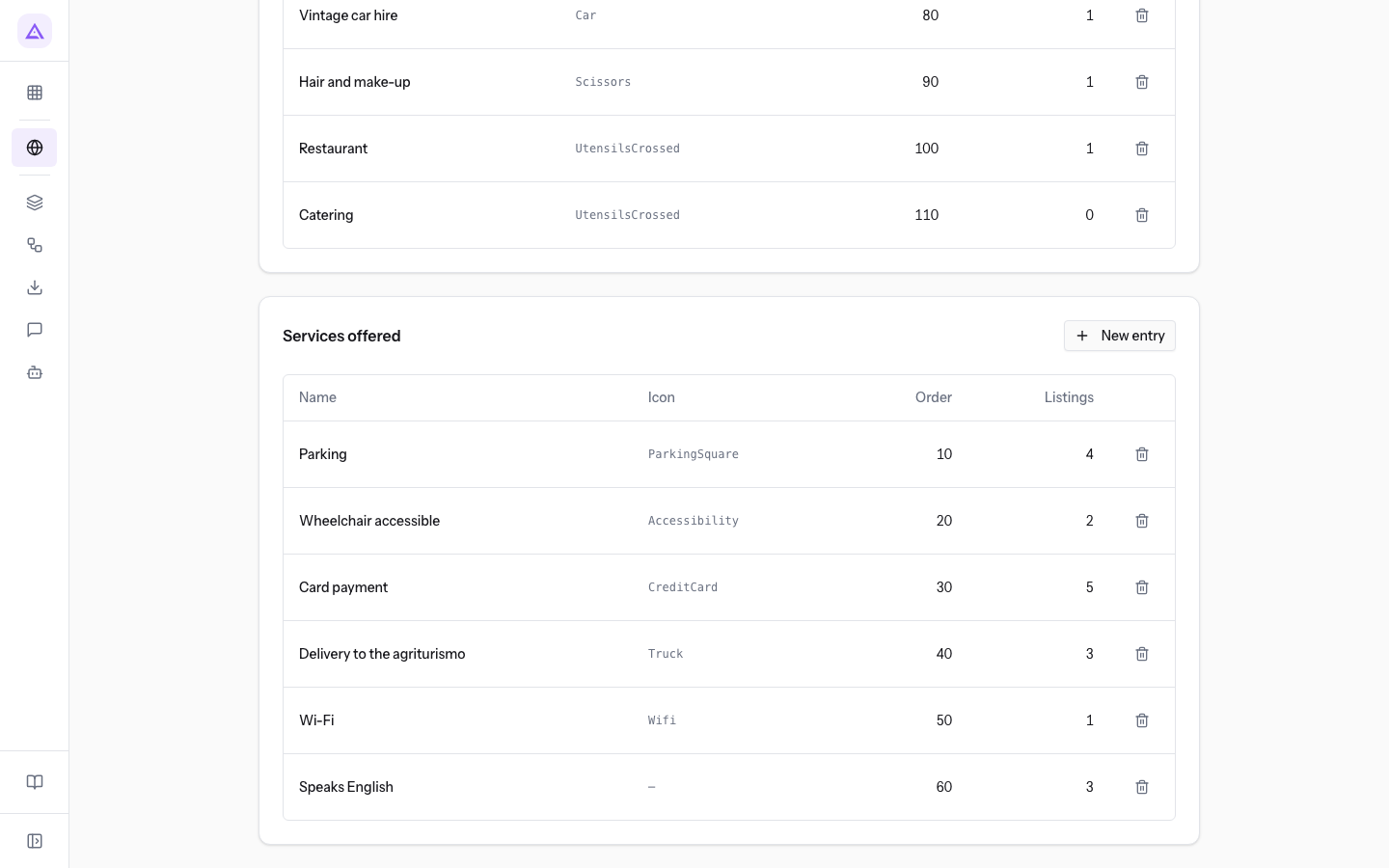
Each entry has a name, an optional icon and an order. Add an entry with New entry.
Important: if you delete a catalogue entry, it is removed from all listings that carry it.
The directory settings
The Directory settings page decides how the public site presents the directory: What the directory lists, how the public site names it, language, badge and copy. In the demo, it has these values:
- What is listed (singular) and What is listed (plural):
supplierandfornitori. - Public URL prefix:
fornitori. The listing pages sit under/fornitori, for example/fornitori/bereguardo/fiori-di-campo. - Badge label:
Recommended by us. - Time zone:
Europe/Rome. The public site uses it to tell whether a business is open at that moment. - Public site language: Italian or English.
- Service types heading and Amenities heading:
Supplier typeandServices offered. - Tagline:
Local suppliers, the short line above the title of the landing page.
Important: the prefix is part of the address of all public directory pages. If you change it, the address of every listing changes.
The public site
Each published listing has a page on the organization's public site, in the demo under /fornitori. The public site also has a page for each town and a search page with filters and the map.
With Directory landing on the home page, the directory's landing page appears at the root of the public site, but only if no CMS page already occupies it.
Who can do what
The module has two access levels.
- Directory operators fill in and edit listings: details, hours, photos, services and status. They do not edit the catalogue or the settings. They cannot delete listings or grant the badge.
- Directory managers have all the operators' permissions. In addition, they grant and revoke the badge, manage Services and amenities and Directory settings, and delete listings.
In the demo, the users with access are Mario Rossi and Giulia Verdi.
See it on your company, not on a slide deck.
In 30 minutes we map the software you use today.We show you how much work and how much margin Archimedes gives back.
Show me on my business →What industry are you in?
One tap — it lets us prepare the demo around your world.
What tools do you use today?
Pick the ones you recognise — or just type them. It helps us show you how they migrate.
Last step: your details.
We reply within one working day — and right after, if you like, you pick the demo slot yourself.
We couldn't send your request. Try again, or write to us at [email protected].
By sending, you agree to your data being processed so we can get back to you about the demo. Privacy notice.
Preview form — nothing is sent from this page.
Want to schedule the demo now?
Your call: book the slot you prefer yourself, or we'll call you to arrange it.
Live availability, 30 minutes, instant confirmation. The calendar opens in a new tab.
Lock in your slot ↗We'll get back to you within one working day — and we'll join the call already knowing your world.
The calendar is open in another tab: pick a slot and the demo is booked. Can't see it? Reopen it ↗
Preview page: nothing was sent.
Our calendar is live: take the slot that suits you and the demo is booked. 30 minutes, instant confirmation, no waiting.
Lock in your slot ↗