Marketing
All modules
Describing your audience with personas
Marketing · 2 of 10 · 3 min read
A persona describes a type of customer the organisation targets, for example a couple passionate about wine, a family with children, or someone who organises corporate events. It does not refer to any real person. With personas, the Ghostwriter knows who it is writing for, and papers suggest who to address.
What personas are for
Personas are the foundation on which the Marketing module prepares content.
- Scientific papers receive a score from 0 to 100 calculated on the voice profile and the personas. Each paper also has a recommendation indicating the persona to address. For details see Choosing the research papers to start from.
- The Ghostwriter, the AI agent that writes drafts, uses personas together with the voice profile.
- A persona can be active or archived. Archived personas remain in the list but are not used to calculate paper scores.
Important: paper scores depend on the personas in effect at the time of calculation. After adding, editing, or archiving a persona, recalculate the scores. Otherwise scores and featured papers remain as they were calculated before.
Opening the personas list
The list collects all of the organisation's personas, both active and archived.
To see the menu item you must belong to the Marketing User or Marketing Manager group.
- Open Marketing › Personas.
- The Marketing Personas page opens, with the description «Target audience archetypes — who you write for.». Personas are listed in alphabetical order by name.
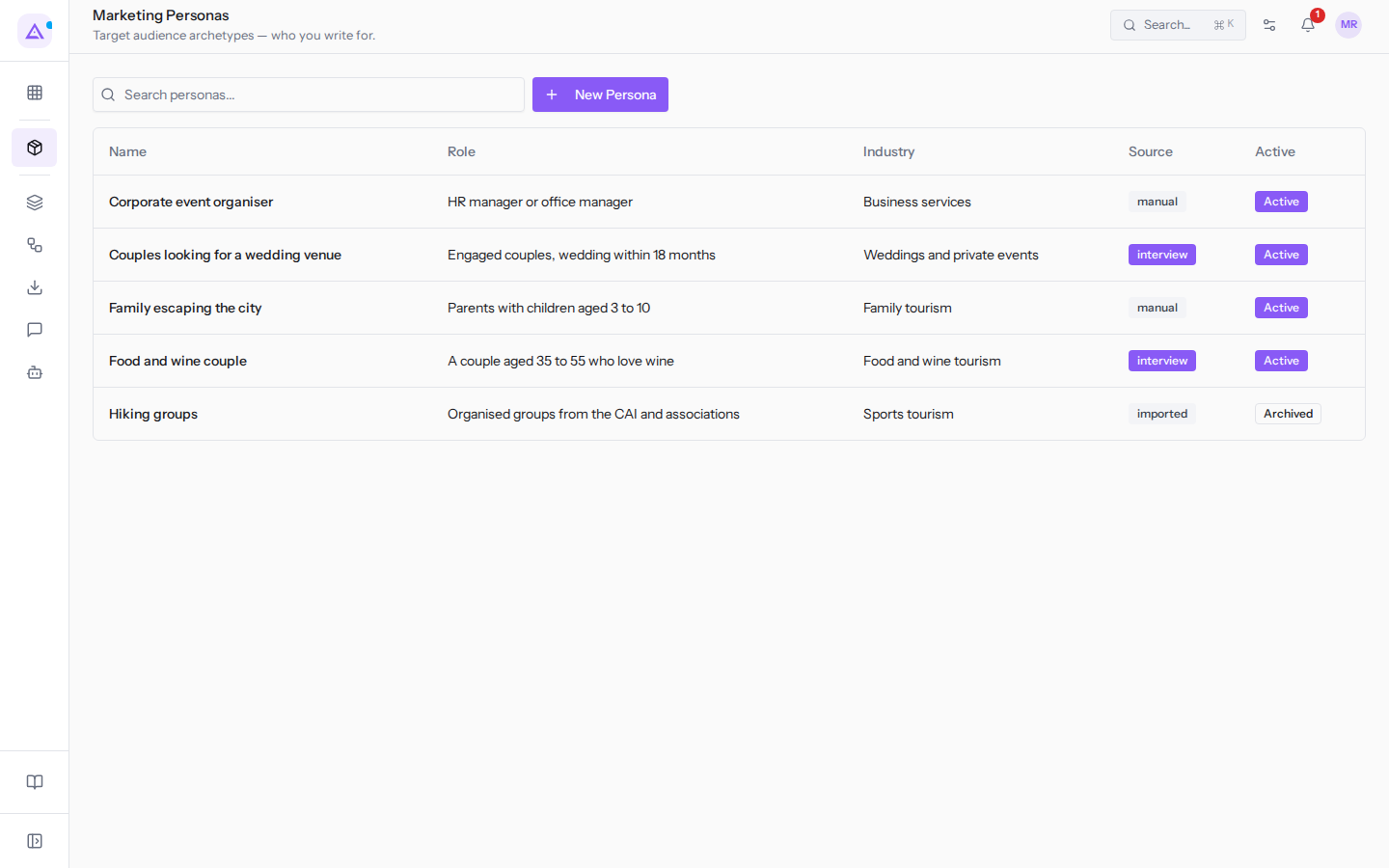
The list has the following columns:
Name: the persona's name, for exampleFood and wine couple.Role: the role or description of the type of customer, for exampleEngaged couples, wedding within 18 months.Industry: the persona's sector.Source: the origin of the persona. The column shows one of these values:manual: the persona was written by hand.interview: the persona was created from a guided interview with Ari.imported: the persona was imported from another source, such asHiking groups.
Active: indicates whether the persona is active (Active) or archived (Archived).
The New Persona button creates a new persona: see Creating a persona.
An example list
A farm stay that works with couples, families, engaged couples, and companies might have these five personas.
Food and wine couple: roleA couple aged 35 to 55 who love wine, origininterview, active.Couples looking for a wedding venue: roleEngaged couples, wedding within 18 months, origininterview, active.Family escaping the city: roleParents with children aged 3 to 10, originmanual, active.Corporate event organiser: roleHR manager or office manager, originmanual, active.Hiking groups: roleOrganised groups from the CAI and associations, originimported, archived.
Searching for a persona
The search narrows the list to personas whose name, role, or sector contains the typed text.
- Type the text in the Search personas... field, for example
couples. - The list updates as you type and shows only the personas found, in this case
Couples looking for a wedding venue.
Opening a persona's record
The record shows everything the persona contains.
- In the list, click on the persona's row, for example
Food and wine couple. - The record opens, with the Personas button to return to the list and the Edit button to edit it.
The record shows the origin, status, and language register, then the sections with the persona's profile. To read and edit the record see Viewing and editing a persona.
See it on your company, not on a slide deck.
In 30 minutes we map the software you use today.We show you how much work and how much margin Archimedes gives back.
Show me on my business →What industry are you in?
One tap — it lets us prepare the demo around your world.
What tools do you use today?
Pick the ones you recognise — or just type them. It helps us show you how they migrate.
Last step: your details.
We reply within one working day — and right after, if you like, you pick the demo slot yourself.
We couldn't send your request. Try again, or write to us at [email protected].
By sending, you agree to your data being processed so we can get back to you about the demo. Privacy notice.
Preview form — nothing is sent from this page.
Want to schedule the demo now?
Your call: book the slot you prefer yourself, or we'll call you to arrange it.
Live availability, 30 minutes, instant confirmation. The calendar opens in a new tab.
Lock in your slot ↗We'll get back to you within one working day — and we'll join the call already knowing your world.
The calendar is open in another tab: pick a slot and the demo is booked. Can't see it? Reopen it ↗
Preview page: nothing was sent.
Our calendar is live: take the slot that suits you and the demo is booked. 30 minutes, instant confirmation, no waiting.
Lock in your slot ↗