Open Banking
All modules
Decide on movements held by the bank
Open Banking · 12 of 15 · 5 min read
Some transactions downloaded from the bank are not recorded automatically: they stay held until you decide what to do with them. For example, a receipt in a currency different from the account's, or a payment the bank sent twice.
Where to find the held transactions
Held transactions appear in a panel at the top of the bank account page, above the transactions. The panel title says how many there are and that your decision is needed: on the Main Current Account it shows 2 transactions.
Before you start: to record or write off a held transaction you need the Open Banking Manager group. With the Open Banking User group you can see held transactions but not change them.
- Open Invoices › Banking and press
Main Current Account. - Look at the panel at the top of the page. For each held transaction you see the description, the amount with its currency, and the account's currency. For example,
Transfer settling invoice FV/2026/0001for3451.38 EUR.
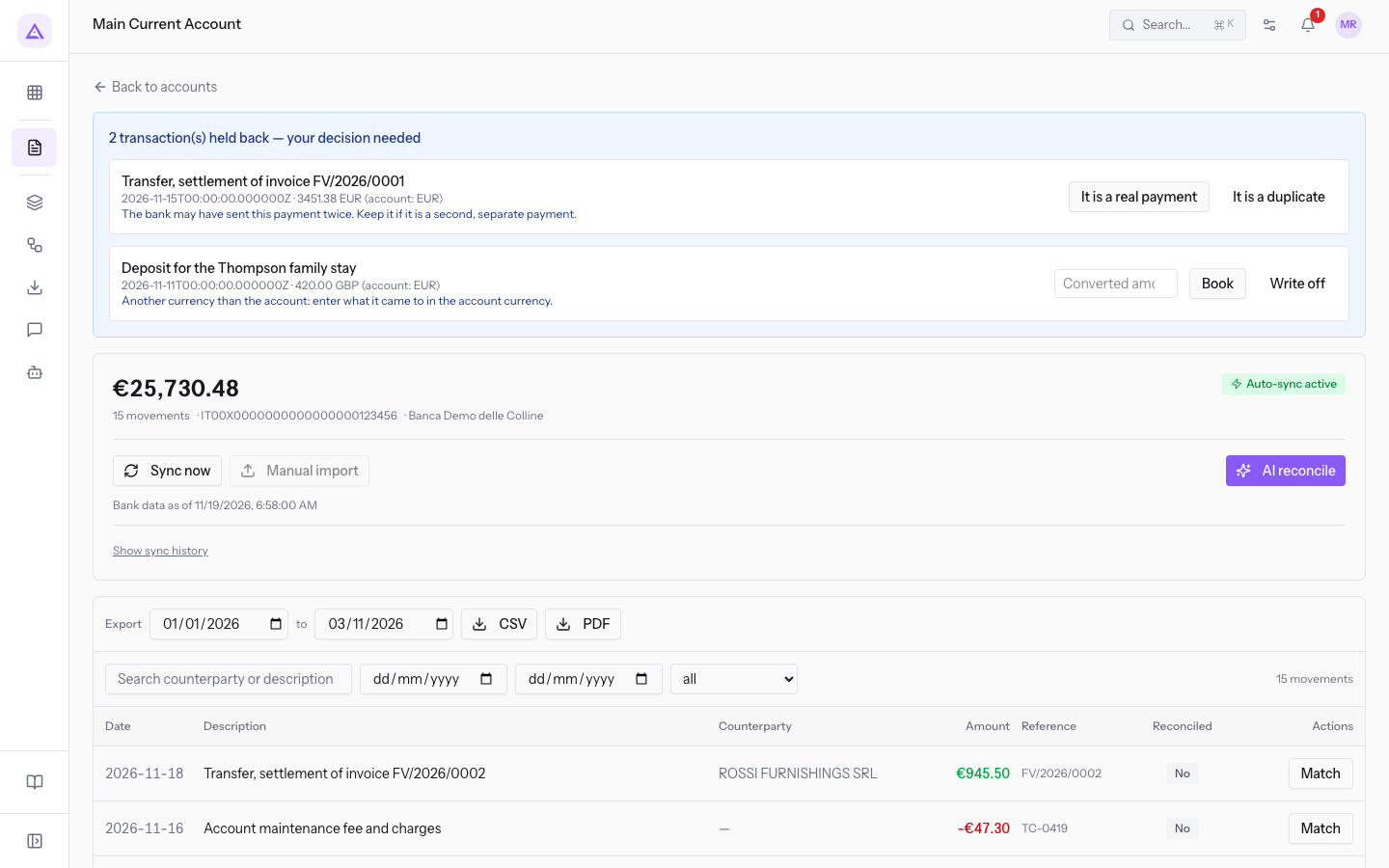
A held transaction does not resolve on its own: each hold is a question that only a person can answer. There are two outcomes: record it or write it off. After the decision, the transaction can no longer be recorded or written off again.
The page is described in detail in Read a bank account page.
Why a transaction is held
A transaction is held for one of four reasons. The reason decides what you can do.
- Currency different from the account's: the transaction is in a currency that is not the account's currency. You can record it by entering the converted amount, or write it off.
- Possible duplicate: the data provider suspects it already delivered the same transaction with different data. It may, however, be a second genuine payment, so you decide.
- Adjustment entry from the data provider: this is not a transaction made by the bank. The data provider adds it when the balance reported by the bank does not match the transactions delivered. It cannot be recorded: you can only acknowledge it with Got it.
- Transaction withdrawn by the bank: the bank has stopped reporting a transaction already downloaded, but the line remains because it is already reconciled or because its statement is confirmed. The transaction is already recorded, so recording it again would double it: you can only acknowledge it with Got it.
Note: for an adjustment entry and for a withdrawn transaction, recording is refused. Acknowledging it closes the transaction without writing anything. If the bank balance does not match, read Understand why the bank balance doesn't match the transactions.
Recording a transaction in another currency
A transaction in another currency is held because the exchange rate is not available in Archimedes: you enter the amount in the account's currency yourself. For example, Deposit for the Thompson family stay for 420.00 GBP on the Main Current Account, which is in EUR.
- If you know how much was credited in the account's currency, record the transaction with the converted amount.
- If the transaction should not enter the accounts, write it off.
- In the held transactions panel, find the row of the transaction.
- In the Converted amount box, enter the amount in the account's currency, the amount the bank actually credited or debited.
- Press Book.
Alternatively, press Write off to write off the transaction without recording it.
- Converted amount: the amount in the account's currency. For a transaction in another currency this field is required to record it.
Deciding on a payment that arrived twice
When the data provider suspects a duplicate, the amount is already in the account's currency: you do not need to enter any amount, you only need to say whether the payment is genuine. For example, the payment for FV/2026/0001 from Studio Bianchi & Associati, which the bank sent twice.
- If the customer really paid twice, the second payment is real: record it.
- If it is the same payment sent twice, it is a duplicate: do not record it.
- In the held transactions panel, find the row
Transfer settling invoice FV/2026/0001. - Press It is a real payment if the payment is genuine: the transaction is recorded with the amount reported by the bank.
- Press It is a duplicate if the payment is a duplicate: the transaction is not recorded.
Important: recording a duplicate puts in the accounts an amount the bank never moved. Before choosing, check in the list of transactions whether the first payment is already there.
What happens when you record a transaction
A recorded transaction enters the account's open statement, as a new row at the bottom. The statement balance is recalculated.
- The row has the date, description and reference of the held transaction.
- The row is created unreconciled: you reconcile it later like the other transactions, for example as explained in Manually matching a transaction to an invoice and undoing a reconciliation.
- The row keeps the bank's identifier: at later syncs the same transaction does not come back among the held ones.
Note: if the account has no open statement, recording is refused. Sync the account at least once before recording, as explained in Sync an account with the bank and read the history.
A written-off transaction creates no row in the statement: it stays closed, marked as seen.
See it on your company, not on a slide deck.
In 30 minutes we map the software you use today.We show you how much work and how much margin Archimedes gives back.
Show me on my business →What industry are you in?
One tap — it lets us prepare the demo around your world.
What tools do you use today?
Pick the ones you recognise — or just type them. It helps us show you how they migrate.
Last step: your details.
We reply within one working day — and right after, if you like, you pick the demo slot yourself.
We couldn't send your request. Try again, or write to us at [email protected].
By sending, you agree to your data being processed so we can get back to you about the demo. Privacy notice.
Preview form — nothing is sent from this page.
Want to schedule the demo now?
Your call: book the slot you prefer yourself, or we'll call you to arrange it.
Live availability, 30 minutes, instant confirmation. The calendar opens in a new tab.
Lock in your slot ↗We'll get back to you within one working day — and we'll join the call already knowing your world.
The calendar is open in another tab: pick a slot and the demo is booked. Can't see it? Reopen it ↗
Preview page: nothing was sent.
Our calendar is live: take the slot that suits you and the demo is booked. 30 minutes, instant confirmation, no waiting.
Lock in your slot ↗