Open Banking
All modules
Read a bank account page
Open Banking · 3 of 15 · 3 min read
A bank account page shows the account balance, the status of the bank connection, and the actions you can take on the account. From here you sync transactions, import a bank statement, or start reconciliation, for example on the Main Current Account or the Bank account.
Open a bank account page
Every bank account in the organization has its own page, which opens from the accounts list.
- Go to Invoices › Banking.
- Press the account card, for example
Main Current Account. - To go back to the accounts list, press Back to accounts.
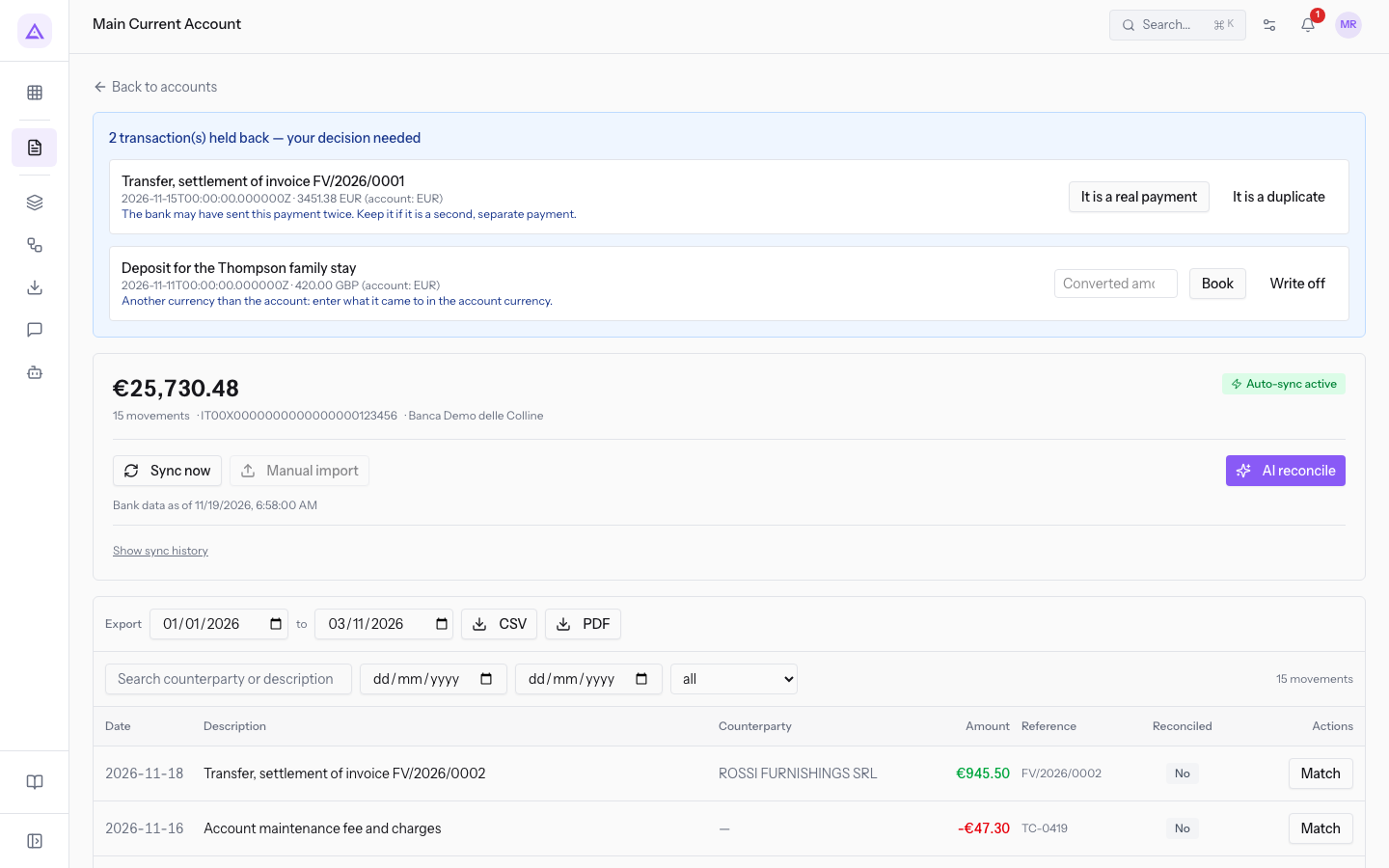
Page header
At the top of the page you find the account name and its balance.
- Account name: the page title, for example
Main Current AccountorBank. - Balance: the amount in large type,
€25,730.48on theMain Current Account. Below it is the number of transactions on the account:16 movementson theBankaccount. - Connection status: a badge shows how transactions arrive. Auto-sync active means an account connected to the bank. Manual only means an account with no connection, such as the
Bankaccount, whose transactions arrive only from imported files.
Note: if the bank has asked you to renew consent, the page shows it. The procedure is in Reconnect a bank account when the bank consent expires.
Action bar
Below the header is the bar with the account actions. The buttons change according to the connection status. Each action has its own article.
- Sync now: appears on accounts connected to the bank and immediately requests new transactions. See Sync an account with the bank and read the history.
- Connect bank: appears on accounts not connected, such as the
Bankaccount, in place of Sync now. See Connect a bank account. - Manual import: uploads a bank statement from a file. On the
Main Current Accountthe button is disabled and shows the hint Disabled while auto-sync is active. See Import a bank statement from a CSV or CAMT.053 file. - AI reconcile: proposes matches between transactions and invoices. See Reconcile transactions with automatic suggestions.
Note: transactions arrive only through sync, not in real time. A transaction just made at the bank appears at the next sync.
Needs setup box
When the account is missing something for automatic reconciliation, the page shows the Needs setup box with the list of problems.
- Go to Invoices › Banking and open the
Bankaccount. - Read the list under Needs setup. The
Bankaccount shows No bank connection linked.
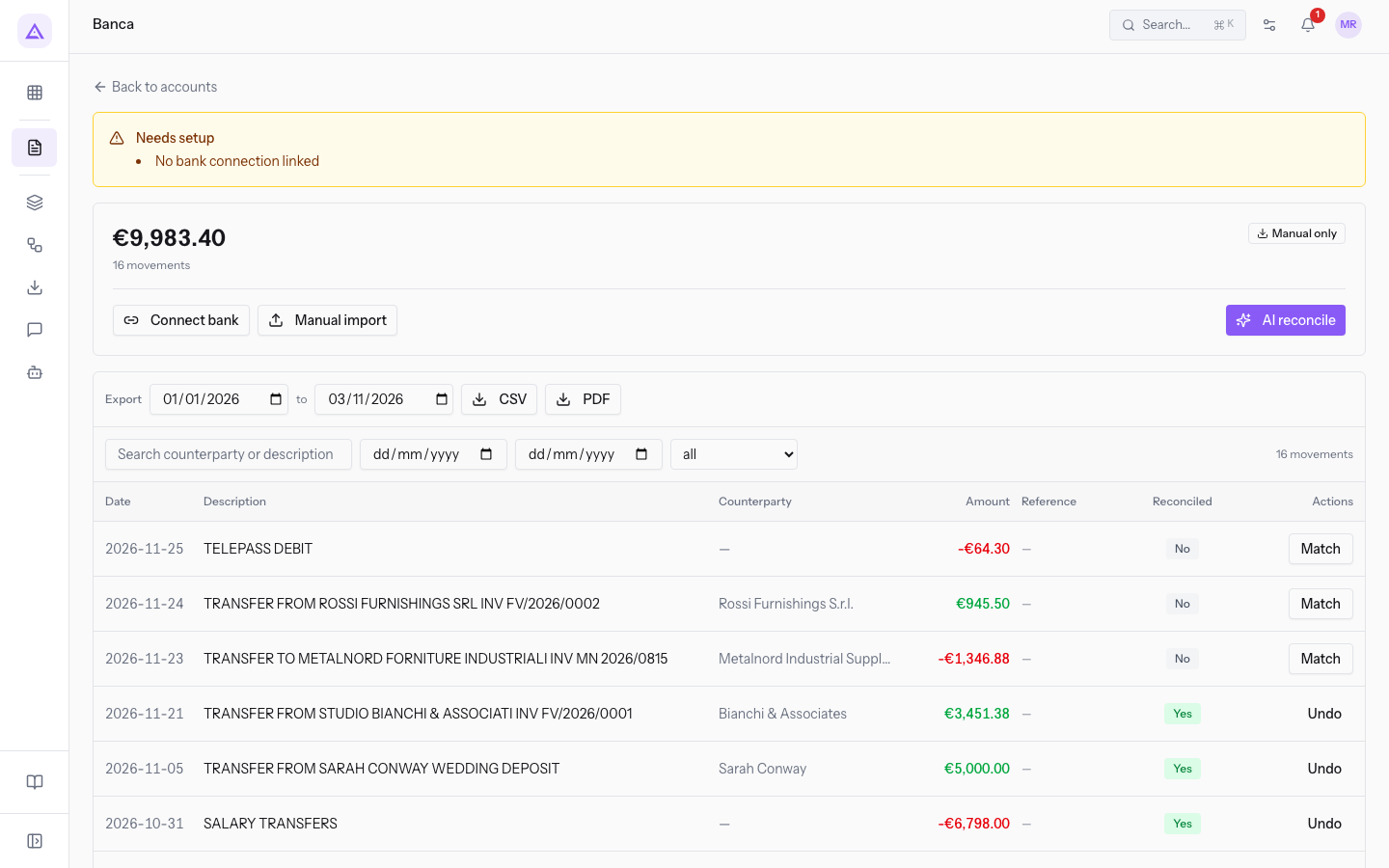
- No bank connection linked: the account receives no transactions from the bank. Connect the account with Connect bank, as described in Connect a bank account, or upload bank statements with Manual import.
Tip: if the bank balance and the sum of the transactions do not match, read Understand why the bank balance doesn't match the transactions.
See it on your company, not on a slide deck.
In 30 minutes we map the software you use today.We show you how much work and how much margin Archimedes gives back.
Show me on my business →What industry are you in?
One tap — it lets us prepare the demo around your world.
What tools do you use today?
Pick the ones you recognise — or just type them. It helps us show you how they migrate.
Last step: your details.
We reply within one working day — and right after, if you like, you pick the demo slot yourself.
We couldn't send your request. Try again, or write to us at [email protected].
By sending, you agree to your data being processed so we can get back to you about the demo. Privacy notice.
Preview form — nothing is sent from this page.
Want to schedule the demo now?
Your call: book the slot you prefer yourself, or we'll call you to arrange it.
Live availability, 30 minutes, instant confirmation. The calendar opens in a new tab.
Lock in your slot ↗We'll get back to you within one working day — and we'll join the call already knowing your world.
The calendar is open in another tab: pick a slot and the demo is booked. Can't see it? Reopen it ↗
Preview page: nothing was sent.
Our calendar is live: take the slot that suits you and the demo is booked. 30 minutes, instant confirmation, no waiting.
Lock in your slot ↗