Open Banking
All modules
Understand why the bank balance doesn't match the transactions
Open Banking · 8 of 15 · 3 min read
When the balance the bank reports for an account differs from the total of the transactions in Archimedes, the account page flags it with a box. This article explains what the box shows, which balance appears in Banking, and how to recover the missing transactions before reconciling.
The box about the difference between balance and transactions
The This account does not add up box appears at the top of the account page, under Back to accounts.
- Open Invoices › Banking.
- Press the account card, for example
Events and Deposits Account(CRD1, Demo Rural Bank).
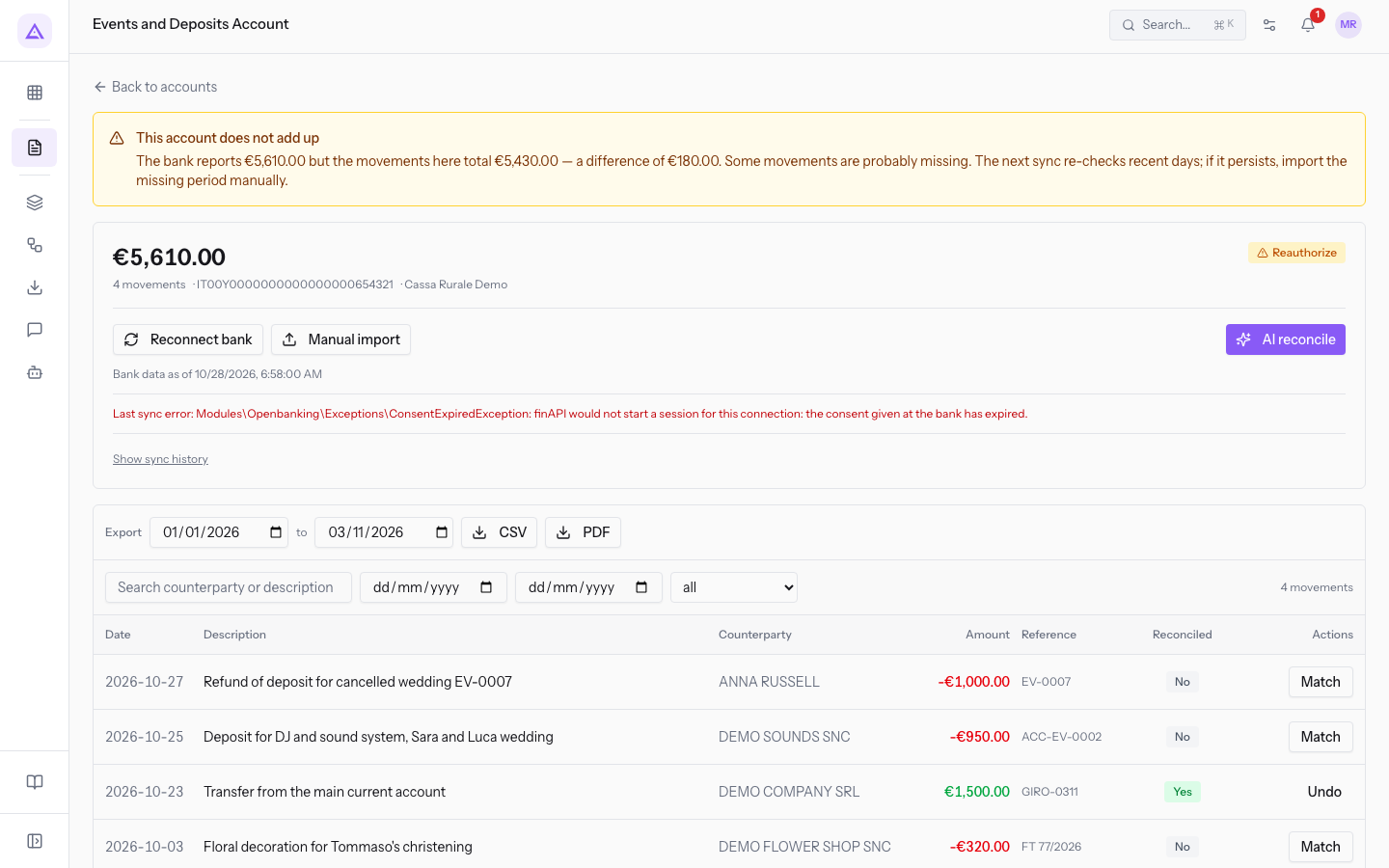
The box shows three values:
- The balance reported by the bank. In the demo it is
€5,610.00. - The total of the transactions in the account page. In the demo it is
€5,430.00. - The difference between the two. In the demo it is
€180.00.
A difference means some transactions on the account are missing from Archimedes.
Note: in the demo, the account
Events and Deposits Accounthas the Reauthorize badge. The bank's consent has expired and the last sync was on 30 September 2026.
Which balance appears as Current balance
In the Banking list, each card shows a Current balance. For an account connected to the bank, the Current balance is the balance reported by the bank, not the total of the transactions present.
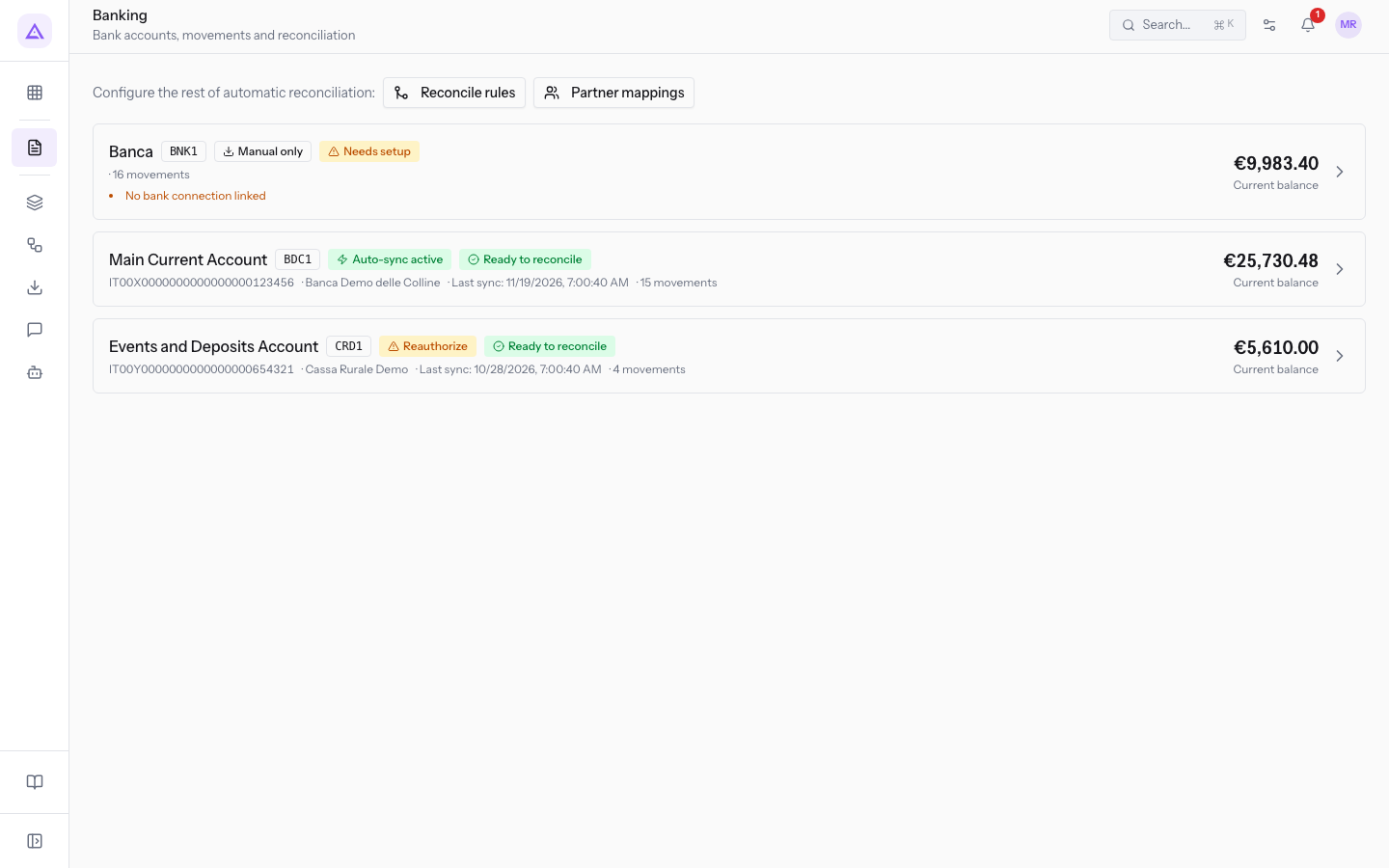
For example, Events and Deposits Account shows €5,610.00 as Current balance, which is the value the bank reports. It is the same amount that appears in large type on the account page. The total of the transactions, €5,430.00, appears only in the box.
The balance in the list can therefore be correct even when some transactions are missing. To check whether the transactions are complete, open the account page and see whether the box appears. To read the other parts of the page, see Read a bank account page.
Why close the gap before reconciling
Reconciliation matches invoices and expenses only with the transactions present on the account page. Open Banking downloads the transactions and passes them to reconciliation, but does not replace it.
A missing transaction cannot be matched. If you reconcile before recovering the missing transactions, a document the bank has already paid or collected stays open, for example a customer invoice. The difference remains until the missing transactions enter the account.
Important: recover the missing transactions before using AI reconcile or Match on the account.
Recovering the missing transactions
Transactions arrive only when the account syncs: real-time notifications are not used. You can recover the missing transactions in these ways.
- If the account is connected and the consent is valid, wait for the next sync. Each sync first asks the bank to refresh the data.
- If the consent has expired, as on
Events and Deposits Account, the sync does not run. The page shows Reconnect bank instead of Sync now. Renew the consent as described in Reconnect a bank account when the bank consent expires. - If you don't want to wait, import the missing period by hand with Manual import. The button is available on accounts that do not sync automatically, such as
Events and Deposits Account. For the procedure, see Import a bank statement from a CSV or CAMT.053 file.
With all the transactions present, you can reconcile as described in Reconcile the bank statement.
See it on your company, not on a slide deck.
In 30 minutes we map the software you use today.We show you how much work and how much margin Archimedes gives back.
Show me on my business →What industry are you in?
One tap — it lets us prepare the demo around your world.
What tools do you use today?
Pick the ones you recognise — or just type them. It helps us show you how they migrate.
Last step: your details.
We reply within one working day — and right after, if you like, you pick the demo slot yourself.
We couldn't send your request. Try again, or write to us at [email protected].
By sending, you agree to your data being processed so we can get back to you about the demo. Privacy notice.
Preview form — nothing is sent from this page.
Want to schedule the demo now?
Your call: book the slot you prefer yourself, or we'll call you to arrange it.
Live availability, 30 minutes, instant confirmation. The calendar opens in a new tab.
Lock in your slot ↗We'll get back to you within one working day — and we'll join the call already knowing your world.
The calendar is open in another tab: pick a slot and the demo is booked. Can't see it? Reopen it ↗
Preview page: nothing was sent.
Our calendar is live: take the slot that suits you and the demo is booked. 30 minutes, instant confirmation, no waiting.
Lock in your slot ↗