Agorà
All modules
Increase capacity and extend the deadline
Agorà · 8 of 12 · 2 min read
The record lets you increase capacity and extend the deadline once. Your organisation must be enabled and your user must belong to Agorà Manager.
Increase capacity
The editor is offered in Published and Threshold met.
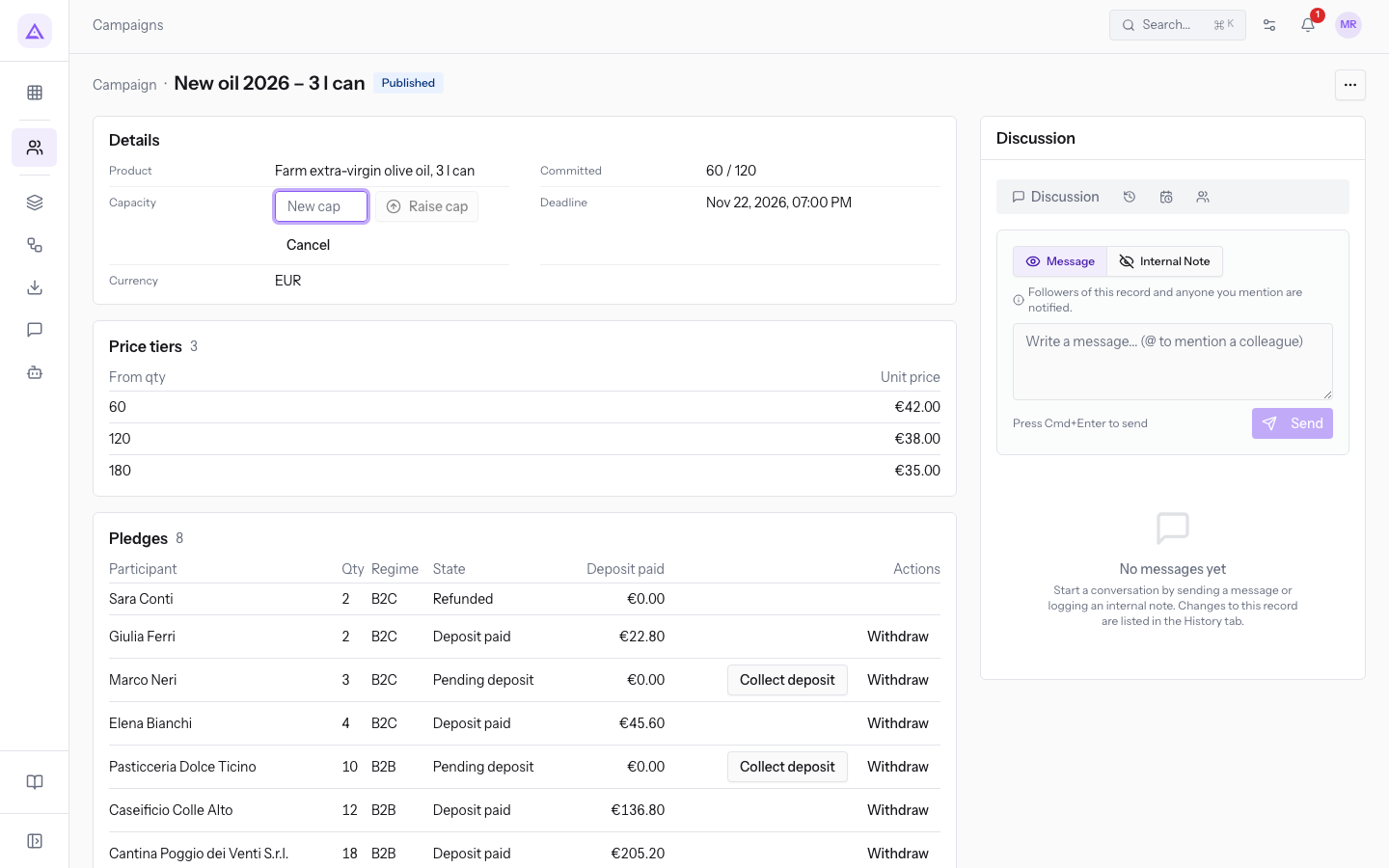
- Open the campaign and click Capacity in Details.
- Enter a positive integer in New maximum capacity. If a cap exists, the new value must be higher.
- Press Raise cap, or Cancel to leave the editor.
- Check the new value. Prices and deadline remain unchanged.
Note: No cap means unlimited capacity. Entering a number in that case introduces a limit rather than increasing capacity. The product permits it: consider committed quantities and pending pledges before using it. Do not choose a limit below quantities already reserved.
Extend the deadline
The editor is offered only in Published, when extension has not been used and the declared maximum is greater than zero. It is unavailable in Threshold met, even if withdrawals subsequently reduced committed quantity.
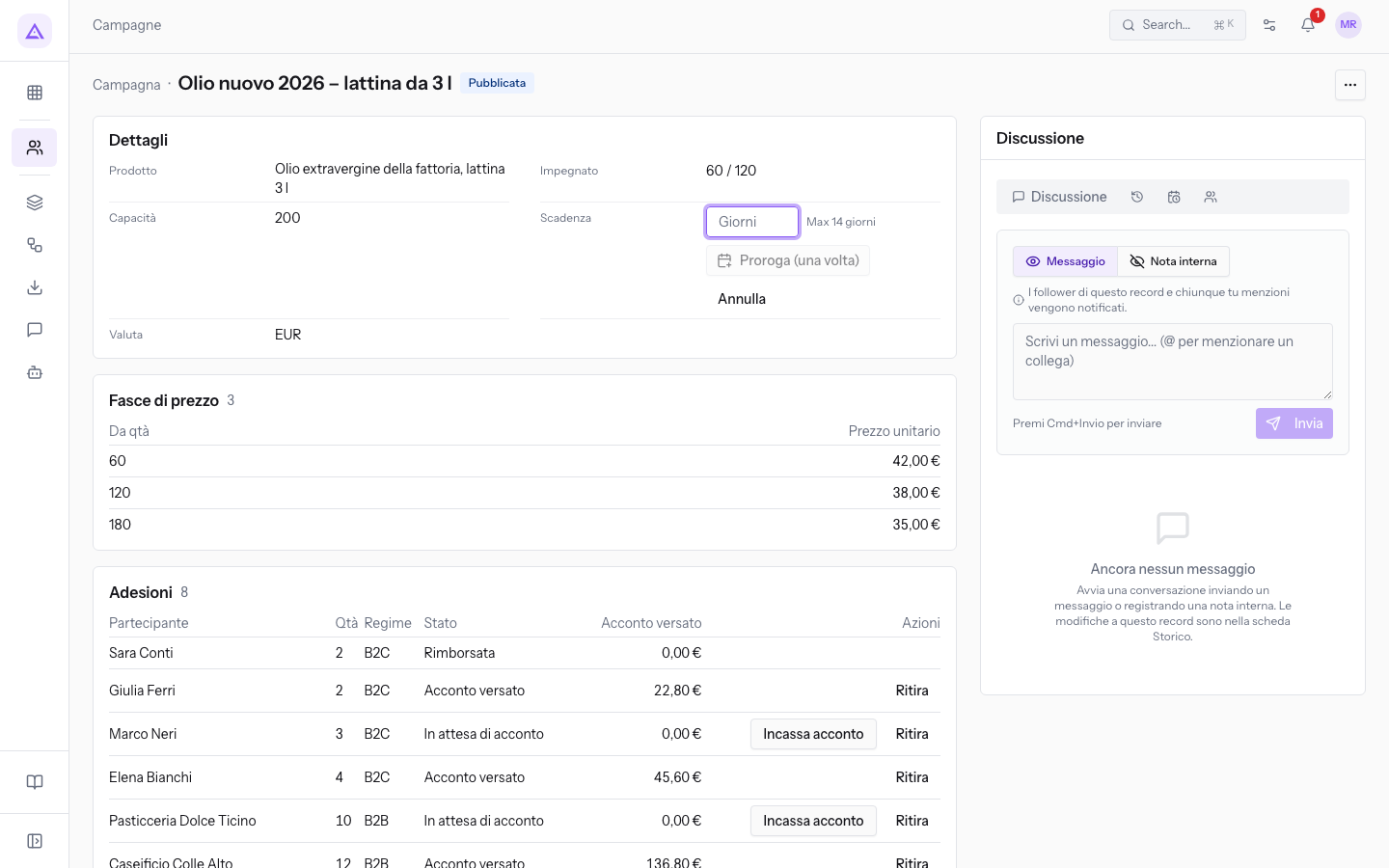
- Click Deadline.
- In Days to extend by, enter from 1 to the maximum shown beside the field.
- Press Extend (once), or Cancel.
- Check the resulting date: days are added to the old deadline, not today's date. Extending an already expired campaign may still leave it expired.
After use, extension is no longer available. For confirmation and expiry limits, see Confirm a campaign and failure.
Changes attempt notifications to contacts of committed pledges. Pending pledges do not receive these events, and Email configuration or errors may prevent delivery. Check outcomes before treating participants as informed.
Screenshot note: the deadline-editor image below uses the Italian interface. Scadenza, Giorni and Proroga (una volta) correspond to Deadline, the days input and Extend (once).
Reference screenshots
See it on your company, not on a slide deck.
In 30 minutes we map the software you use today.We show you how much work and how much margin Archimedes gives back.
Show me on my business →What industry are you in?
One tap — it lets us prepare the demo around your world.
What tools do you use today?
Pick the ones you recognise — or just type them. It helps us show you how they migrate.
Last step: your details.
We reply within one working day — and right after, if you like, you pick the demo slot yourself.
We couldn't send your request. Try again, or write to us at [email protected].
By sending, you agree to your data being processed so we can get back to you about the demo. Privacy notice.
Preview form — nothing is sent from this page.
Want to schedule the demo now?
Your call: book the slot you prefer yourself, or we'll call you to arrange it.
Live availability, 30 minutes, instant confirmation. The calendar opens in a new tab.
Lock in your slot ↗We'll get back to you within one working day — and we'll join the call already knowing your world.
The calendar is open in another tab: pick a slot and the demo is booked. Can't see it? Reopen it ↗
Preview page: nothing was sent.
Our calendar is live: take the slot that suits you and the demo is booked. 30 minutes, instant confirmation, no waiting.
Lock in your slot ↗