Agorà
All modules
Create a group purchasing campaign
Agorà · 4 of 12 · 2 min read
Create a draft from Agorà › Campaigns with New campaign. Your organisation must be enabled as an organiser and your user must belong to Agorà Manager.
Note: payments are simulated. Read the overview before arranging public participation.
Complete the form
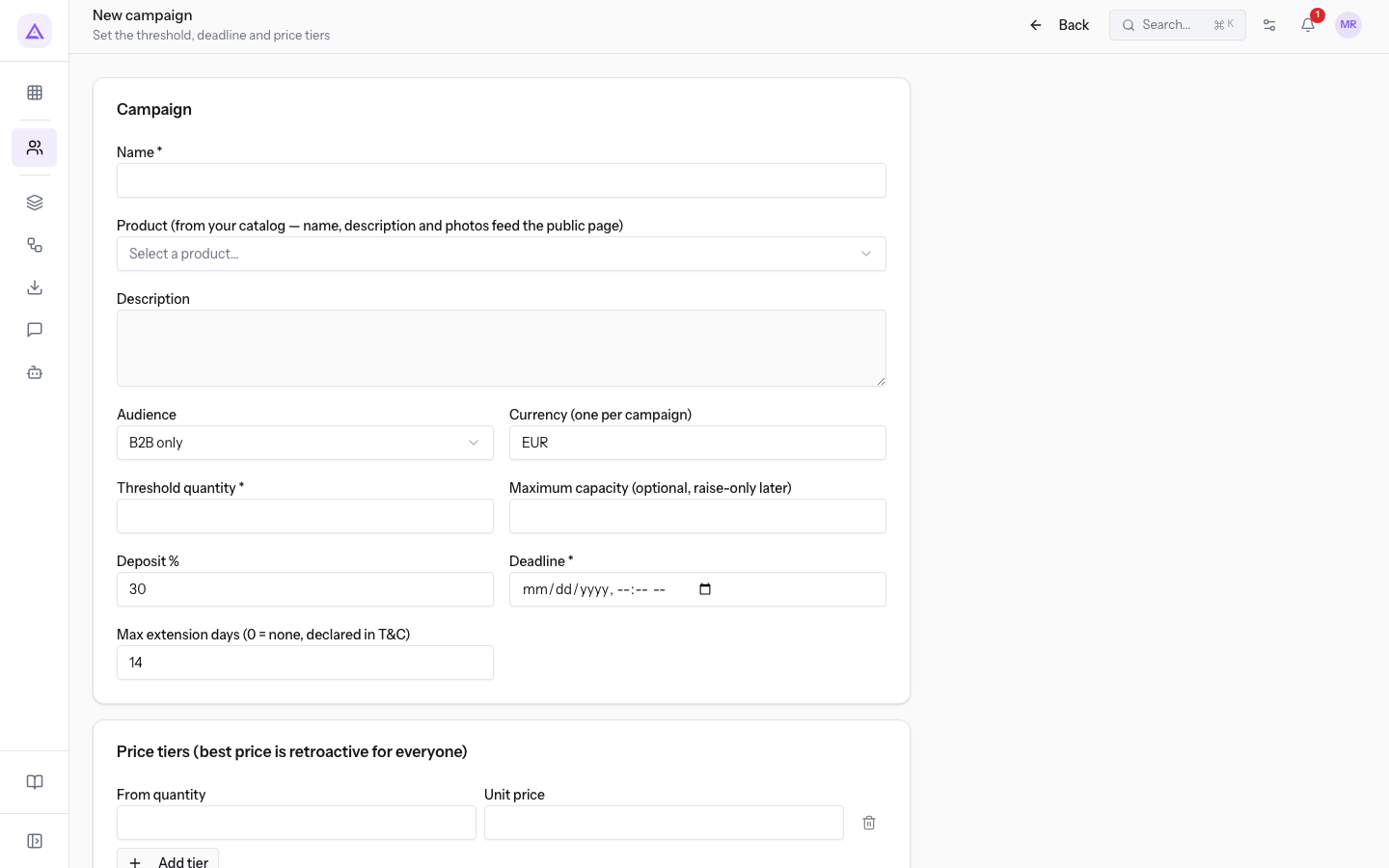
- Enter Name, the campaign name.
- If needed, select a product in Select a product… and enter Description. The product is optional.
- In Audience, choose B2B only or B2C enabled. The latter also accepts B2C pledges. Software withdrawal rules are explained in Pledges; this selection does not determine participants' legal rights.
- In Currency (one per campaign), enter a three-letter code; the initial value is EUR.
- Enter an integer of at least 1 in Threshold quantity. If you set Maximum capacity (optional, raise-only later), choose a limit sufficient to reach the threshold; leaving it empty means no cap.
- Set Deposit % from 1 to 100; the initial value is 30. The calculation uses the recorded maximum price and pledge quantity.
- Set Deadline to a future date and time. This is required to save the draft, not just to publish it.
- Set Max extension days (0 = none, declared in T&C) from 0 to 60; the initial value is 14. Zero disables extension; the screen allows one extension while Published.
- Complete at least one valid tier with From quantity and Unit price. Use Add tier for more rows, with distinct starting quantities and decreasing prices. See Price tiers.
- Press Create draft. If validation succeeds, a confirmation appears and the record opens in Draft.
If saving fails
The button becomes active when name, threshold and deadline are filled in, but the server checks additional constraints. Incomplete tier rows are omitted; creation is refused if no complete tier remains. A draft without tiers is not created.
The record does not offer tier editing, so check inputs before saving. Ask support to correct an existing draft if no suitable control is available. Then follow Publish a campaign.
Reference screenshots
See it on your company, not on a slide deck.
In 30 minutes we map the software you use today.We show you how much work and how much margin Archimedes gives back.
Show me on my business →What industry are you in?
One tap — it lets us prepare the demo around your world.
What tools do you use today?
Pick the ones you recognise — or just type them. It helps us show you how they migrate.
Last step: your details.
We reply within one working day — and right after, if you like, you pick the demo slot yourself.
We couldn't send your request. Try again, or write to us at [email protected].
By sending, you agree to your data being processed so we can get back to you about the demo. Privacy notice.
Preview form — nothing is sent from this page.
Want to schedule the demo now?
Your call: book the slot you prefer yourself, or we'll call you to arrange it.
Live availability, 30 minutes, instant confirmation. The calendar opens in a new tab.
Lock in your slot ↗We'll get back to you within one working day — and we'll join the call already knowing your world.
The calendar is open in another tab: pick a slot and the demo is booked. Can't see it? Reopen it ↗
Preview page: nothing was sent.
Our calendar is live: take the slot that suits you and the demo is booked. 30 minutes, instant confirmation, no waiting.
Lock in your slot ↗