Agorà
All modules
Understand group purchases
Agorà · 2 of 12 · 2 min read
A campaign collects pledges for a group purchase. The organiser proposes the supply; the product records its progress. Payment operations are currently simulated, as explained in the overview.
Quantities and prices
- Threshold: the intended minimum quantity for confirmation.
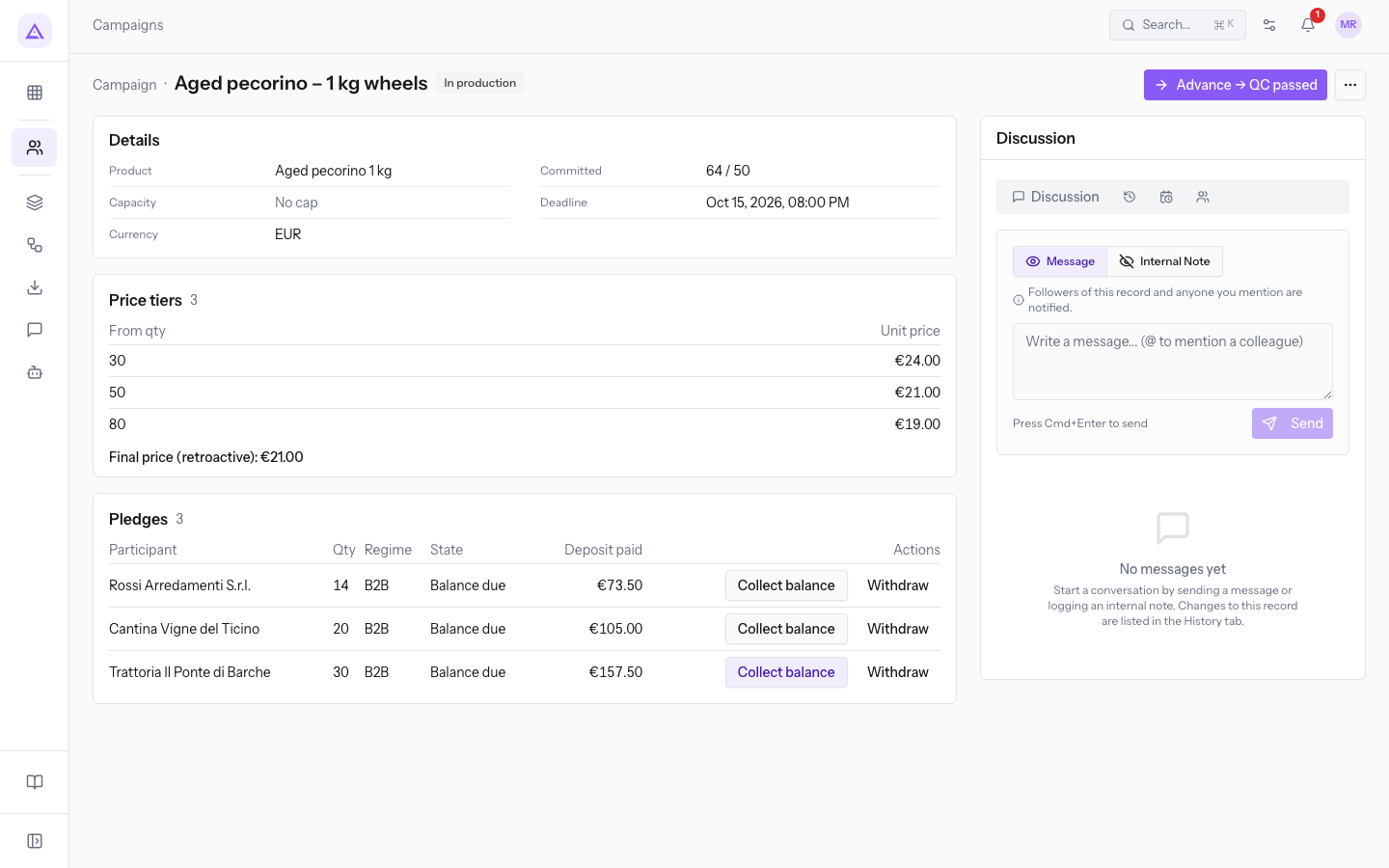
- Committed: quantities of pledges in Deposit paid, Balance due and Balance paid. Pending deposits do not count, but reserve capacity.
- Capacity: an optional limit on accepted quantities. No cap means no limit was set.
- Tier: a starting quantity and unit price, applying until the next tier.
- Recorded contractual maximum price: the tier price covering the threshold, saved when a pledge is created.
- Deposit: maximum price × quantity × deposit percentage, rounded per pledge.
- Balance: final price × quantity − recorded deposit.
For example, with a threshold of 120 and tiers 60 → €42, 120 → €38 and 180 → €35, the recorded maximum is €38. A 30% deposit is €11.40 per unit. Confirmation at 180 units sets a €35 final price and a €23.60 balance per unit.
Enter decreasing prices and distinct starting quantities: the product does not validate that prices decrease. A lower final price reduces the balance without triggering a partial deposit refund. See Price tiers.
States
The ordinary path is Draft → Published → Threshold met → Confirmed → Ordered → In production → QC passed → Collecting balances → Shipped → Arrived → Completed → Settled.
Only the move to Threshold met follows a deposit that brings committed quantity to the threshold; the other steps require an action. A withdrawal can subsequently reduce the quantity without correcting the badge. Check the quantity again before confirming. Expiry does not automatically close the campaign or start refunds.
Advancement records supply status: it does not send orders, verify quality or arrange shipments. The screen has limitations for failed quality checks; see Production and delivery.
Withdrawals and closure
Withdraw is available only before a pledge reaches Balance paid. Before a deposit it records no payment movement; after a deposit, B2B withdrawal leaves the deposit with the campaign, while B2C withdrawal attempts a refund. These are software rules, not a determination of legal rights or contractual validity. See Pledges and cancellation.
Reference screenshots
See it on your company, not on a slide deck.
In 30 minutes we map the software you use today.We show you how much work and how much margin Archimedes gives back.
Show me on my business →What industry are you in?
One tap — it lets us prepare the demo around your world.
What tools do you use today?
Pick the ones you recognise — or just type them. It helps us show you how they migrate.
Last step: your details.
We reply within one working day — and right after, if you like, you pick the demo slot yourself.
We couldn't send your request. Try again, or write to us at [email protected].
By sending, you agree to your data being processed so we can get back to you about the demo. Privacy notice.
Preview form — nothing is sent from this page.
Want to schedule the demo now?
Your call: book the slot you prefer yourself, or we'll call you to arrange it.
Live availability, 30 minutes, instant confirmation. The calendar opens in a new tab.
Lock in your slot ↗We'll get back to you within one working day — and we'll join the call already knowing your world.
The calendar is open in another tab: pick a slot and the demo is booked. Can't see it? Reopen it ↗
Preview page: nothing was sent.
Our calendar is live: take the slot that suits you and the demo is booked. 30 minutes, instant confirmation, no waiting.
Lock in your slot ↗