Availability
All modules
Understanding where non-working days count
Availability · 5 of 10 · 3 min read
A non-working day is a day on which the organization does not work: a closure, a national holiday, or a closed day of the week. Archimedes recognises this automatically. It shows it in the Calendar, moves deadlines that fall on it, and removes time slots from booking pages on closure days.
How the application knows a day is a non-working day
A day is a non-working day for one of three reasons. When a day has more than one reason, the first in this list takes precedence:
- An organization closure: a full-day closure recorded in the Closures section, for example
Closed for kitchen maintenanceorImmaculate Conception long weekend. It applies to the entire organization, regardless of the default schedule. - A national holiday. Holidays are already handled and do not need to be entered: New Year's Day, Epiphany, Easter, Easter Monday, Liberation Day, Labour Day, Republic Day, Assumption Day, All Saints' Day, Immaculate Conception, Christmas, St Stephen's Day, St Francis of Assisi Day.
- A closed day in the weekly opening schedule. In the example the Sat and Sun days are closed, so every Saturday and Sunday is a non-working day.
If a day is both a closure and a national holiday, it counts as a closure. If a national holiday falls on a Saturday or Sunday, it counts as a national holiday.
Note: if the organization has not yet chosen a default schedule, working days are Monday to Friday. To choose the schedule that applies to everyone, see Choosing which schedule applies to the whole organization.
Viewing non-working days in the Calendar
In the Month view the Calendar shades non-working days with a colour by reason: closures in beige, national holidays in light blue, closed days of the week in grey. Closures and national holidays also show their name.
- Open Calendar from the sidebar.
- Click Month.
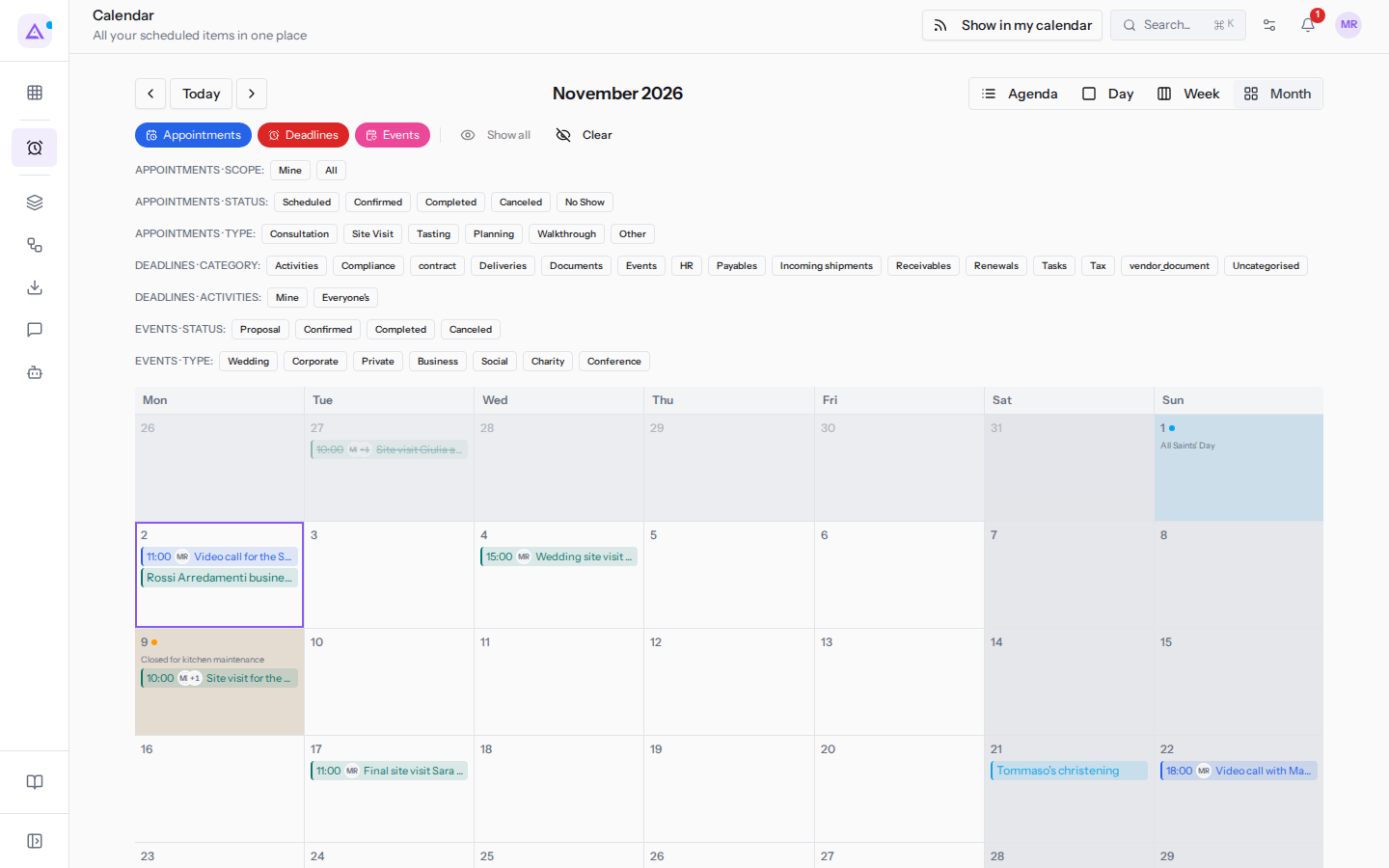
- Click Next period to move to the next month, or Previous period to go back. Today returns to the current month.
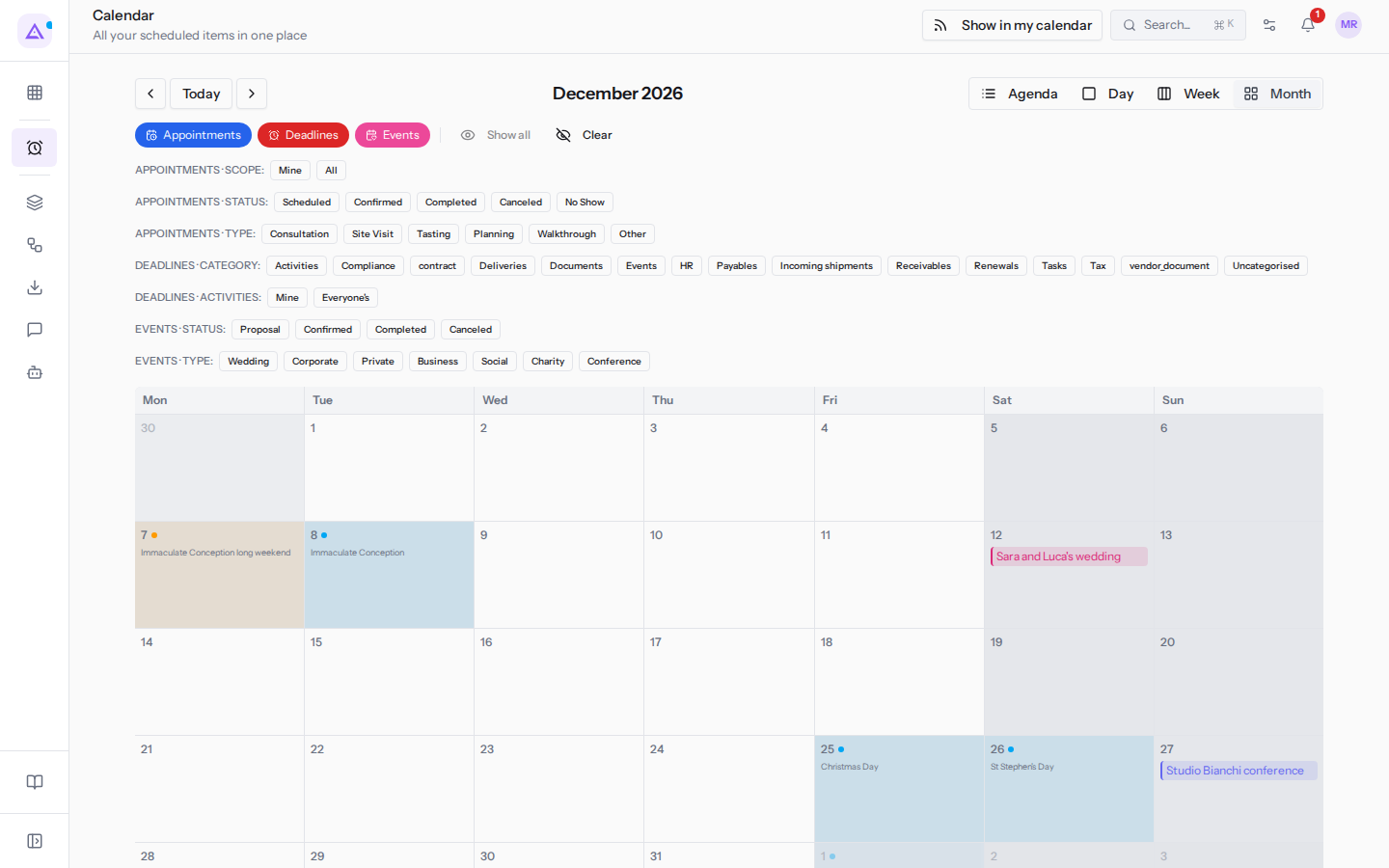
In November the Closed for kitchen maintenance appears. In December the Immaculate Conception long weekend on the 7th is a closure, the Immaculate Conception on the 8th and Christmas and St Stephen's Day are national holidays.
Deadlines on a non-working day
A deadline never falls on a non-working day. If the date falls on a non-working day, the deadline moves to the first working day after it. This applies to all three reasons: closure, national holiday, and weekend.
In the Calendar the moved deadline shows «moved from …» with the date it was moved from. In the example a deadline on a Saturday moves to Monday; if that Monday is a closure or a national holiday, it moves to the first working day after.
Appointment bookings
Appointment booking pages do not offer time slots on organization closure days.
National holidays, on the other hand, do not remove time slots. A booking page offers time slots on Christmas or on Assumption Day if the availability schedule for the appointment type is open on that day.
Important: to avoid receiving bookings on a national holiday, close that date in the availability schedule for the appointment type, for example
Booking hours for tours and site visits, or record an organization closure for that day.
Where to change each setting
- The weekly schedule: Setting the organization's working hours.
- Closures: Recording organization closures.
- National holidays cannot be changed: they are already included.
- The days and times when an appointment type can be booked: Setting the hours when bookings are possible.
See it on your company, not on a slide deck.
In 30 minutes we map the software you use today.We show you how much work and how much margin Archimedes gives back.
Show me on my business →What industry are you in?
One tap — it lets us prepare the demo around your world.
What tools do you use today?
Pick the ones you recognise — or just type them. It helps us show you how they migrate.
Last step: your details.
We reply within one working day — and right after, if you like, you pick the demo slot yourself.
We couldn't send your request. Try again, or write to us at [email protected].
By sending, you agree to your data being processed so we can get back to you about the demo. Privacy notice.
Preview form — nothing is sent from this page.
Want to schedule the demo now?
Your call: book the slot you prefer yourself, or we'll call you to arrange it.
Live availability, 30 minutes, instant confirmation. The calendar opens in a new tab.
Lock in your slot ↗We'll get back to you within one working day — and we'll join the call already knowing your world.
The calendar is open in another tab: pick a slot and the demo is booked. Can't see it? Reopen it ↗
Preview page: nothing was sent.
Our calendar is live: take the slot that suits you and the demo is booked. 30 minutes, instant confirmation, no waiting.
Lock in your slot ↗