Data Import
All modules
Comparing receivables and payables with Fatture in Cloud
Data Import · 11 of 11 · 6 min read
The Receivables vs. source page compares each imported document with what Fatture in Cloud reports today. It shows the balance in Archimedes, the balance at the source, and the difference between the two.
Use it after a migration or with sync active, before trusting the schedule: it tells you which Archimedes balances don't match those in Fatture in Cloud and why.
When to use the comparison
The comparison flags differences and does not modify anything. You make the corrections, in the document in Archimedes or in Fatture in Cloud.
- After importing invoices from Fatture in Cloud, check the comparison before recording receipts in Archimedes.
- With sync active, check it to find documents that sync has not aligned.
You don't need to remember to run it: Archimedes runs a comparison on its own after each completed invoice import, at most once a day.
Opening the comparison
- Open Data Import from the sidebar.
- Click Compare with the source at the top. The Receivables vs. source page opens.
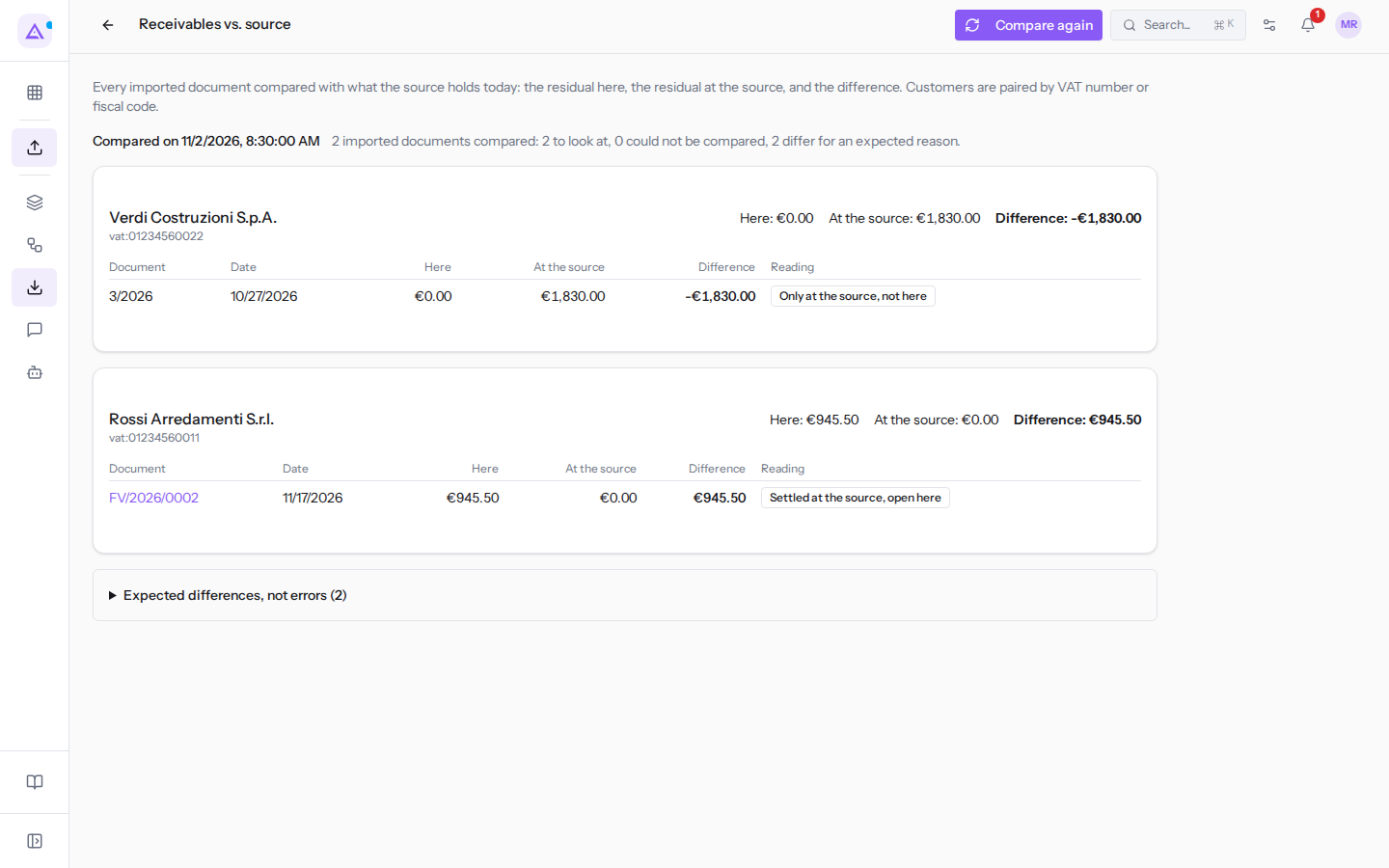
If no comparison has been made yet, the page shows No comparison has been taken yet. If the last comparison did not complete, for example because the connection is not saved, an orange warning appears beginning with The last comparison did not finish: followed by the reason. Save the connection on the Data Import page and run the comparison again.
Running the comparison again
The page shows the last comparison, with date and time in Compared on …. To run it again, for example after correcting a document, click Compare again: Archimedes re-reads all imported documents from Fatture in Cloud, consuming requests from the quota. During the comparison the button shows Comparing… and the page updates on its own.
Reading the summary
Next to the date, a sentence summarizes the comparison, for example "2 imported documents compared: 2 to look at, 0 could not be compared, 2 differ for an expected reason."
- Imported documents compared: the imported documents that Archimedes re-read one by one from Fatture in Cloud. Documents present on one side only are not counted here, but among those to check or among the expected differences.
- To look at: the differences to check and correct.
- Could not be compared: the documents for which Fatture in Cloud did not give a useful response.
- Differ for an expected reason: differences with a known cause that are not errors.
When there is nothing to check or compare again, the page shows No differences to fix on …: … imported documents compared with the source., with the date and number of documents.
In this morning's comparison there are two documents to check, FV/2026/0002 from Rossi Arredamenti S.r.l. and invoice 3/2026 from Verdi Costruzioni S.p.A., and two expected differences.
Reading the cards by customer
Documents to check are grouped by customer, one card per customer. Documents that match in Fatture in Cloud do not appear.
At the top of the card are the customer name and, on the right, the totals Here, At the source, and Difference for that customer. Below the name the key appears with which Archimedes matched the customer in the two systems: vat: followed by the VAT number, for example vat:01234560022, or cf: followed by the tax code. A customer without a VAT number or tax code cannot be matched: their documents are grouped with the key contact: and a number.
For each document the card shows:
- Document: the number. If the document exists in Archimedes, the number is a link that opens it, for example FV/2026/0002; 3/2026 is not a link because it does not exist in Archimedes.
- Date: the document date.
- Here: the balance in Archimedes, i.e. how much remains to be collected or paid.
- At the source: the balance in Fatture in Cloud.
- Difference: Here minus At the source. A negative value means more remains open in Fatture in Cloud than in Archimedes.
- Reading: the reason for the difference.
The reasons for differences
The Reading column indicates one of these reasons, each with what to do.
- Settled at the source, open here: in Fatture in Cloud the document is paid, in Archimedes it still shows as open. Record the receipt or payment in Archimedes. This is the case for FV/2026/0002 from Rossi Arredamenti S.r.l.
- Only at the source, not here: the document exists in Fatture in Cloud but not in Archimedes. This is the case for invoice 3/2026 from Verdi Costruzioni S.p.A., which sync set aside because its VAT nature N6.3 does not match any tax. Correct the cause and bring the document in, as explained in Keeping Archimedes in sync with automatic synchronization.
- Open at the source, settled here: in Archimedes the document is paid, in Fatture in Cloud it still shows as open. Check the payment recorded in Archimedes.
- Open on both sides, different amounts: the document is open in both systems, but with different balances. Compare the partial payments recorded in both systems.
- No longer at the source: the document was imported, but today it is no longer in Fatture in Cloud. Check whether it was deleted or cancelled there and decide whether to keep it in Archimedes.
- Held twice here: in Archimedes there are two documents with the same number, type, and date, and the balance is counted twice. Check the two documents and keep the correct one.
- The source could not say: Fatture in Cloud did not return the document or did not say how much has been collected. The document is counted among those that could not be compared: run the comparison again later.
Expected differences, not errors
Some differences have a known cause and do not need to be corrected. The page collects them at the bottom, in the Expected differences, not errors section, with the count in parentheses, and does not count them among the documents to check. Click the title to open it.
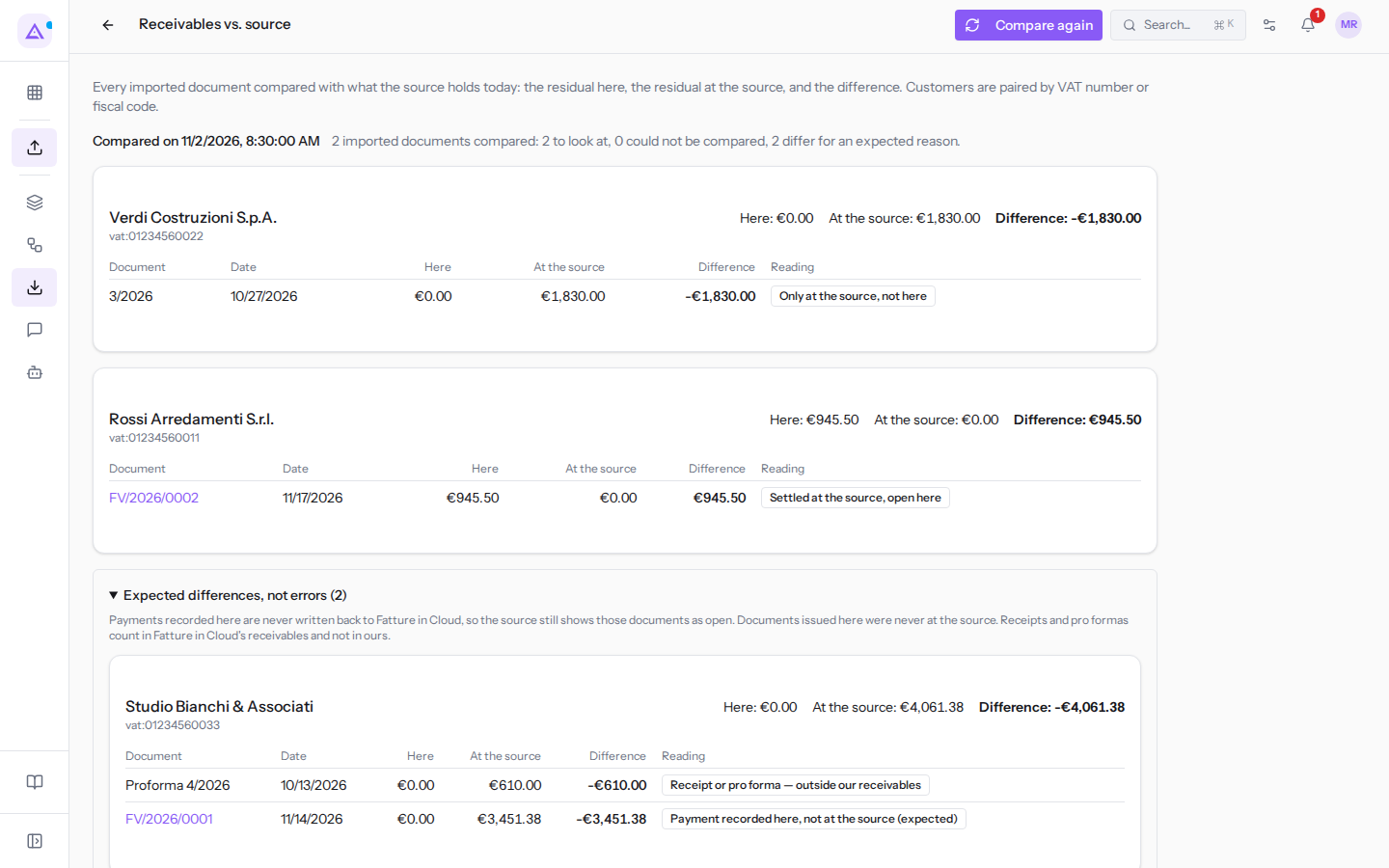
- Payment recorded here, not at the source (expected): payments recorded in Archimedes are never sent to Fatture in Cloud, which continues to show the document as open. This is the case for FV/2026/0001 from Studio Bianchi & Associati, paid in Archimedes.
- Issued here, not at the source: a document issued in Archimedes has never been in Fatture in Cloud.
- Receipt or pro forma — outside our receivables: Fatture in Cloud counts receipts and pro formas among receivables, Archimedes does not. This is the case for the Proforma 4/2026 from Studio Bianchi & Associati.
See it on your company, not on a slide deck.
In 30 minutes we map the software you use today.We show you how much work and how much margin Archimedes gives back.
Show me on my business →What industry are you in?
One tap — it lets us prepare the demo around your world.
What tools do you use today?
Pick the ones you recognise — or just type them. It helps us show you how they migrate.
Last step: your details.
We reply within one working day — and right after, if you like, you pick the demo slot yourself.
We couldn't send your request. Try again, or write to us at [email protected].
By sending, you agree to your data being processed so we can get back to you about the demo. Privacy notice.
Preview form — nothing is sent from this page.
Want to schedule the demo now?
Your call: book the slot you prefer yourself, or we'll call you to arrange it.
Live availability, 30 minutes, instant confirmation. The calendar opens in a new tab.
Lock in your slot ↗We'll get back to you within one working day — and we'll join the call already knowing your world.
The calendar is open in another tab: pick a slot and the demo is booked. Can't see it? Reopen it ↗
Preview page: nothing was sent.
Our calendar is live: take the slot that suits you and the demo is booked. 30 minutes, instant confirmation, no waiting.
Lock in your slot ↗