Construction - Qualification and Tenders
All modules
Register the company's offices, depots and sites
Construction - Qualification and Tenders · 4 of 13 · 4 min read
A contact's addresses also describe the offices, depots and construction sites of a company. In the Addresses tab you record each place and indicate its type, surface area, ownership title and cadastral reference.
Viewing addresses
The Addresses tab shows a card for each address of the contact. The number in brackets shows how many addresses are recorded: Verdi Construction S.p.A. has three, so the tab is Addresses (3).
Before you start: the Construction Tenders module must be active for the organization.
- In Contacts, press the row of Verdi Construction S.p.A.
- Open the Addresses tab.
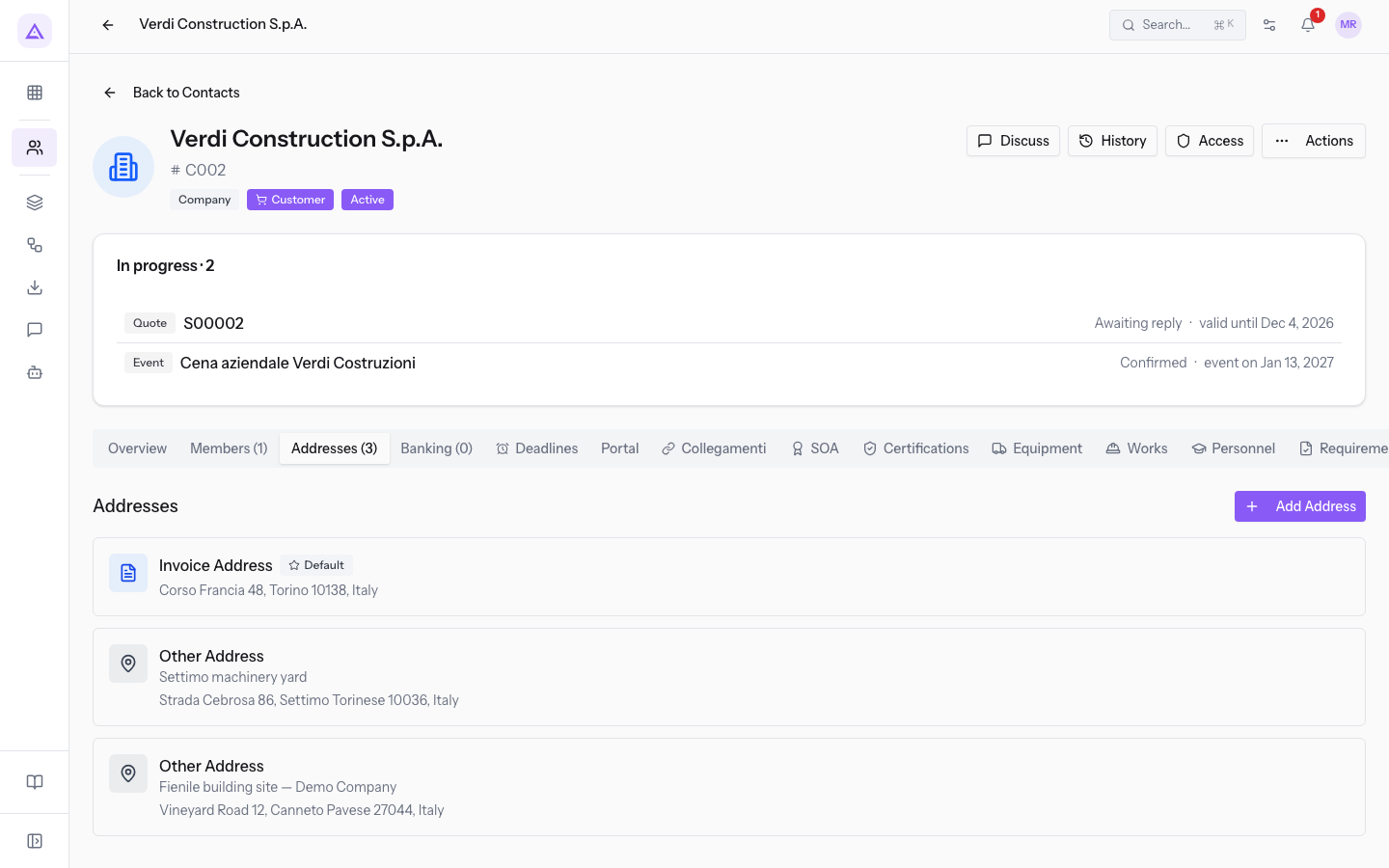
Each card shows the address type, the name, the full address, the phone and the email, when they are filled in. The default address has an extra label. The Edit Address and Delete Address icons appear when you hover over the card.
Important: the site data does not appear on the card. To read it, open the address edit window.
Choosing how to record a site
The site data describes the offices and depots required by the capacity requirements. It is part of the company's file, but it is stored in the contact's addresses and not in one of its tabs. Record one address for each place.
- If you record the registered office, choose Registered office in Site type. For Verdi Construction S.p.A. it is the address of type Invoice Address, set as default.
- If you record a rented depot, choose Depot and Rented, as for Settimo machinery yard.
- If you record a construction site, choose Construction site / base site and the title you hold on the place, such as Free loan (comodato) for Barn building site — Demo Company.
Note: the Site / warehouse (Tenders) section also appears on contacts not activated as economic operators, such as Rossi Furnishings S.r.l. Fill it in only for contacts activated as economic operators: see Activate a company as an economic operator and fill in its details.
Adding an address
An address is added in the Add Address window. The window has two sections: Address Details and Site / warehouse (Tenders), which can be collapsed.
- In the contact's Addresses tab, press Add Address.
- Fill in Address Details. The only required field is Address Type.
- Scroll down and fill in Site / warehouse (Tenders). All fields in this section are optional.
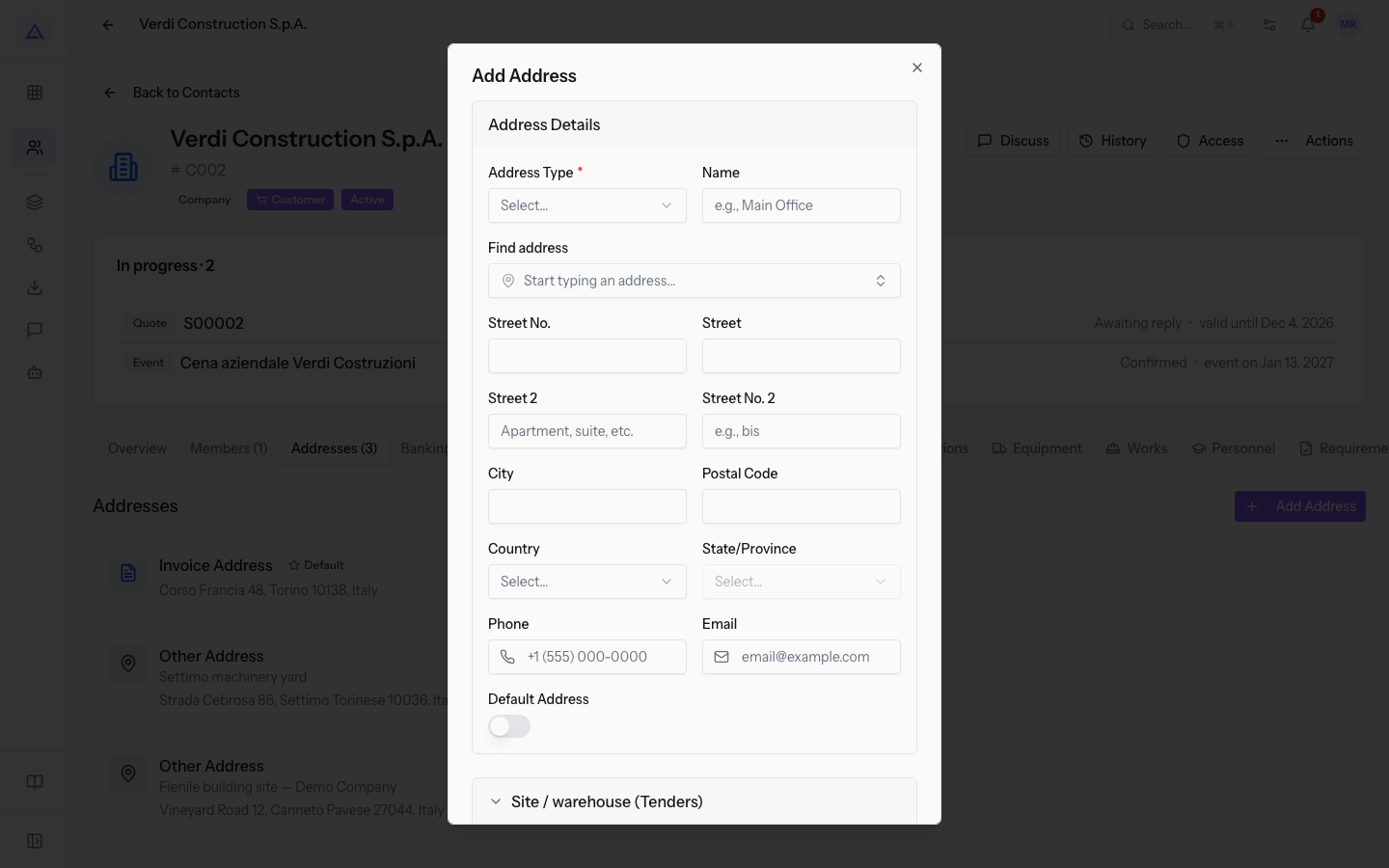
Address Details fields
- Address Type: the category of the address, shown at the top of the card. The field is required.
- Invoice Address: billing address.
- Delivery Address: delivery address.
- Private Address: private address.
- Other Address: other address. For Verdi Construction S.p.A. it is the type of the depot and of the site.
- Name: the name of the place, shown on the card, such as Settimo machinery yard.
- Find address: start typing an address to look it up.
- Street No.: the street number.
- Street: the street.
- Street 2 and Street No. 2: a second address line.
- City: the city.
- Postal Code: the postal code.
- Country: the country.
- State/Province: the province. The list is empty until you choose Country. With Italy it lists the Italian provinces.
- Phone: the phone of the address.
- Email: the email of the address.
- Default Address: sets the address as default. The card shows a label.
Site / warehouse (Tenders) fields
- Site type: the function of the place.
- Registered office
- Operational site
- Warehouse
- Depot
- Construction site / base site
- Office
- Size (sqm): the surface area in square metres. Accepts decimals.
- Ownership title: the title under which the company has the place.
- Owned
- Rented
- Leased
- Free loan (comodato)
- Cadastral reference: the cadastral details of the place, for example Foglio 12, mappale 345, sub. 7.
Editing site data
The Edit Address window has the same fields as Add Address and shows the values already recorded. It is the only place where you read and change site data.
- In the Addresses tab, hover over the card and press the Edit Address icon.
- Scroll down and update the fields in the Site / warehouse (Tenders) section.
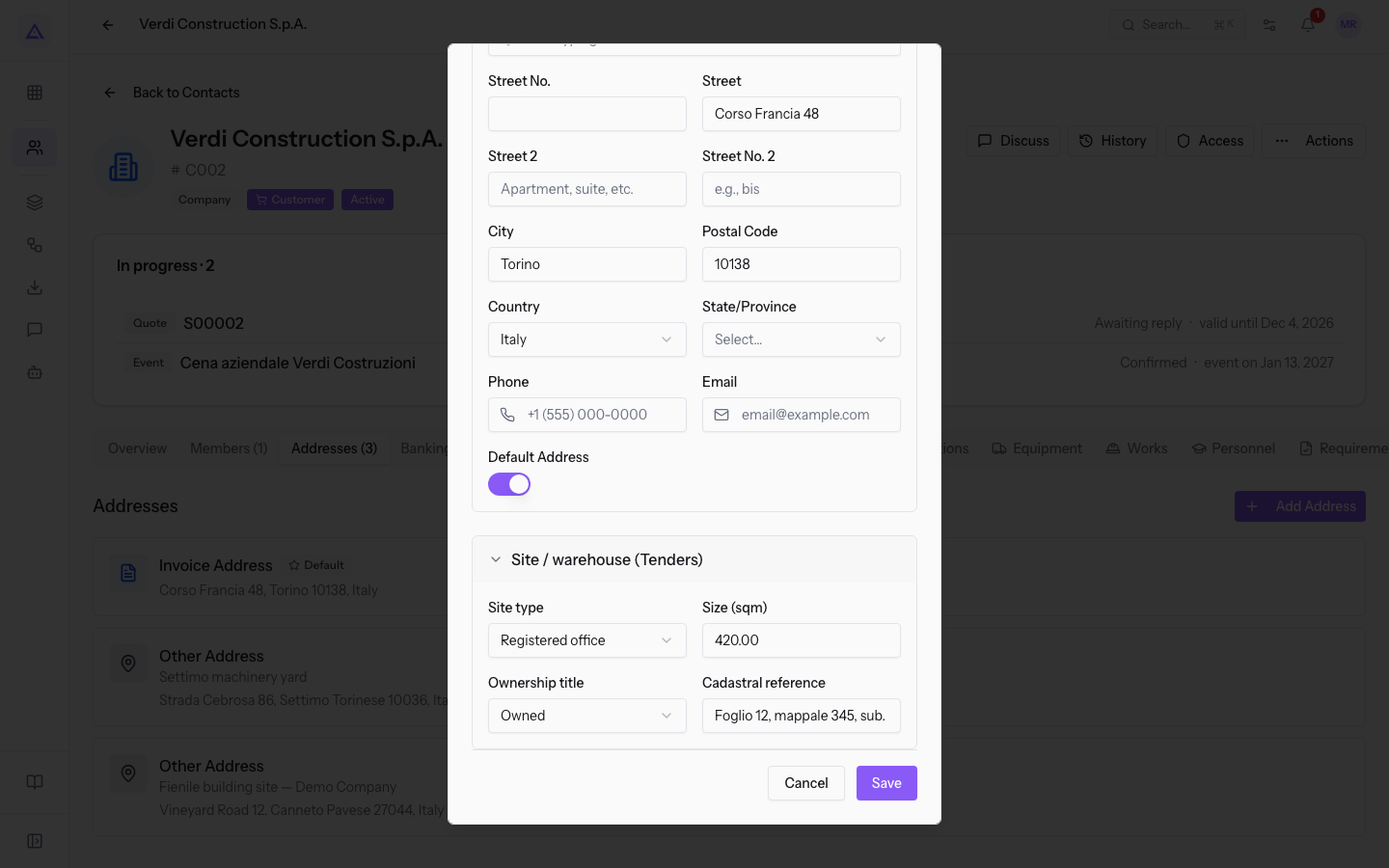
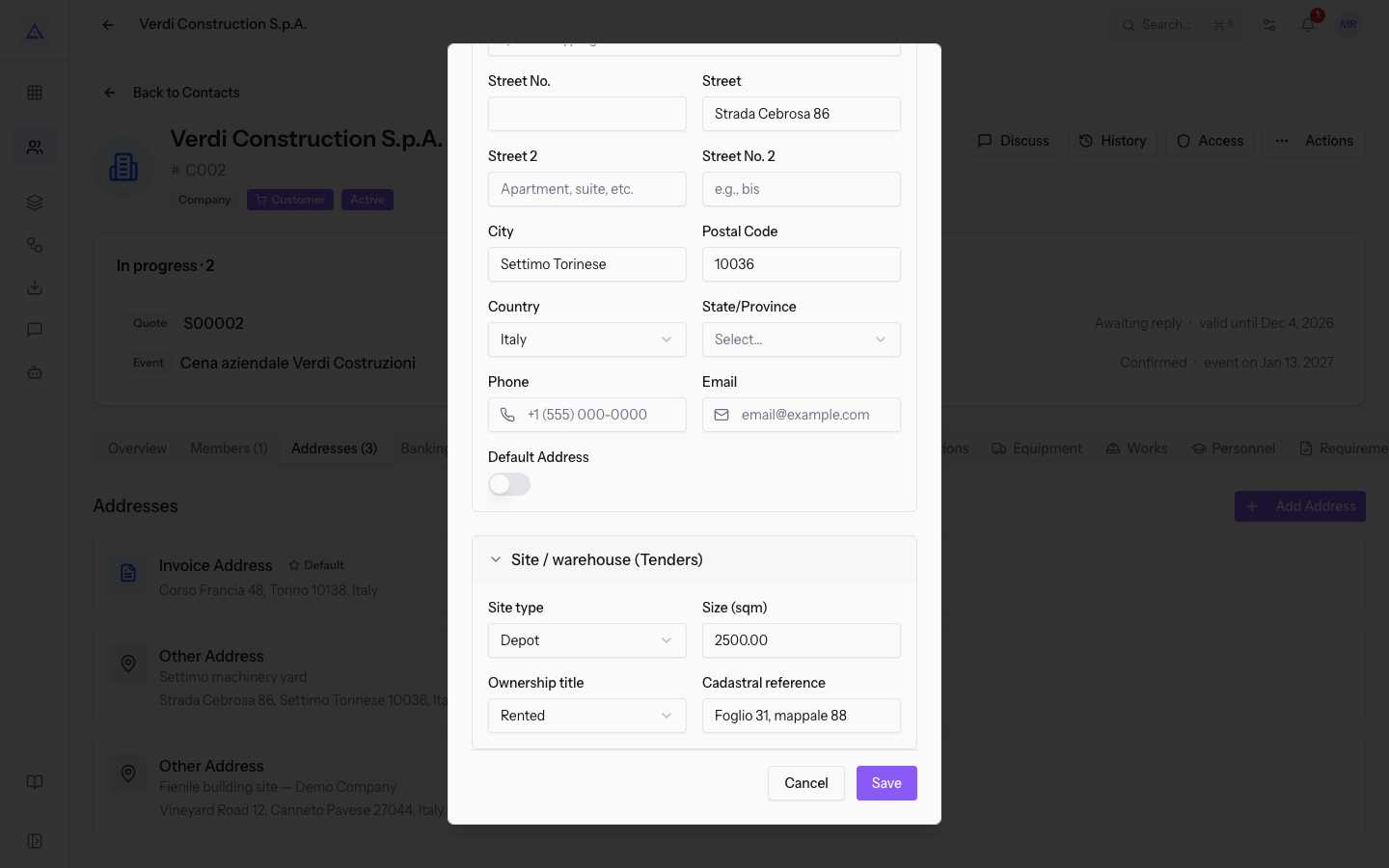
Verdi Construction S.p.A. has these addresses:
- Corso Francia 48, Torino: Registered office, Owned, 420 sqm, Foglio 12, mappale 345, sub. 7.
- Settimo machinery yard, Strada Cebrosa 86, Settimo Torinese: Depot, Rented, 2,500 sqm, Foglio 31, mappale 88.
- Barn building site — Demo Company, Vineyard Road 12, Canneto Pavese: Construction site / base site, Free loan (comodato), 380 sqm.
For the rest of the file see Understanding the economic operator's qualification file.
See it on your company, not on a slide deck.
In 30 minutes we map the software you use today.We show you how much work and how much margin Archimedes gives back.
Show me on my business →What industry are you in?
One tap — it lets us prepare the demo around your world.
What tools do you use today?
Pick the ones you recognise — or just type them. It helps us show you how they migrate.
Last step: your details.
We reply within one working day — and right after, if you like, you pick the demo slot yourself.
We couldn't send your request. Try again, or write to us at [email protected].
By sending, you agree to your data being processed so we can get back to you about the demo. Privacy notice.
Preview form — nothing is sent from this page.
Want to schedule the demo now?
Your call: book the slot you prefer yourself, or we'll call you to arrange it.
Live availability, 30 minutes, instant confirmation. The calendar opens in a new tab.
Lock in your slot ↗We'll get back to you within one working day — and we'll join the call already knowing your world.
The calendar is open in another tab: pick a slot and the demo is booked. Can't see it? Reopen it ↗
Preview page: nothing was sent.
Our calendar is live: take the slot that suits you and the demo is booked. 30 minutes, instant confirmation, no waiting.
Lock in your slot ↗