Construction - Qualification and Tenders
All modules
Keep quality, environmental and safety certifications up to date
Construction - Qualification and Tenders · 6 of 13 · 4 min read
The Certifications tab collects an economic operator's certifications. It lets you record them, check their number, status and expiry date, and update them when they change.
What certifications are for in tenders
Certifications are part of the company's qualification file. Record them here so they are up to date when you prepare tender documents.
In tenders, certifications can be used to:
- reduce the required guarantee;
- earn technical scores;
- meet a requirement for the higher SOA classes.
Note: the module does not manage tenders or bids. It records certifications in the file, but it does not follow the tenders you take part in.
The company's other compliance documents have their own tab: see Keep an eye on DURC, anti-mafia and the other general requirements.
Looking at certifications
The tab shows one card for each certification of the economic operator. If there are no certifications, the message No certifications recorded appears.
Before you start: the Certifications tab only appears on contacts activated as an economic operator.
- In Contacts, press the row of the economic operator, that is Verdi Construction S.p.A. in the demo organization.
- Open the Certifications tab.
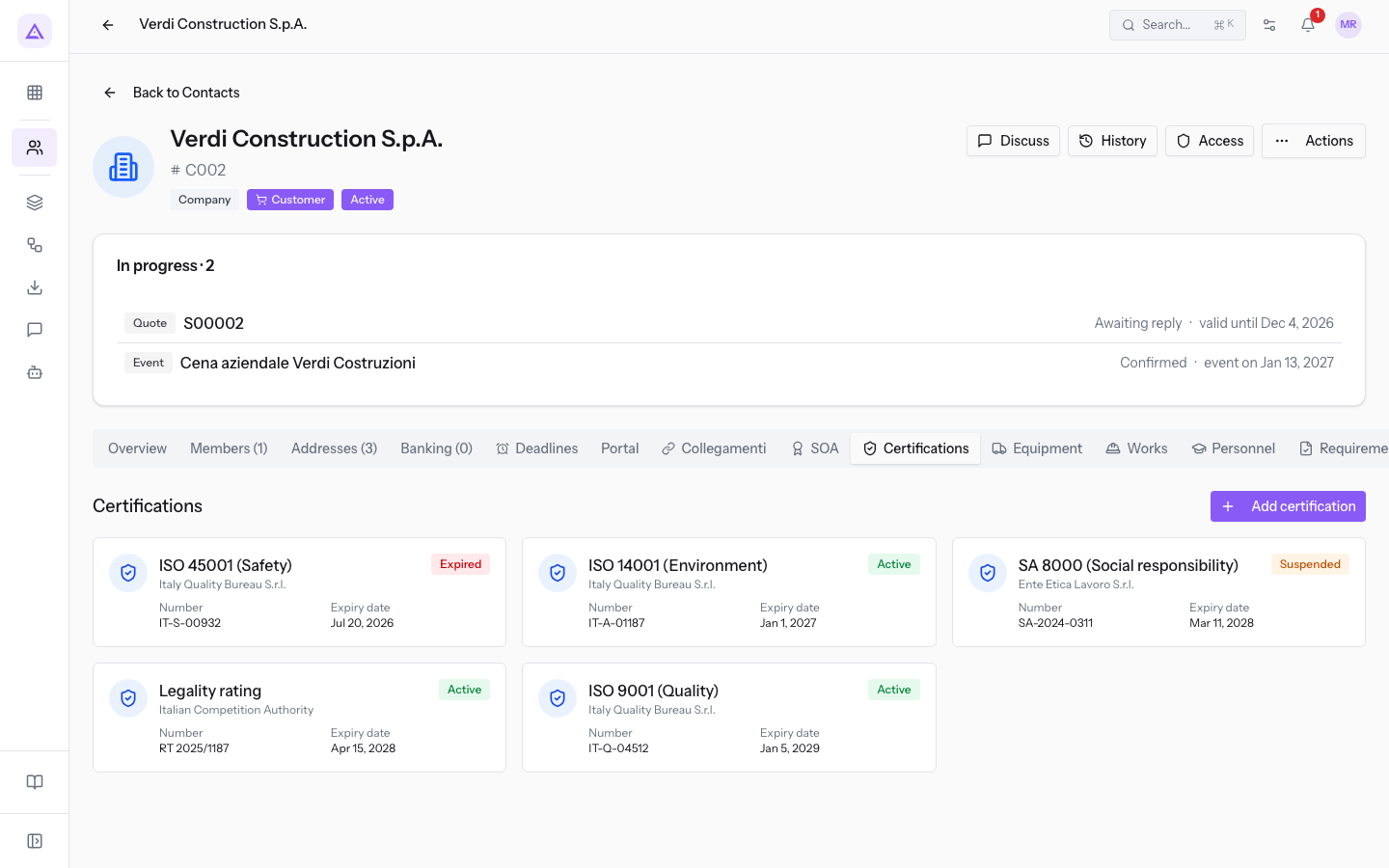
Each card shows this data:
- Certification type: it is the card title.
- Certifying body: it appears under the title.
- Status: Active in green, Expired in red, Suspended in amber.
- Number: the certification number.
- Expiry date: the expiry date.
Press a card to open the side panel. The panel shows the card data and adds Issue date, Scope / EA sectors and Notes. Data that is not filled in does not appear: the Legality rating panel of Verdi Construction S.p.A. has no Scope / EA sectors row.
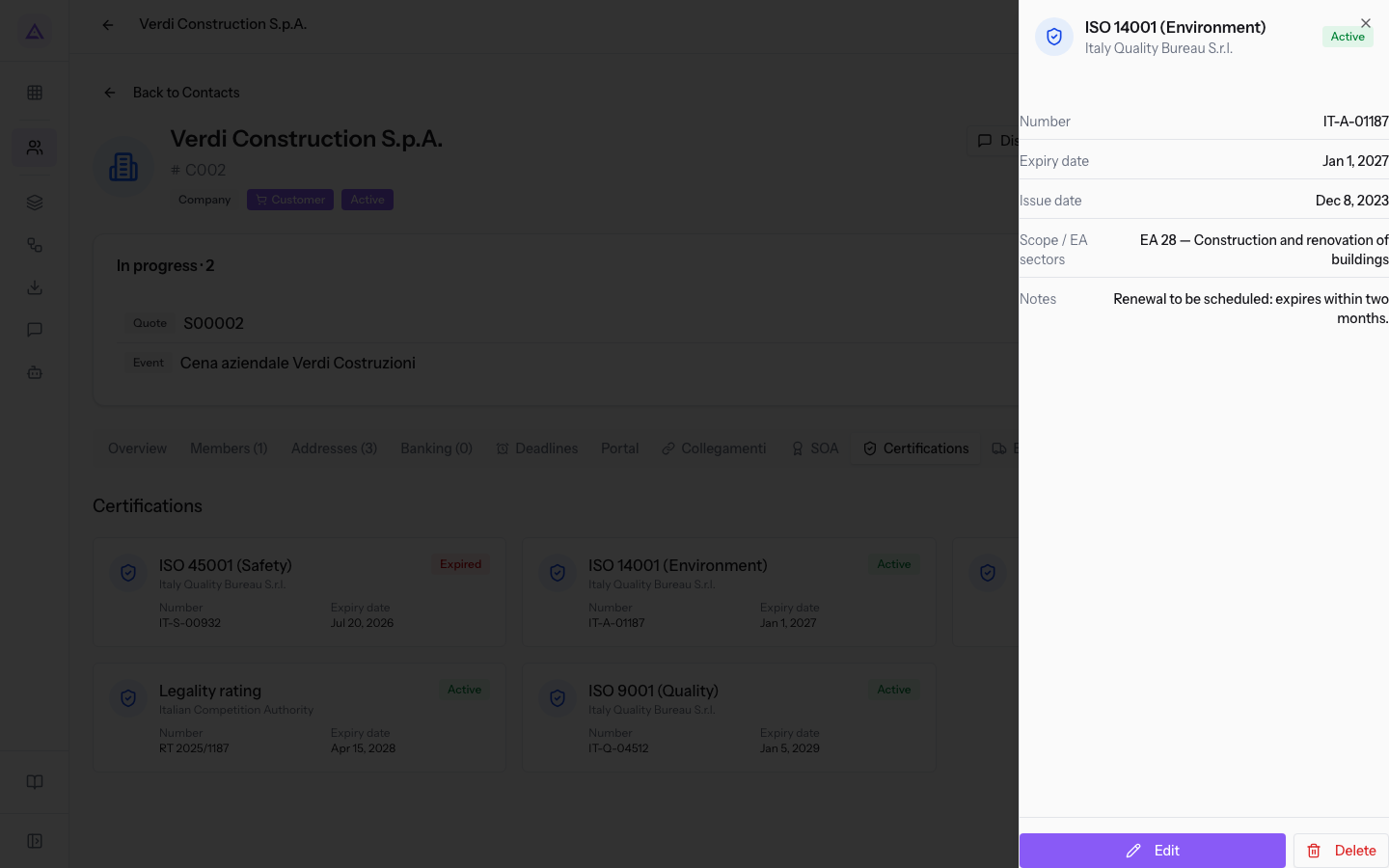
The panel has the Edit and Delete buttons.
Adding a certification
Add one entry for each certification the company holds.
- In the Certifications tab, press Add certification.
- Fill in the fields of the window. Only Type is required.
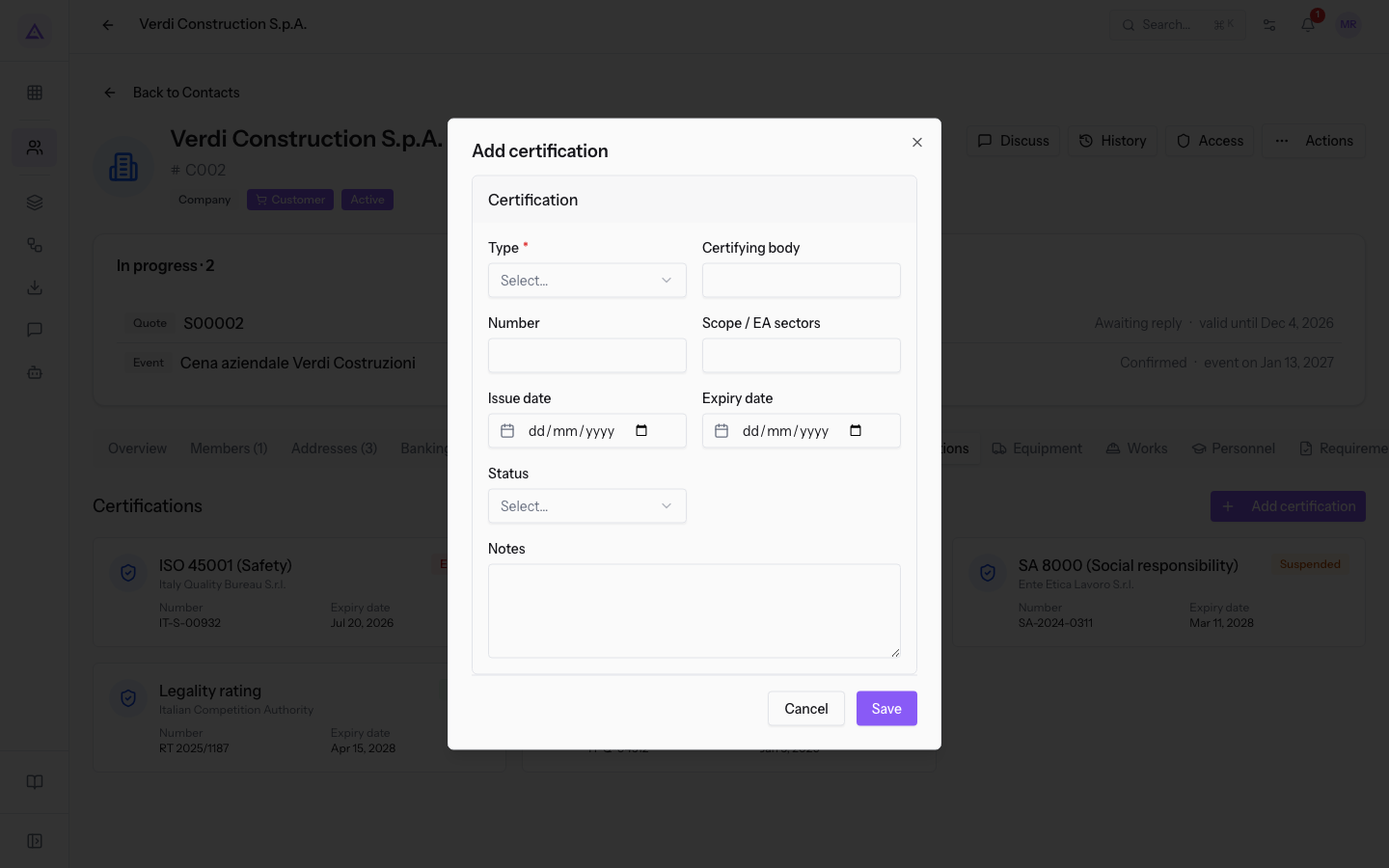
Window fields:
- Type: the certification to record. The field is required.
- ISO 9001 (Quality)
- ISO 14001 (Environment)
- ISO 45001 (Safety)
- ISO 37001 (Anti-corruption)
- SA 8000 (Social responsibility)
- F-Gas certification
- Legality rating
- MOG 231/2001
- Other
- Certifying body: the body that issued the certification.
- Number: the certification number.
- Scope / EA sectors: the scope covered by the certification, such as
EA 28 — Construction and renovation of buildings. - Issue date: the date of issue.
- Expiry date: the expiry date.
- Status: the state of the certification. The options are Active, Expired and Suspended.
- Notes: free text, for example the reason for a suspension or the renewal to schedule.
Updating status and expiry
The status does not change by itself when the Expiry date passes: you update it. So check the dates on the cards.
Choose the Status based on the situation of the certification:
- If the certification is valid, choose Active.
- If the expiry date has passed and there is no renewal yet, choose Expired.
- If the body has suspended the certification, choose Suspended and write the reason in Notes.
To update a certification:
- Press the certification card.
- In the side panel, press Edit. A window opens with the same fields as Add certification and the saved data; the dates must be entered again.
- After a renewal, enter the Number, Issue date and Expiry date of the renewed certification.
- Choose the Status.
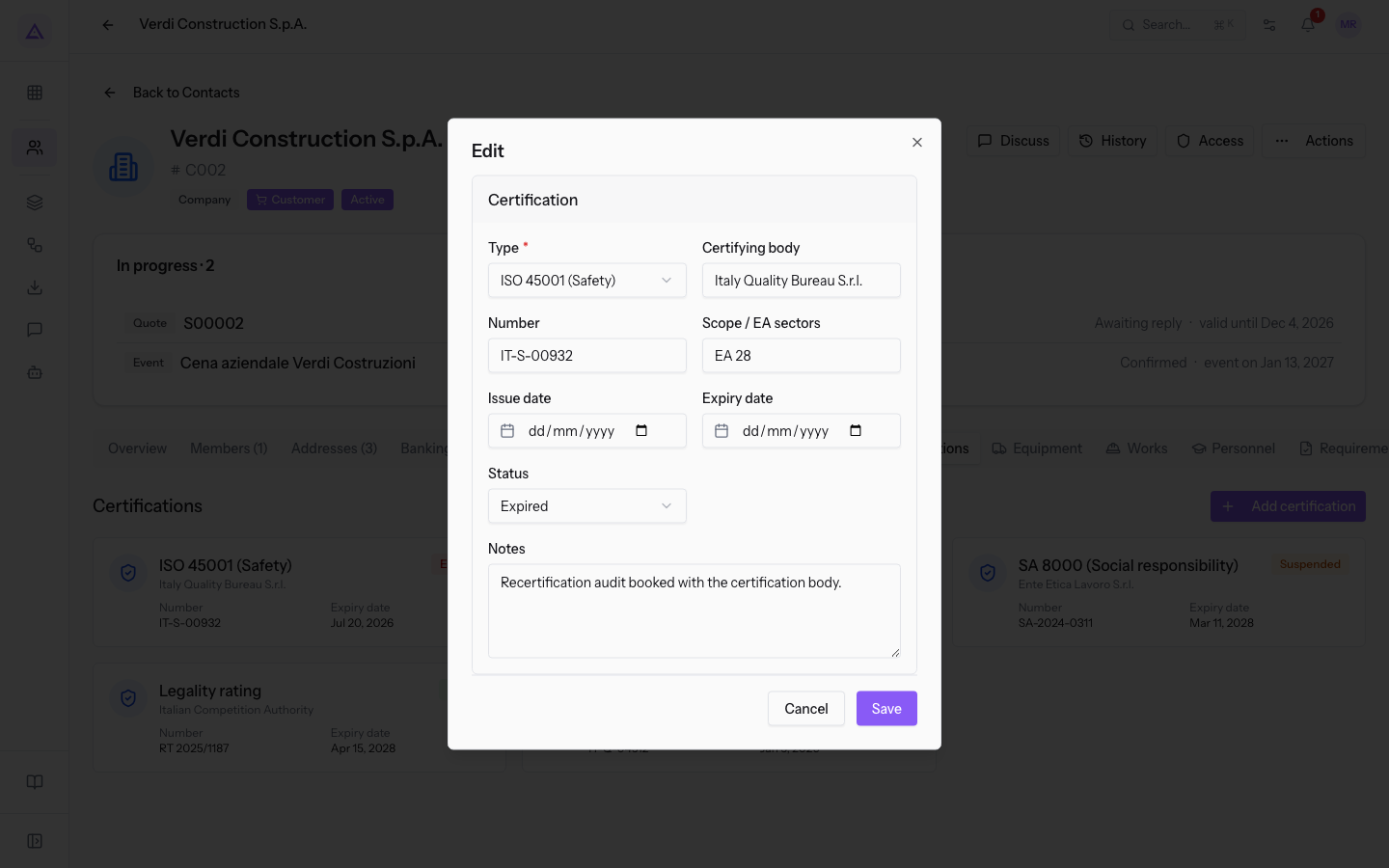
The certifications of Verdi Construction S.p.A. show the possible cases:
| Type | Number | Expiry date | Status | Situation |
|---|---|---|---|---|
| ISO 9001 (Quality) | IT-Q-04512 | Jan 5, 2029 | Active | Valid. |
| ISO 14001 (Environment) | IT-A-01187 | Jan 1, 2027 | Active | Expires within two months: renewal to schedule. |
| ISO 45001 (Safety) | IT-S-00932 | Jul 20, 2026 | Expired | Recertification audit booked with the certification body. |
| SA 8000 (Social responsibility) | SA-2024-0311 | Mar 11, 2028 | Suspended | Suspended for a non-conformity. |
| Legality rating | RT 2025/1187 | Apr 15, 2028 | Active | Two stars. |
Tip: do not delete an expired certification. Set the Status to Expired, so the entry stays in the file.
Important: Delete is reserved for the
Tender Managergroup. TheTender Usergroup can create and edit entries, but cannot delete them.
See it on your company, not on a slide deck.
In 30 minutes we map the software you use today.We show you how much work and how much margin Archimedes gives back.
Show me on my business →What industry are you in?
One tap — it lets us prepare the demo around your world.
What tools do you use today?
Pick the ones you recognise — or just type them. It helps us show you how they migrate.
Last step: your details.
We reply within one working day — and right after, if you like, you pick the demo slot yourself.
We couldn't send your request. Try again, or write to us at [email protected].
By sending, you agree to your data being processed so we can get back to you about the demo. Privacy notice.
Preview form — nothing is sent from this page.
Want to schedule the demo now?
Your call: book the slot you prefer yourself, or we'll call you to arrange it.
Live availability, 30 minutes, instant confirmation. The calendar opens in a new tab.
Lock in your slot ↗We'll get back to you within one working day — and we'll join the call already knowing your world.
The calendar is open in another tab: pick a slot and the demo is booked. Can't see it? Reopen it ↗
Preview page: nothing was sent.
Our calendar is live: take the slot that suits you and the demo is booked. 30 minutes, instant confirmation, no waiting.
Lock in your slot ↗