Construction - Qualification and Tenders
All modules
Keep an eye on DURC, anti-mafia and the other general requirements
Construction - Qualification and Tenders · 10 of 13 · 5 min read
The Requirements tab collects the general requirements of an economic operator. For each requirement you record the protocol, validity and outcome of the certificate that proves it, and you also keep the expired certificates.
What the general requirements are for
General requirements are what an economic operator must prove to take part in public tenders (D.Lgs. 36/2023, arts. 94-98). The Requirements tab keeps together the certificates that prove them, each with its validity and its outcome.
The Tender documents page generates the administrative documents from the file. Among the document types is Declaration of general requirements (art. 94-98).
Important: you request the certificates outside the app, with DURC online, BDNA or Agenzia delle Entrate, and you record them here by hand. The Add compliance item window has no link to those services.
The Requirements tab
The Requirements tab is part of the economic operator's file and is found on the contact page. It shows one card for each recorded compliance item, under the heading General requirements / compliance.
Before you start: the tab appears only on contacts activated as an economic operator. To add and edit a compliance item you need the
Tender Usergroup, to delete it theTender Managergroup.
- Open Contacts and press the row of
Verdi Construction S.p.A. - Open the Requirements tab.
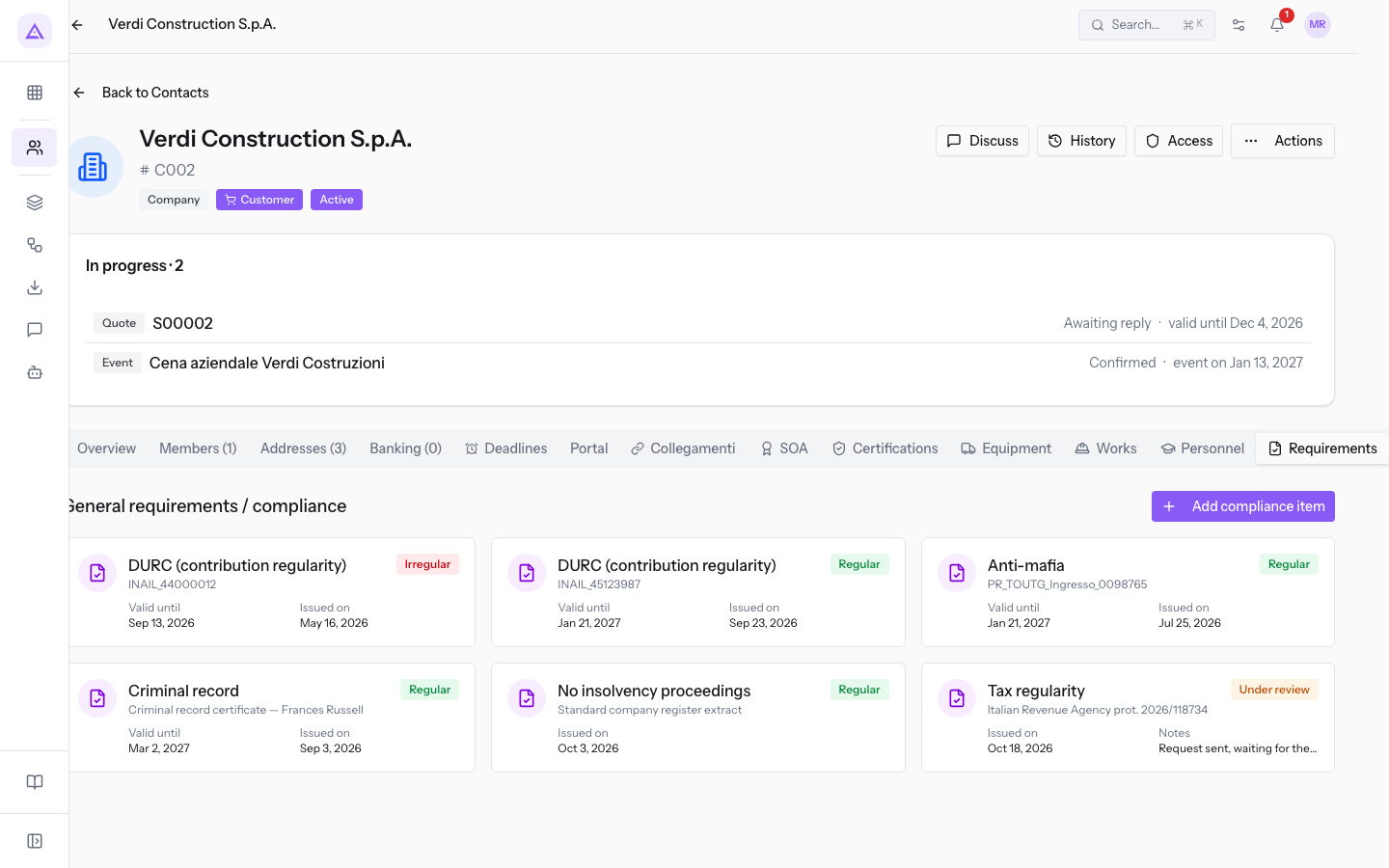
If the operator has no compliance items, the tab shows the message No compliance items recorded.
Each card shows:
- The type of compliance item, as the title.
- The value of Protocol / reference, under the title.
- The outcome, in a coloured label: Regular in green, Irregular in red, Under review in amber.
- The first two fields filled in among Valid until, Issued on and Notes.
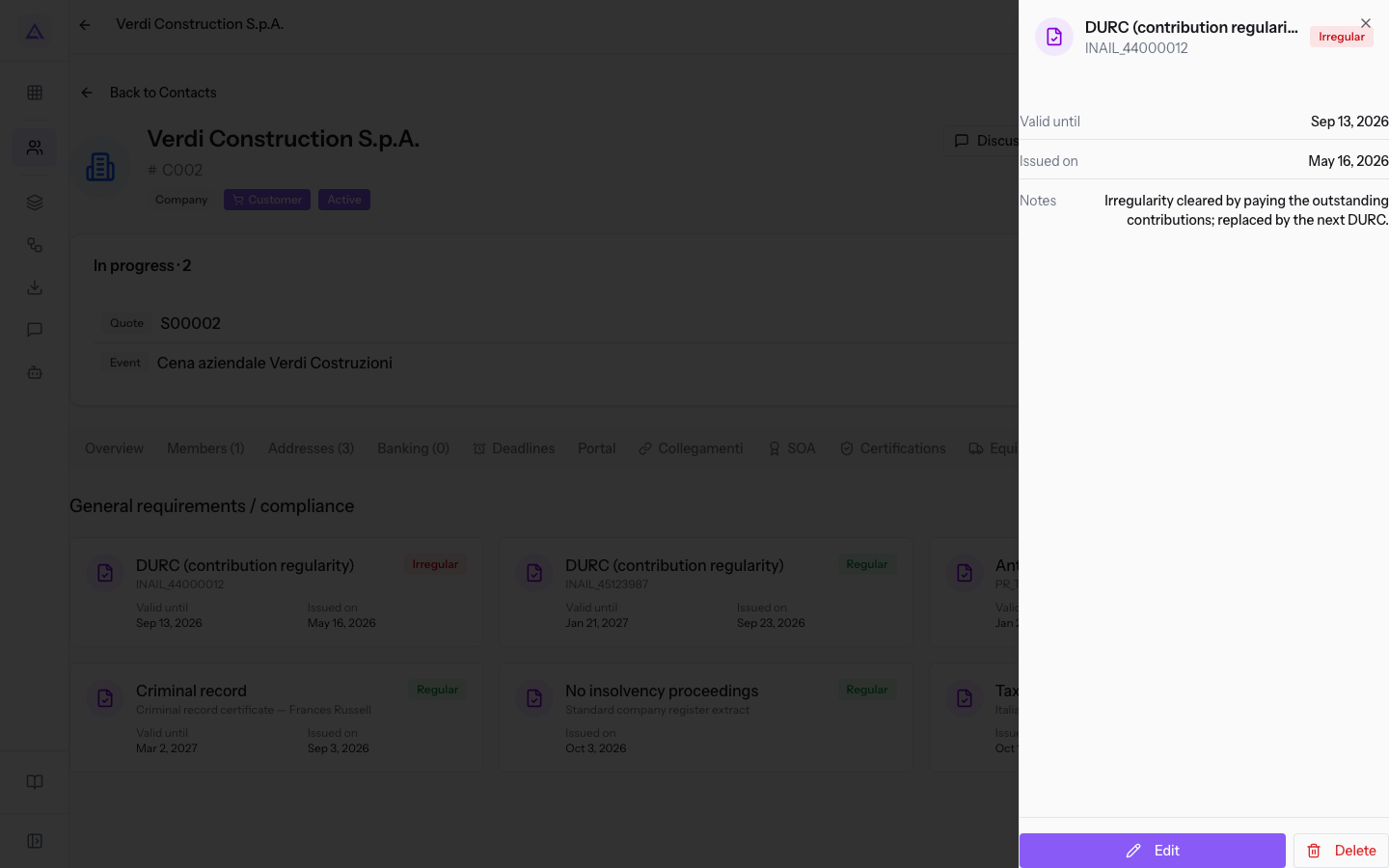
Press a card to open the side panel. The panel shows all the data of the compliance item, including the Notes, and the Edit and Delete buttons.
Adding a compliance item
Add a compliance item for each certificate you receive or request. If you have requested a certificate and have not received it yet, record it straight away with the outcome Under review, so the request stays visible in the file.
Choose the outcome based on the certificate:
- If the certificate proves regularity, choose Regular.
- If the certificate shows an irregularity, choose Irregular and explain in the Notes how it was remedied.
- If the certificate has been requested and has not arrived yet, choose Under review and write it in the Notes.
- In the Requirements tab press Add compliance item. The Add compliance item window opens.
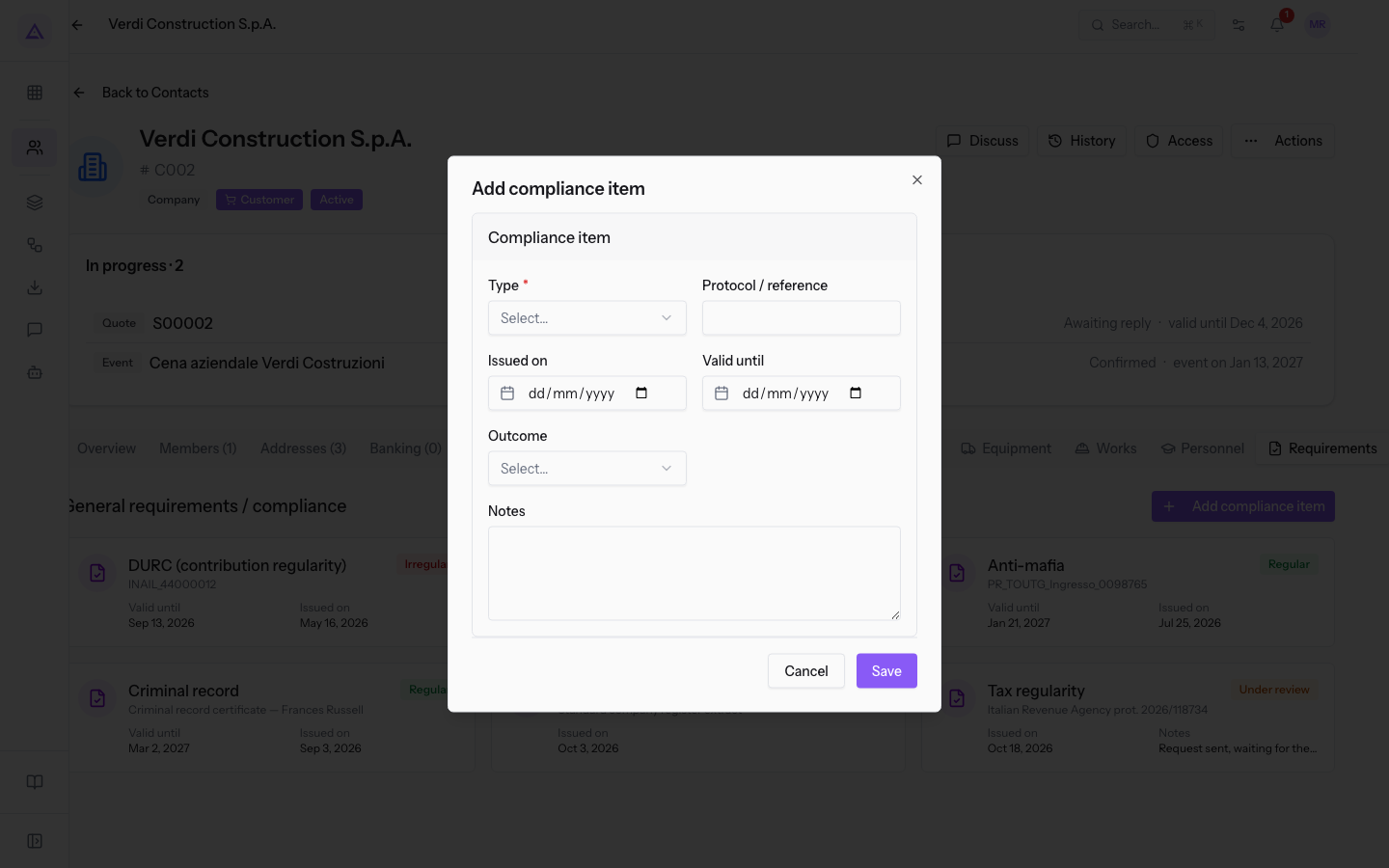
- Choose the Type and fill in the fields. The choices of Type and Outcome do not change the fields of the window.
Fields of the window:
- Type: the requirement the certificate proves. The field is required.
- DURC (contribution regularity)
- Anti-mafia
- Tax regularity
- No insolvency proceedings
- Criminal record
- Other
- Protocol / reference: the protocol number or the document name, such as
INAIL_45123987. The field is optional. - Issued on: the date the certificate was issued. The field is optional.
- Valid until: the last day of validity. The field is optional: leave it empty if the certificate has no expiry date.
- Outcome: the outcome of the certificate. The field is optional.
- Regular
- Irregular
- Under review
- Notes: free information, for example
Request sent, waiting for the certificate.. The field is optional.
Updating a compliance item under review
When a requested certificate arrives, update the compliance item you had recorded with the outcome Under review. The Outcome is set by hand: it does not change by itself, not even when the date in Valid until passes.
- Press the compliance item's card.
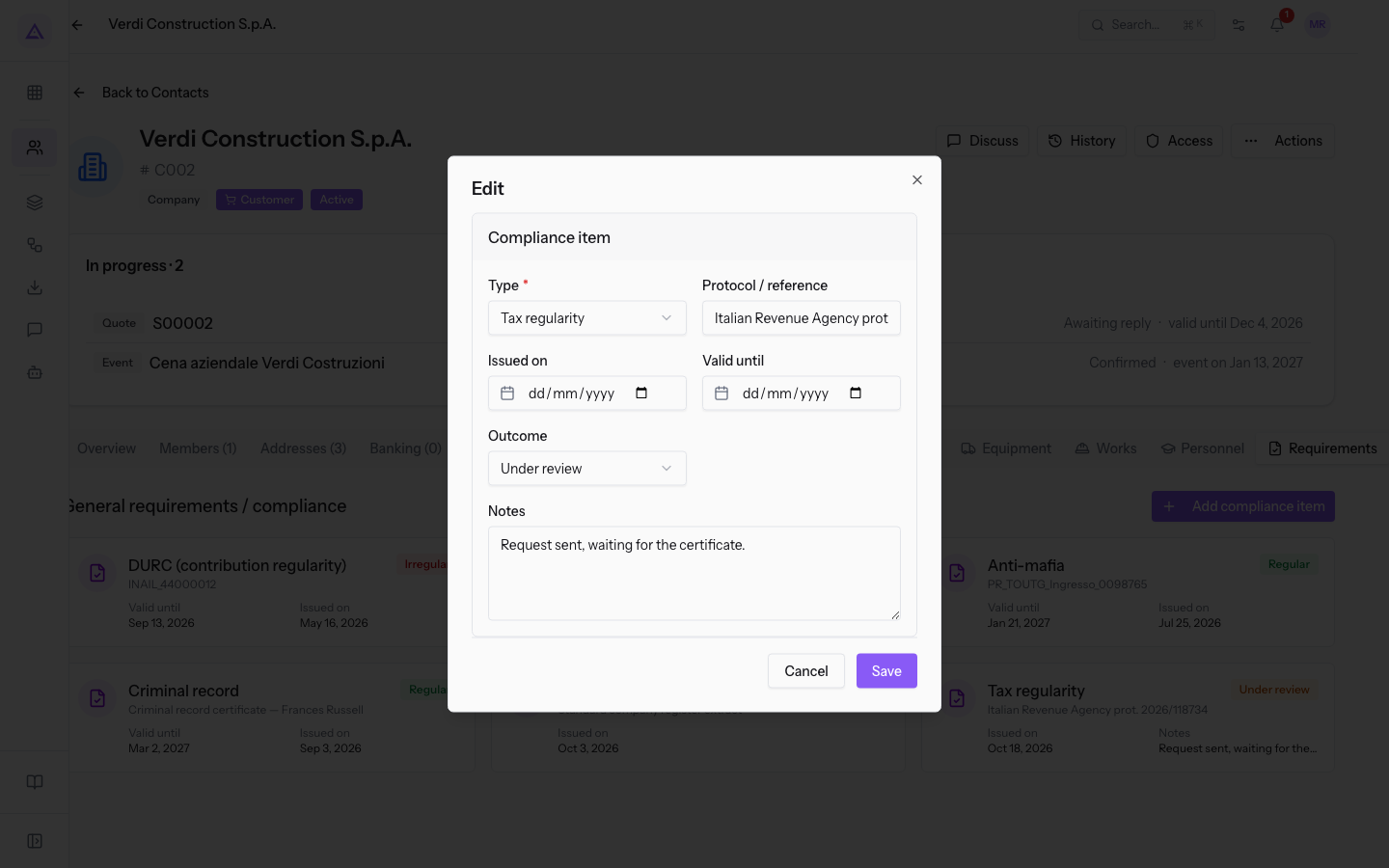
- Press Edit. The Edit window opens, with the same fields and the saved data; the dates must be entered again.
- Set the Outcome and the Valid until of the certificate received, then update Protocol / reference and Notes.
Tip: check Valid until on the cards and request the new certificate before that date.
Keeping the history of certificates
When a certificate is replaced, record the new one as a separate compliance item and keep the old one. This way the file shows which certificate is valid today and what happened before.
If an irregularity has been remedied, leave the outcome Irregular on the old compliance item and write in the Notes how it was remedied. Do not correct the outcome or overwrite the protocol and dates: you would lose the data of the original certificate. The DURC INAIL_44000012 is recorded this way, next to the DURC INAIL_45123987 that replaced it.
Note: Delete removes the compliance item from the file. Use it for an entry entered by mistake, not for an expired certificate.
The compliance items of Verdi Construction S.p.A.
The Requirements tab of Verdi Construction S.p.A. contains these entries.
| Type | Protocol / reference | Outcome | Valid until |
|---|---|---|---|
| DURC (contribution regularity) | INAIL_45123987 |
Regular | Jan 21, 2027 |
| DURC (contribution regularity) | INAIL_44000012 |
Irregular, then remedied | Sep 13, 2026 |
| Anti-mafia | PR_TOUTG_Ingresso_0098765 |
Regular | Jan 21, 2027 |
| Tax regularity | Italian Revenue Agency prot. 2026/118734 |
Under review | not indicated |
| No insolvency proceedings | Standard company register extract |
Regular | not indicated |
| Criminal record | Criminal record certificate — Frances Russell |
Regular | Mar 2, 2027 |
See it on your company, not on a slide deck.
In 30 minutes we map the software you use today.We show you how much work and how much margin Archimedes gives back.
Show me on my business →What industry are you in?
One tap — it lets us prepare the demo around your world.
What tools do you use today?
Pick the ones you recognise — or just type them. It helps us show you how they migrate.
Last step: your details.
We reply within one working day — and right after, if you like, you pick the demo slot yourself.
We couldn't send your request. Try again, or write to us at [email protected].
By sending, you agree to your data being processed so we can get back to you about the demo. Privacy notice.
Preview form — nothing is sent from this page.
Want to schedule the demo now?
Your call: book the slot you prefer yourself, or we'll call you to arrange it.
Live availability, 30 minutes, instant confirmation. The calendar opens in a new tab.
Lock in your slot ↗We'll get back to you within one working day — and we'll join the call already knowing your world.
The calendar is open in another tab: pick a slot and the demo is booked. Can't see it? Reopen it ↗
Preview page: nothing was sent.
Our calendar is live: take the slot that suits you and the demo is booked. 30 minutes, instant confirmation, no waiting.
Lock in your slot ↗