Contracts
All modules
Keep an eye on expiring contracts and their lifecycle
Contracts · 3 of 15 · 5 min read
The Expiring list shows signed or active contracts that expire within 120 days. From here you check which contracts need a decision and follow their status, from draft to the end of the contract.
Open the Expiring list
It is the list of contracts with a filter already applied: the subtitle "Expiring within 120 days" shows the period considered. In the demo, Framework contract Neri Supplies 2026 appears, in Notice window, and Venue rental — Sara and Luca's wedding, Signed.
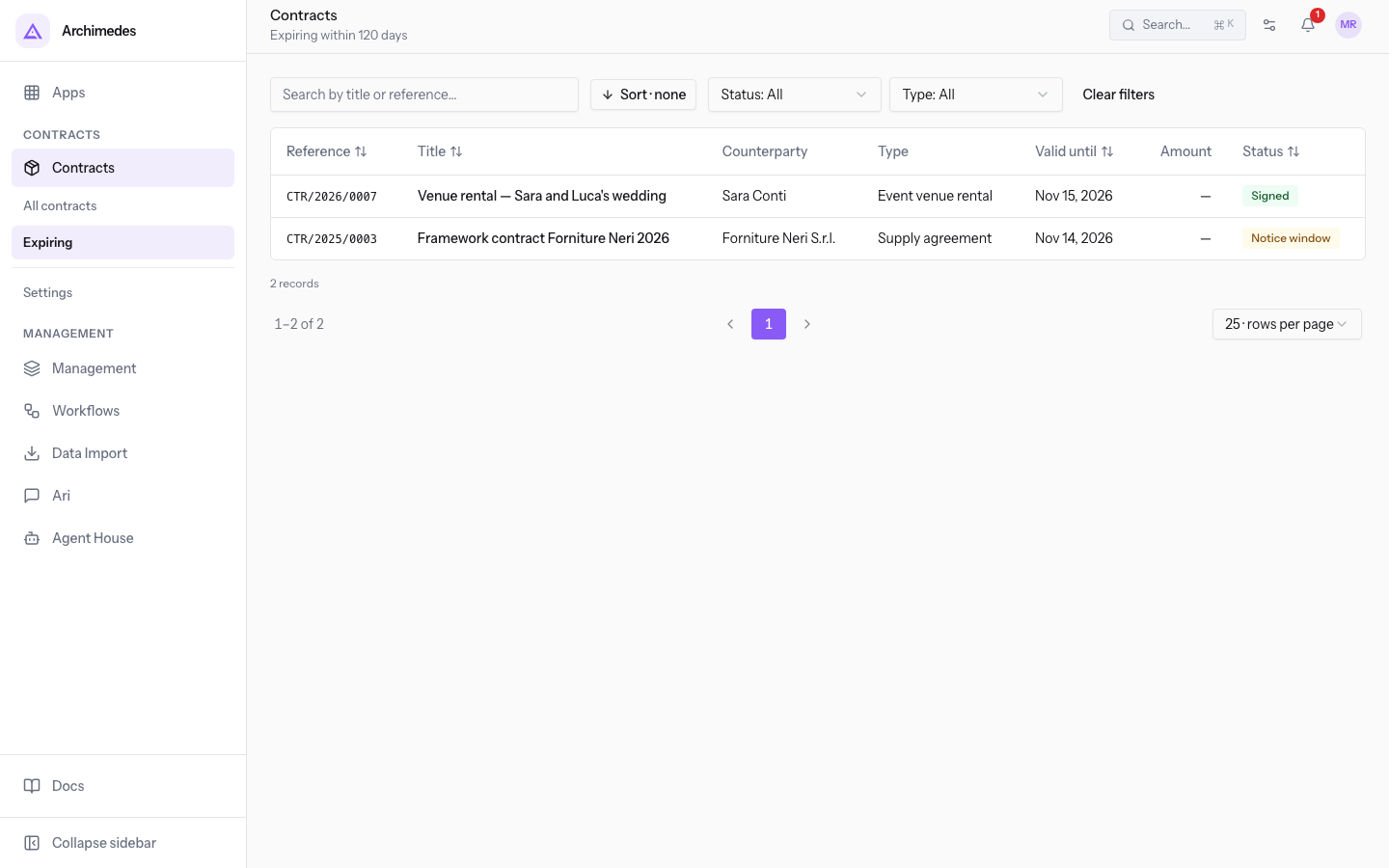
Press the Valid until header to put the contract that expires first at the top. Press a contract row to open its page: the Terms tab shows the dates and the renewal rule.
The tools are the same as in Contracts › All contracts:
- Search by title or reference…: searches the contracts in the list.
- Status: shows only the contracts in one status.
- Type: shows only the contracts of one type.
- Clear filters: also removes the 120-day filter and returns to the list of all contracts.
- Columns: Reference, Title, Counterparty, Type, Valid until, Amount and Status.
If no contract matches the filters, the list shows No results.
The statuses of a contract
The badge next to the title and the Status column show where the contract stands. Some statuses change with an action, others change by themselves overnight.
- Draft: the contract can be edited freely and does not have a reference yet.
- Awaiting signature: the contract was sent with Send for signature and its text is frozen. See Send a contract for signature with the link by email.
- Signed: the counterparty has signed, but the Valid from date has not arrived yet. If the Valid from date has already arrived, the contract becomes Active right away.
- Active: the contract is in force from the Valid from date. If the Invoicing module is active, the linked recurring billing starts here.
- Notice window: 30 days or fewer remain before the Notice deadline. It is time to decide whether the contract should continue.
- Expired: the Valid until date has passed and the contract had no Tacit renewal and no notice on record.
- Terminated: the contract ended after a notice.
- Declined: the counterparty did not sign. Only a contract Awaiting signature can be declined: the counterparty does it from the link, or you do it with Mark declined. See Record the signatures: the counterparty's on paper, ours, the refusal.
The usual path is Draft → Awaiting signature → Signed → Active → Notice window. At the Valid until date the contract renews by itself or becomes Expired or Terminated.
A contract with No renewal has no Notice deadline: it does not enter Notice window and goes from Active to Expired.
How the Notice deadline is calculated
The Notice deadline is the last useful date to give notice before renewal. It appears in the Terms tab and is calculated like this:
Notice deadline = Valid until minus Notice period (days)
Framework contract Neri Supplies 2026 has a 30-day notice period: the deadline falls 30 days before the Valid until date. If an amendment changes the Valid until or the Notice period (days), the deadline is recalculated.
Note: after the deadline, a notice does not end the contract before the current Valid until date.
What changes every night
Automatic status changes happen during the nightly check.
- A Signed contract becomes Active on the night of its Valid from date.
- An Active contract moves to Notice window when 30 days or fewer remain before the Notice deadline.
- With Tacit renewal, once the Valid until date has passed, the contract is extended by the Renewal period (months). The text stays the same, an amendment records the new end date, and the contract returns to Active.
- With Explicit renewal or No renewal, once the Valid until date has passed, the contract becomes Expired.
- A contract with a recorded notice, once the Valid until date has passed, becomes Terminated.
When a contract becomes Expired or Terminated, its recurring billing also closes, if the Invoicing module is active. If the warning email is turned on, the counterparty of a contract that does not renew by itself receives a warning, only once, when 30 days or fewer remain until the end.
A contract signed before the Valid from date
A Signed contract with a future Valid from date waits for that date. Venue rental — Sara and Luca's wedding stays Signed until the wedding day and that day it becomes Active by itself.
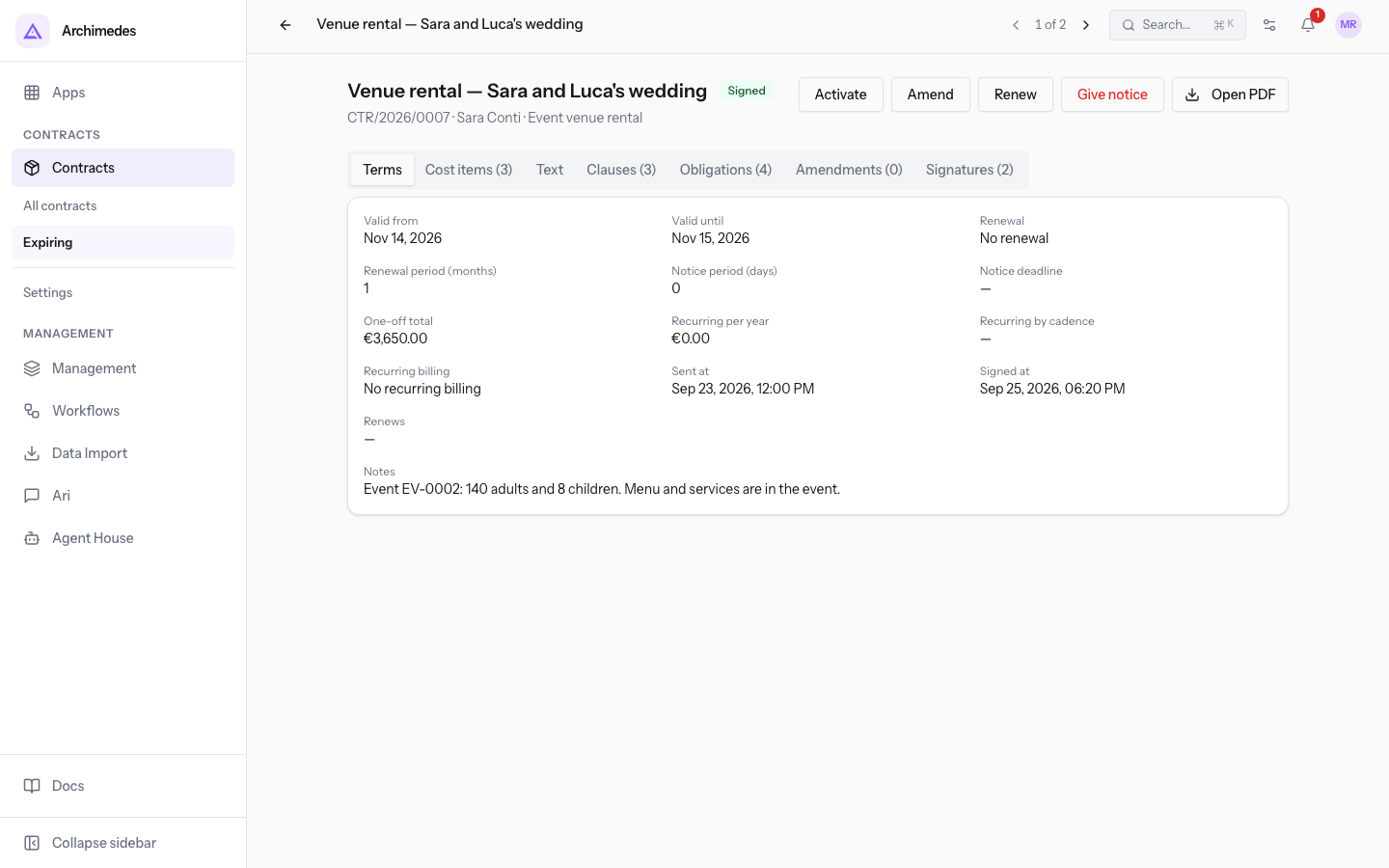
The Activate button appears on the contract page of a Signed contract and only works from the Valid from date onward. Before that date the contract stays Signed, even if the message Contract activated appears.
Important: Signed does not mean in force. A contract is in force only from when the badge shows Active.
Deciding in Notice window
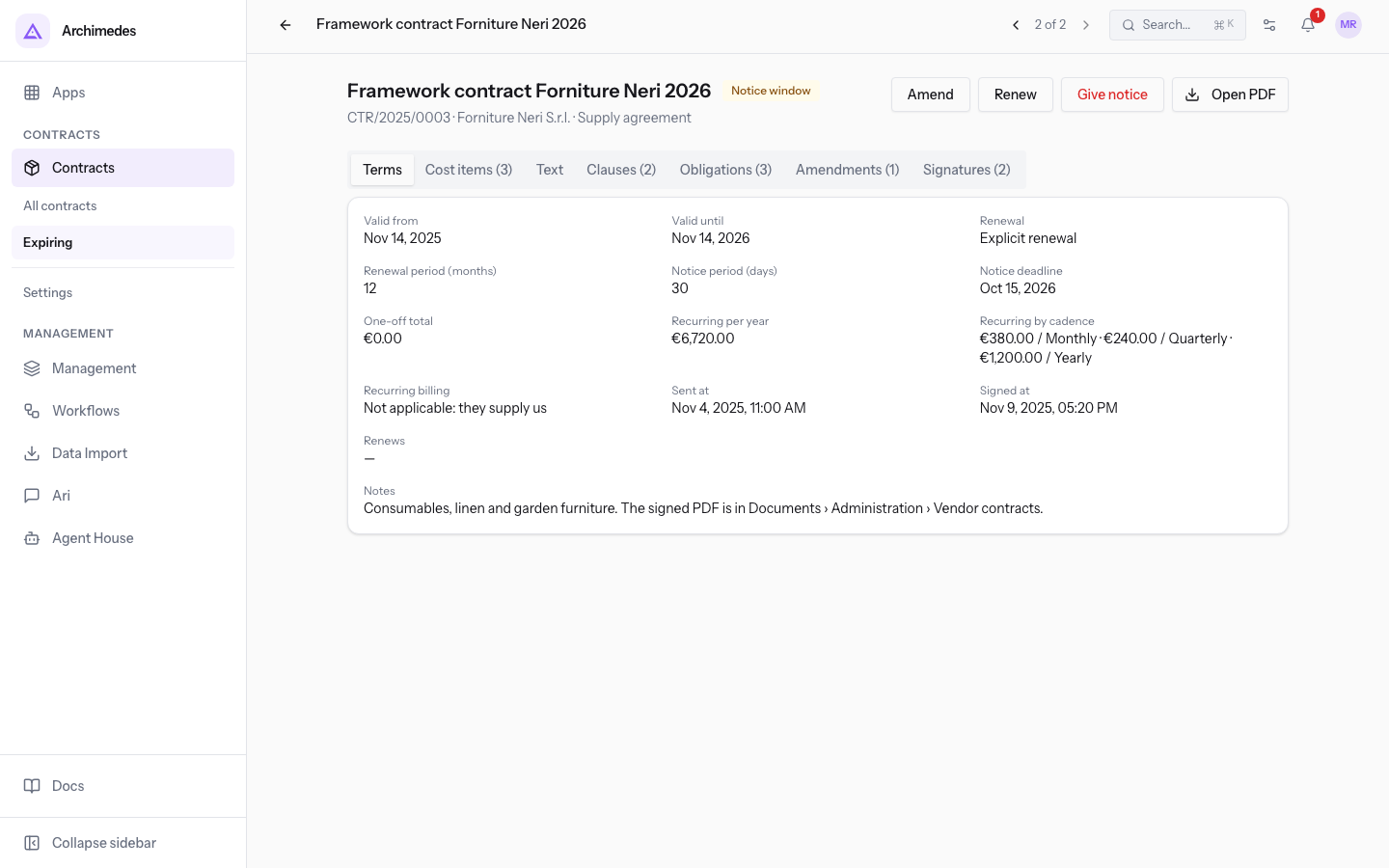
In Notice window the contract page shows the buttons Amend, Renew and Give notice. The choice depends on the contract's Renewal setting and on what you want to happen at the Valid until date.
- If the contract has Tacit renewal and should continue, do nothing: it renews by itself.
- If the contract has Explicit renewal and should continue, use Renew: a new draft is created to send and have signed again. This is the case of
Framework contract Neri Supplies 2026. See Renewing a contract, tacitly or with a new contract. - If the contract should not continue, use Give notice: the renewal is removed and the contract becomes Terminated once the end date has passed. With Terminate immediately (no notice) it becomes Terminated right away. See Give notice on a contract.
See it on your company, not on a slide deck.
In 30 minutes we map the software you use today.We show you how much work and how much margin Archimedes gives back.
Show me on my business →What industry are you in?
One tap — it lets us prepare the demo around your world.
What tools do you use today?
Pick the ones you recognise — or just type them. It helps us show you how they migrate.
Last step: your details.
We reply within one working day — and right after, if you like, you pick the demo slot yourself.
We couldn't send your request. Try again, or write to us at [email protected].
By sending, you agree to your data being processed so we can get back to you about the demo. Privacy notice.
Preview form — nothing is sent from this page.
Want to schedule the demo now?
Your call: book the slot you prefer yourself, or we'll call you to arrange it.
Live availability, 30 minutes, instant confirmation. The calendar opens in a new tab.
Lock in your slot ↗We'll get back to you within one working day — and we'll join the call already knowing your world.
The calendar is open in another tab: pick a slot and the demo is booked. Can't see it? Reopen it ↗
Preview page: nothing was sent.
Our calendar is live: take the slot that suits you and the demo is booked. 30 minutes, instant confirmation, no waiting.
Lock in your slot ↗