Contracts
All modules
Renewing a contract, tacitly or with a new contract
Contracts · 12 of 15 · 4 min read
At expiry a contract can continue in two ways: it renews by itself (tacit renewal), or you renew it yourself with a new draft to be signed again (explicit renewal). From the contract page you follow tacit renewals and create the renewal draft.
Tacit renewal or explicit renewal
The renewal rule is chosen in the Renewal field of the contract and decides what happens at expiry.
- Tacit renewal: if nobody gives notice, at expiry the contract renews by itself for the Renewal period (months). The text stays the same, the new expiry is recorded as an amendment and the contract returns to Active.
- Explicit renewal: at expiry the contract becomes Expired. To continue, use Renew: a new draft is created, to be sent and signed again.
- No renewal: at expiry the contract becomes Expired, as with explicit renewal.
If the relationship usually continues on the same terms, choose Tacit renewal. If the terms must be renegotiated and signed again at every expiry, for example a framework contract with a supplier, choose Explicit renewal.
The moment to decide is the Notice window. The contract enters it when 30 days remain until the Notice deadline, that is the expiry minus the Notice period (days). In that period you can let it renew, renew it with Renew or give notice with Give notice.
Note: status changes and tacit renewals are applied by the nightly check. You do not need to press any button.
Following a tacit renewal
A tacit renewal does not create a new contract: the same contract gets a new expiry and the Amendments tab shows an amendment of type Tacit renewal. Routine maintenance of the farmhouse shows Amendments (2): it has already renewed tacitly once.
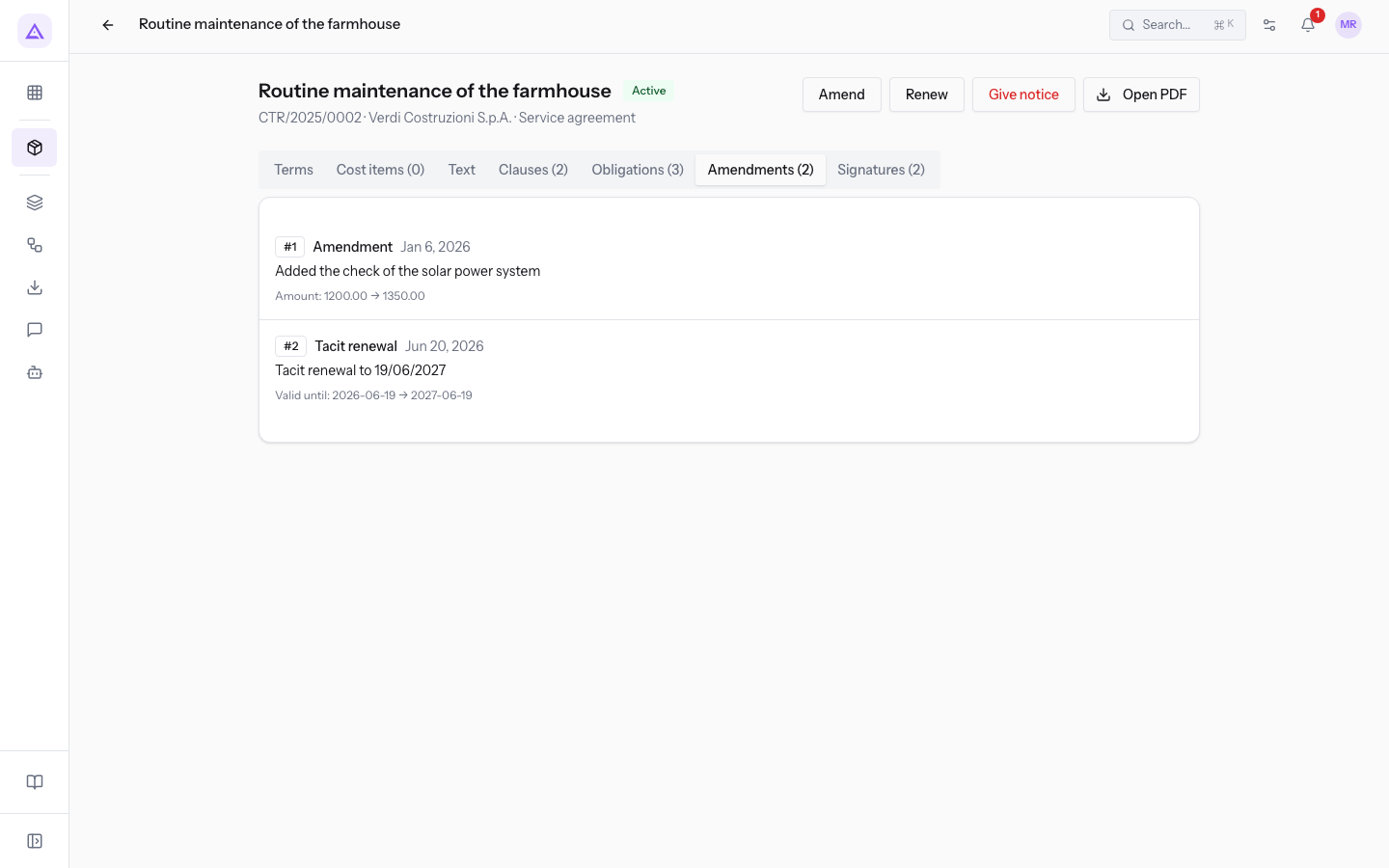
A tacitly renewed contract remains editable as before: at the top there are still Amend, Renew and Give notice.
Renewing a contract with a new contract
The Renew button creates a new draft linked to the current contract, effective after its expiry. The button appears on a contract that is Signed, Active, in Notice window, Expired or Terminated.
- Open the contract, for example
Framework contract Neri Supplies 2026, and press Renew. The Renew the contract window opens, with the text "A new draft with the same terms, starting after the current end date."
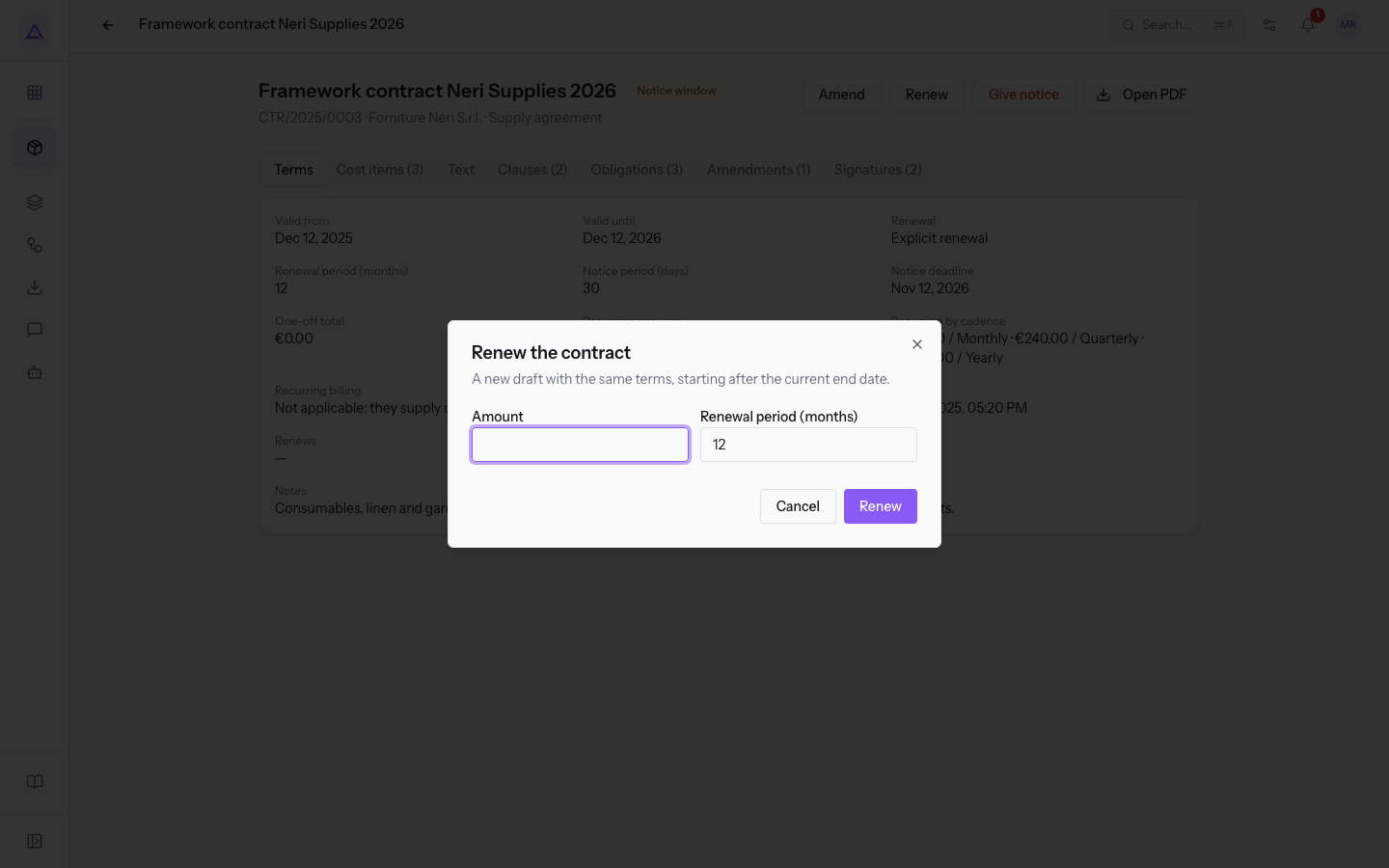
- Fill in the fields and press Renew.
The fields in the window:
- Amount: the amount of the new contract. The field shows the header amount of the current contract and is empty if there is none. It is not required.
- Renewal period (months): the duration of the new contract. The field shows the period of the current contract.
The message Renewal drafted appears and you stay on the contract page of the original contract, which does not change status: the Renewals panel shows the new draft.
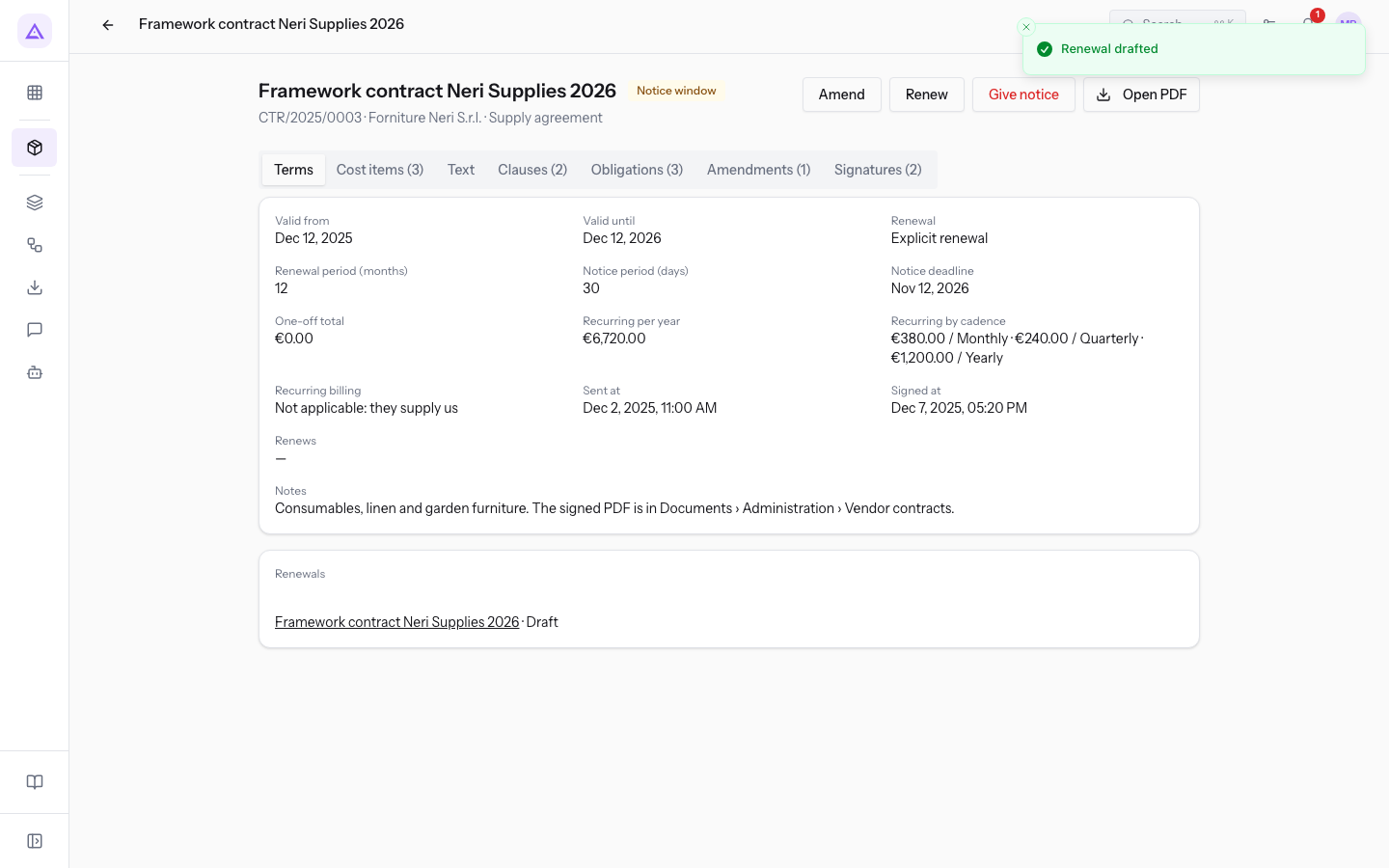
The renewal draft
The new draft has the same title, the same counterparty and the same type as the original contract, is in Draft status and has no reference yet. In the list the Reference column shows —.
In Contracts › All contracts search for the contract in Search by title or reference… and open the row with Reference —.
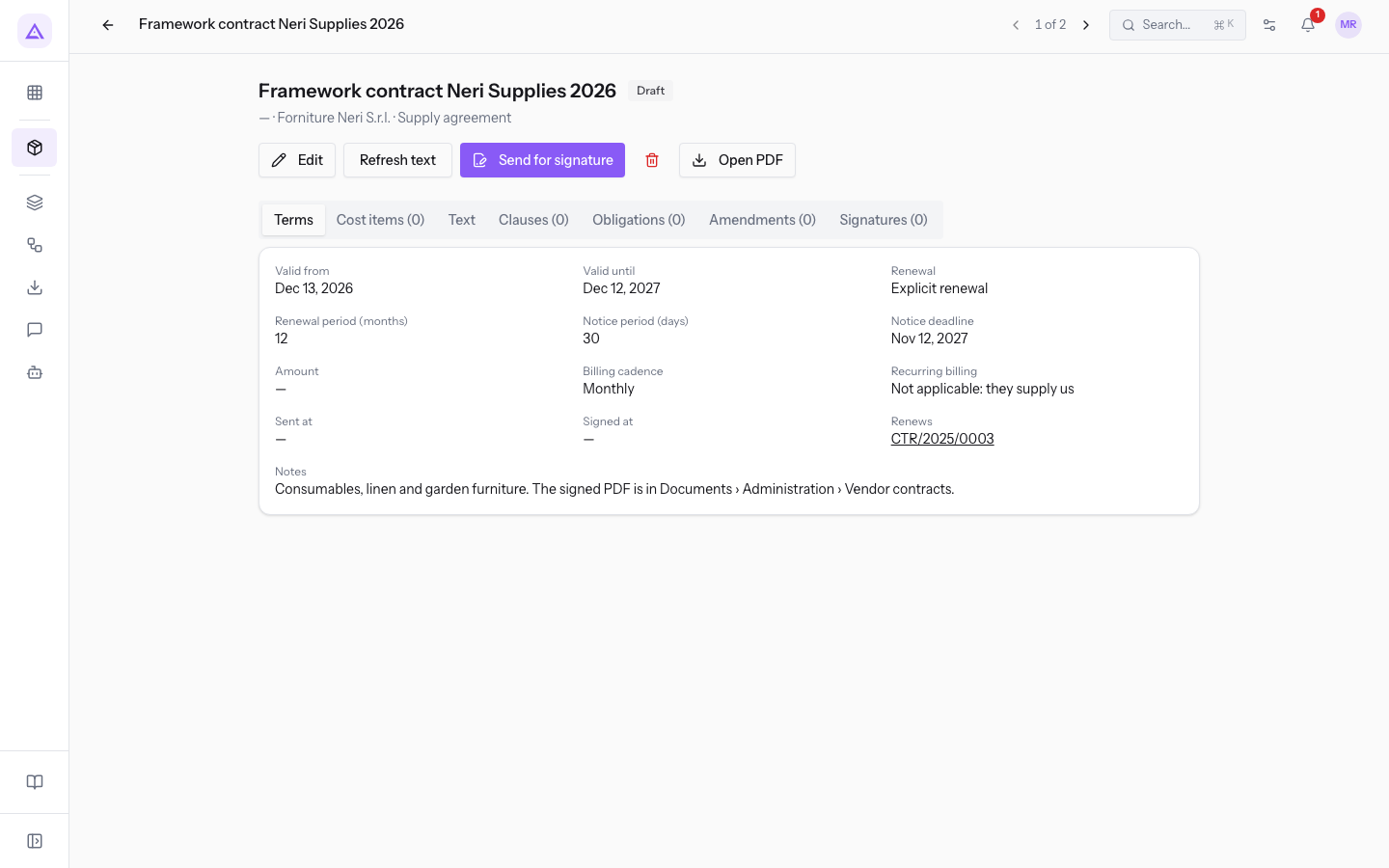
Like any draft, the renewal can be changed freely with Edit and Refresh text, then sent with Send for signature. The contract receives its reference when it is sent.
Important: the renewal takes over the header terms but not the cost items, clauses and obligations. The draft shows Cost items (0), Clauses (0) and Obligations (0): add them in the respective tabs before sending.
Note: if you created the renewal by mistake, delete it from its page with Delete. The button is only there while the contract is in draft.
The link between the two contracts
The original contract and its renewal are linked to each other, in the Terms tab of both.
- On the renewal page the Renews field shows the reference of the previous contract. Pressing it opens that contract.
- On the previous contract page the Renewals panel shows the new contract with its status.
Catering framework agreement Bianchi & Associates(CTR/2024/0001, Expired) showsCTR/2026/0006.
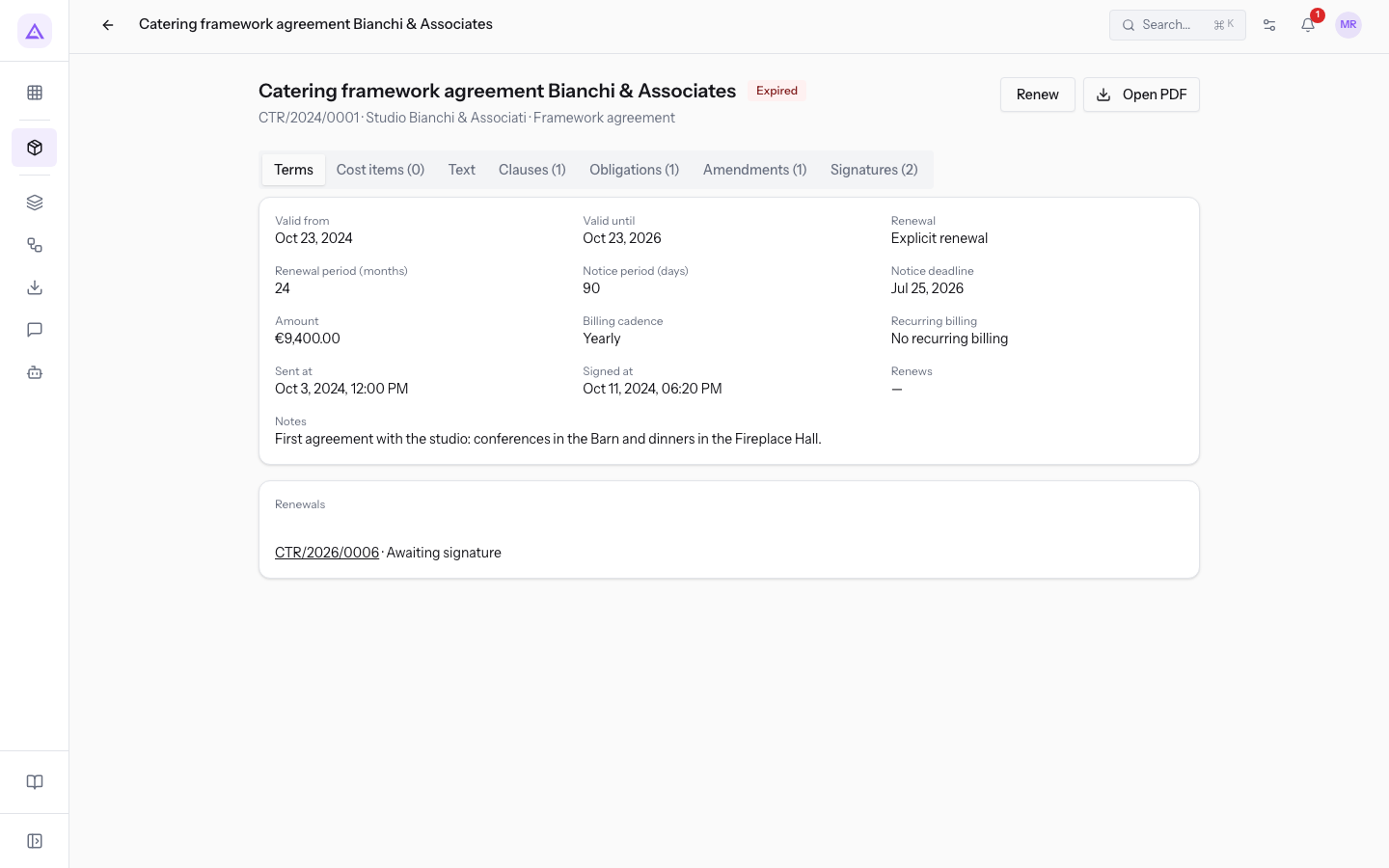
An Expired contract can still be renewed: Catering framework agreement Bianchi & Associates still has the Renew button.
See it on your company, not on a slide deck.
In 30 minutes we map the software you use today.We show you how much work and how much margin Archimedes gives back.
Show me on my business →What industry are you in?
One tap — it lets us prepare the demo around your world.
What tools do you use today?
Pick the ones you recognise — or just type them. It helps us show you how they migrate.
Last step: your details.
We reply within one working day — and right after, if you like, you pick the demo slot yourself.
We couldn't send your request. Try again, or write to us at [email protected].
By sending, you agree to your data being processed so we can get back to you about the demo. Privacy notice.
Preview form — nothing is sent from this page.
Want to schedule the demo now?
Your call: book the slot you prefer yourself, or we'll call you to arrange it.
Live availability, 30 minutes, instant confirmation. The calendar opens in a new tab.
Lock in your slot ↗We'll get back to you within one working day — and we'll join the call already knowing your world.
The calendar is open in another tab: pick a slot and the demo is booked. Can't see it? Reopen it ↗
Preview page: nothing was sent.
Our calendar is live: take the slot that suits you and the demo is booked. 30 minutes, instant confirmation, no waiting.
Lock in your slot ↗