Contracts
All modules
Give notice on a contract
Contracts · 13 of 15 · 3 min read
Give notice on a contract when you don't want it to continue past its end date, or want it to end sooner. Notice removes the renewal, records an amendment and, if needed, brings forward the Valid until.
Notice with a notice period or immediate termination
The Give notice window has two outcomes. Choose based on when the contract should stop being valid.
- If the contract must stay in force until the end of the agreed notice period, leave Terminate immediately (no notice) unselected.
- If the contract must end today, for example because the counterparty has already agreed to close it, select Terminate immediately (no notice).
With a notice period, this happens:
- The end date is today plus the Notice period (days) of the contract.
- If this date comes before the current Valid until, the Valid until is shortened to this date. If it comes after, the Valid until stays as it is: after the Notice deadline, a notice does not bring the end date forward.
- The Renewal becomes No renewal, so the contract no longer renews by itself.
- A termination amendment with the reason and the end date is recorded on the Amendments tab.
- The contract stays in its status (Signed, Active or Notice window). The nightly check moves it to Terminated once the end date has passed.
With Terminate immediately (no notice), the contract becomes Terminated straight away, the Valid until becomes today's date, and a termination amendment is recorded in this case too. If the contract has linked recurring billing, that billing is closed.
Note: a Terminated contract cannot be reactivated. To continue the relationship, use Renew, which creates a new draft to send and have signed.
Giving notice
The Give notice button appears on the contract page of a Signed, Active or Notice window contract.
- Open the contract and press Give notice. The Give notice window opens with the text "The contract ends after the notice period, unless you terminate immediately."
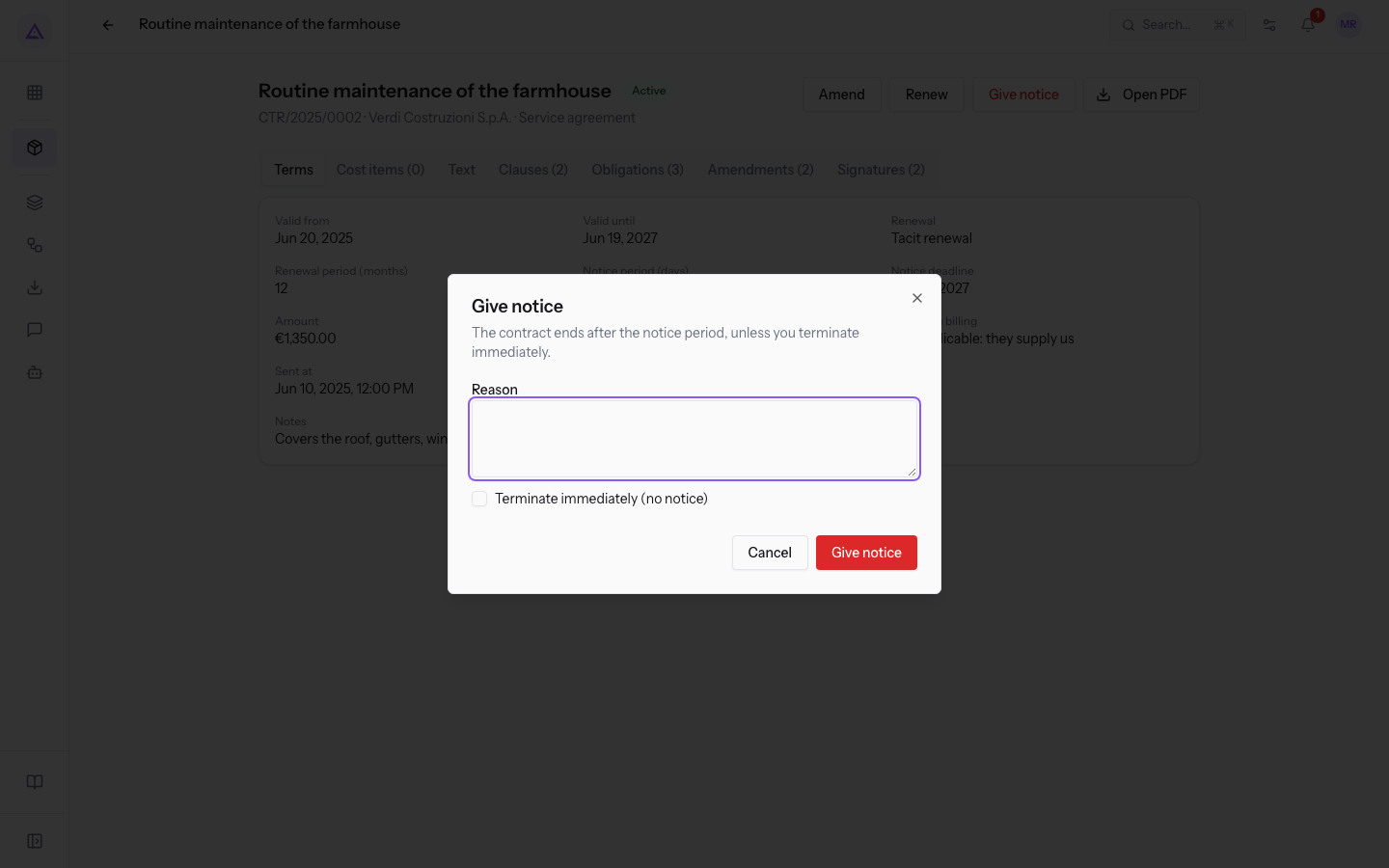
- Write the Reason for the notice. If the contract must end today, select Terminate immediately (no notice).
- Press Give notice in the window. The Notice recorded message appears.
The fields in the window:
- Reason: the reason for the notice, shown in the description of the termination amendment. The field is required.
- Terminate immediately (no notice): if you select it, the contract becomes Terminated today, without waiting for the end of the notice period. The default is unselected.
What you see after giving notice
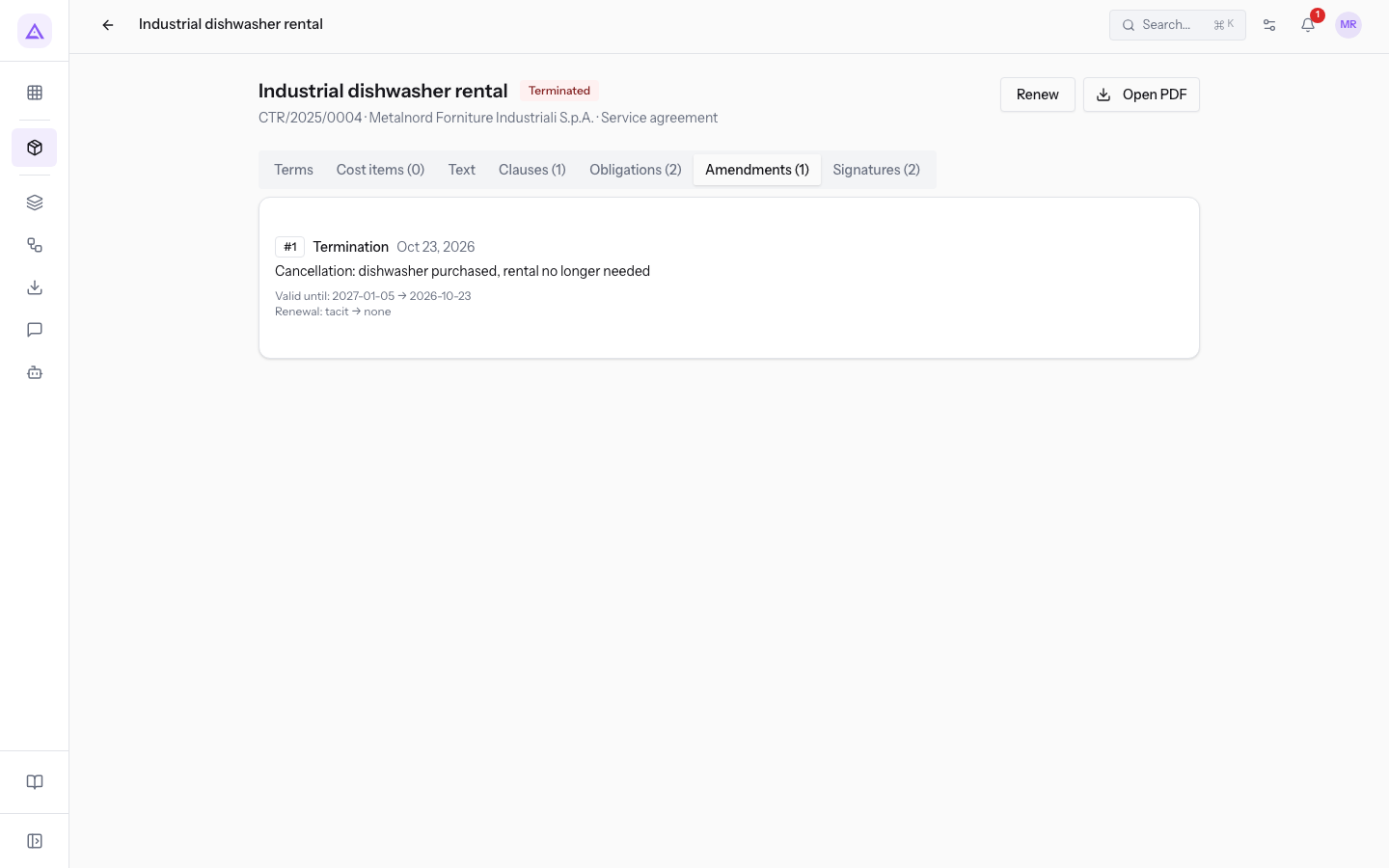
The contract Industrial dishwasher rental (CTR/2025/0004, Metalnord Industrial Supplies S.p.A., type Service agreement) shows the result of a notice: the status is Terminated and only Renew and Open PDF remain among the buttons.
The Amendments (1) tab shows the termination amendment, with the effective date, the reason and the changes to the Renewal and the Valid until.
The Obligations (2) tab shows the obligations of the contract, which no longer change.
See it on your company, not on a slide deck.
In 30 minutes we map the software you use today.We show you how much work and how much margin Archimedes gives back.
Show me on my business →What industry are you in?
One tap — it lets us prepare the demo around your world.
What tools do you use today?
Pick the ones you recognise — or just type them. It helps us show you how they migrate.
Last step: your details.
We reply within one working day — and right after, if you like, you pick the demo slot yourself.
We couldn't send your request. Try again, or write to us at [email protected].
By sending, you agree to your data being processed so we can get back to you about the demo. Privacy notice.
Preview form — nothing is sent from this page.
Want to schedule the demo now?
Your call: book the slot you prefer yourself, or we'll call you to arrange it.
Live availability, 30 minutes, instant confirmation. The calendar opens in a new tab.
Lock in your slot ↗We'll get back to you within one working day — and we'll join the call already knowing your world.
The calendar is open in another tab: pick a slot and the demo is booked. Can't see it? Reopen it ↗
Preview page: nothing was sent.
Our calendar is live: take the slot that suits you and the demo is booked. 30 minutes, instant confirmation, no waiting.
Lock in your slot ↗