Contracts
All modules
Configuring contract types
Contracts · 14 of 15 · 5 min read
In the Types tab of Contracts › Settings you manage contract types. The type sets the nature of a contract and fills in its default values: direction, renewal, duration, notice and template.
How the type affects contracts
When you pick a type on a new contract, the contract takes the renewal, duration, notice and template from the type. You can change these values later on the individual contract.
The Direction decides whether the contract has linked recurring billing, when the Invoicing module is active:
- If you supply the counterparty, choose We supply them: the contract with an amount and cadence, or with recurring cost items, generates recurring billing.
- If the obligations go both ways, choose Bilateral: recurring billing applies here too.
- If the counterparty supplies you, choose They supply us: there is no recurring billing, and the contract page shows Not applicable: they supply us.
A contract without a type is handled as if you supply the counterparty: it is billed, with tacit renewal, 12 months of duration and 90 days of notice.
For the renewal, the same choice applies that you will later make on the contract:
- If the contract should continue by itself until someone gives notice, choose Tacit renewal.
- If each expiry needs a new contract to sign, choose Explicit renewal.
- If the contract ends at expiry, such as renting a venue for one day, choose No renewal.
Note: changing a type does not change contracts already created with that type: the values are copied into the contract when you create it.
The list of types
The list shows all the contract types of the organization with their main values.
Before you start: the Contracts › Settings item only appears to people responsible for contracts.
Open Contracts › Settings. The Contract types & templates page opens, on the Types tab.
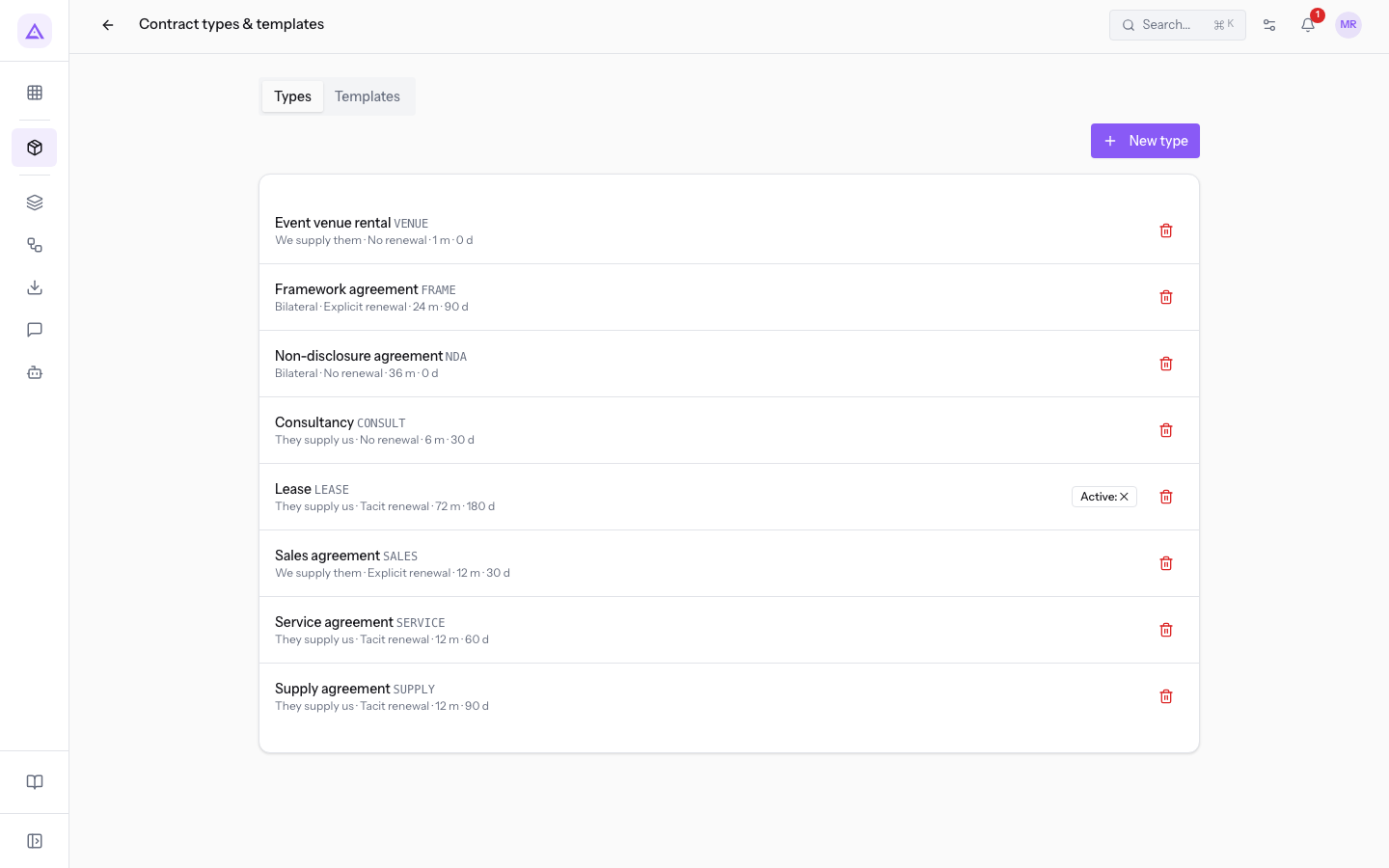
Each row shows the name and the code of the type, then direction · renewal · duration in months · notice in days, in the form 12 m · 90 d.
The demo types:
Event venue rental(VENUE): We supply them · No renewal ·1 m · 0 d.Framework agreement(FRAME): Bilateral · Explicit renewal ·24 m · 90 d.Non-disclosure agreement(NDA): Bilateral · No renewal ·36 m · 0 d.Consultancy(CONSULT): They supply us · No renewal ·6 m · 30 d.Lease(LEASE): They supply us · Tacit renewal ·72 m · 180 d. The type is deactivated and the row shows Active: ✕.Sales agreement(SALES): We supply them · Explicit renewal ·12 m · 30 d.Service agreement(SERVICE): They supply us · Tacit renewal ·12 m · 60 d.Supply agreement(SUPPLY): They supply us · Tacit renewal ·12 m · 90 d.
Each row has the Delete icon: the type is deleted at once, and the message that appears lets you undo for a few seconds.
Tip: to stop offering a type on new contracts, deactivate it instead of deleting it, as with
Lease.
Editing a type
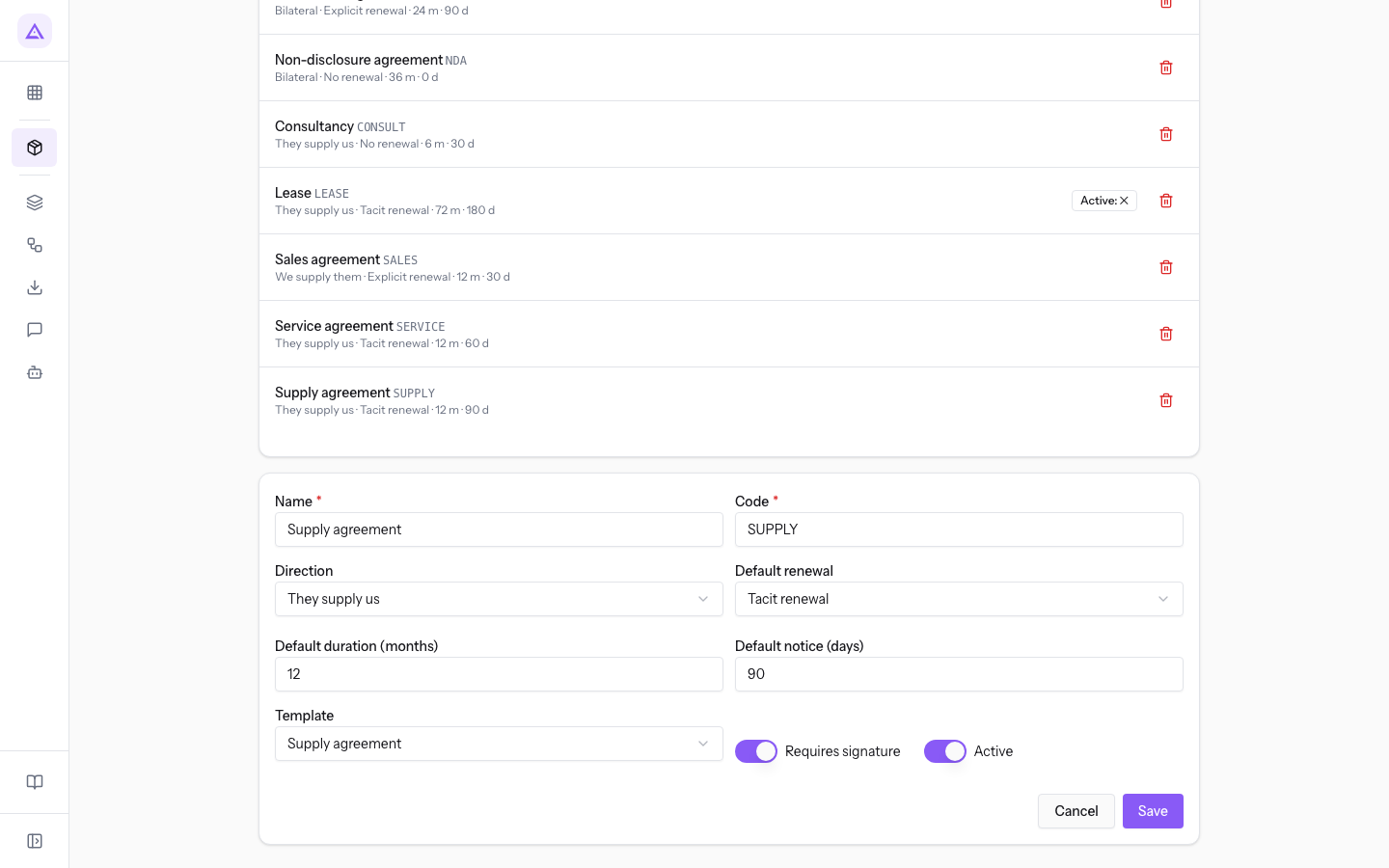
Press the row of a type: its form opens below the list. Edit the fields and press Save. The message Type saved appears.
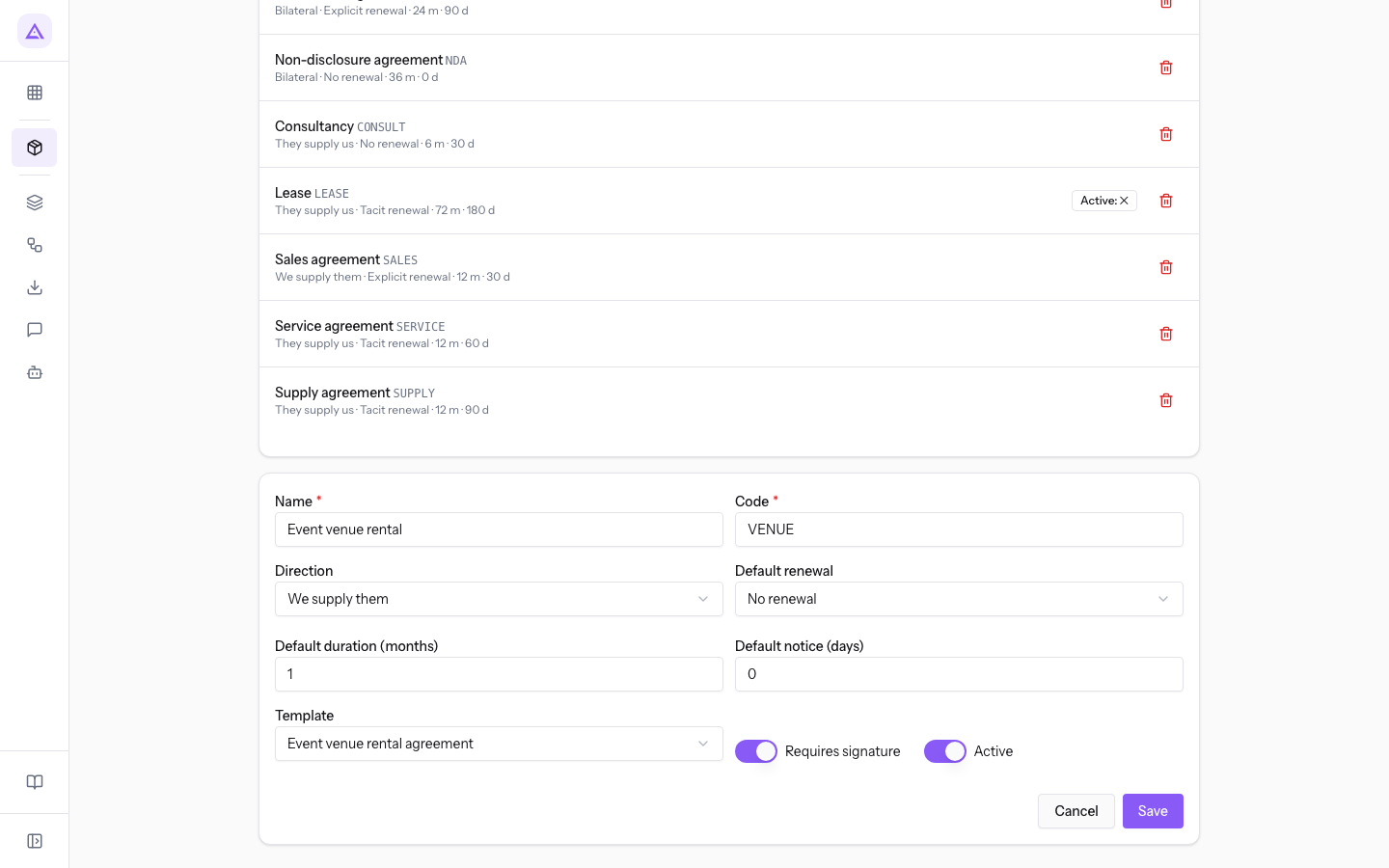
The Event venue rental type is the one used for renting the venues: Code VENUE, Direction We supply them, Default renewal No renewal, Default duration (months) 1, Default notice (days) 0, Template Event venue rental agreement.
The Supply agreement type is the one for suppliers: Code SUPPLY, Direction They supply us, Default renewal Tacit renewal, Default duration (months) 12, Default notice (days) 90, Template Supply agreement.
Creating a type
Create a type when a recurring contract of the organization does not fit the existing ones.
- In the Types tab press New type. The empty form opens below the list.
- Fill in the fields described below and press Save. The message Type saved appears and the type shows up in the list.
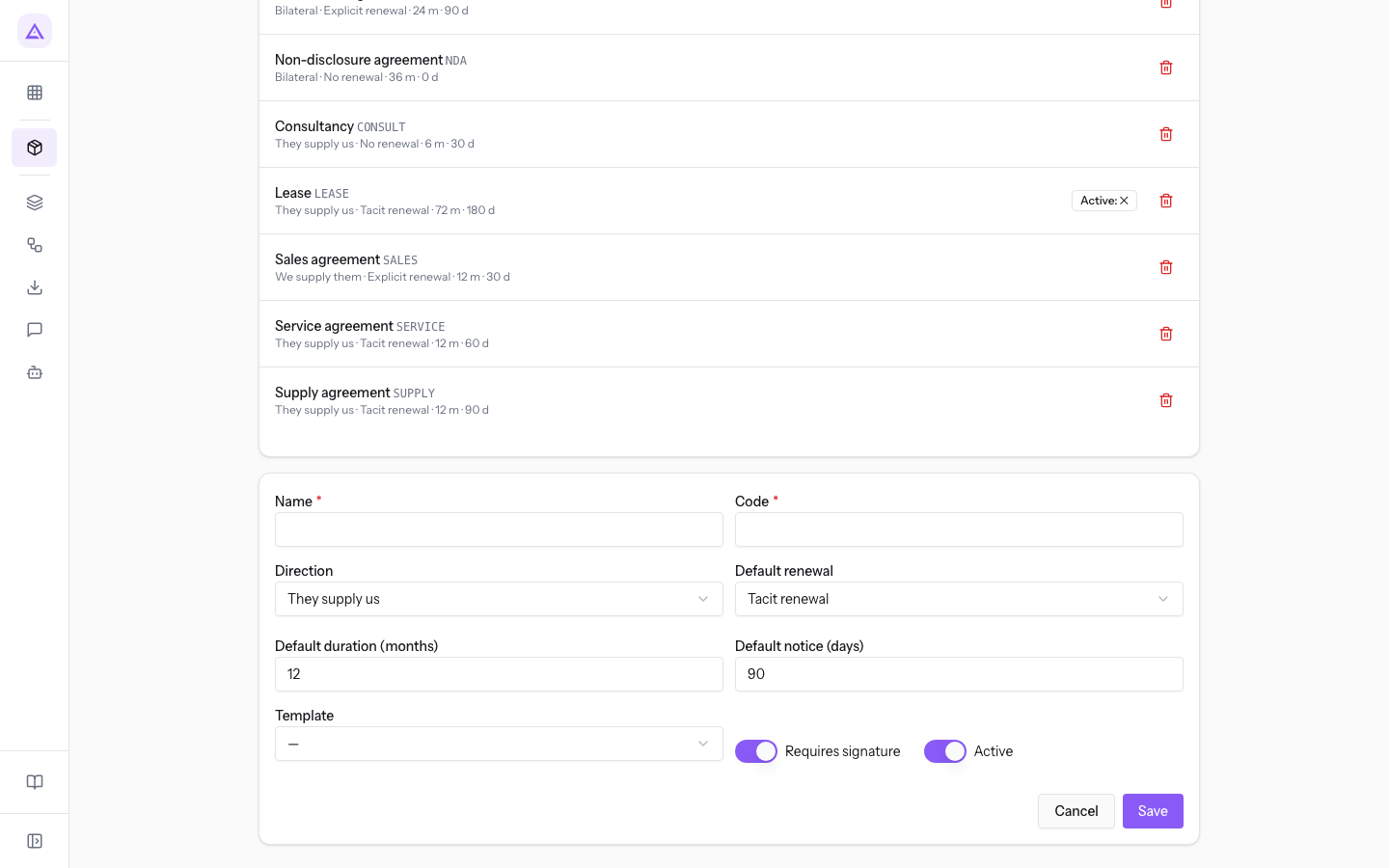
The new form proposes They supply us, Tacit renewal, 12 months, 90 days and no template (—).
The type fields
The fields are the same for a new type and for an existing one.
- Name: the name of the type, which appears in the contract type choice and in the list. The field is required.
- Code: a short code for the type, shown next to the name in the list. The field is required.
- Direction: who supplies whom. It decides whether recurring billing applies.
- They supply us: the counterparty supplies the organization; no recurring billing.
- We supply them: the organization supplies the counterparty; recurring billing.
- Bilateral: mutual obligations; recurring billing.
- Default renewal: the renewal rule proposed for new contracts.
- No renewal: at expiry the contract becomes Expired.
- Tacit renewal: at expiry the contract renews by itself, unless notice is given.
- Explicit renewal: at expiry the contract becomes Expired and must be renewed with a new contract.
- Default duration (months): the proposed duration; the contract expiry is calculated from the start date and this duration.
- Default notice (days): the proposed notice days; the deadline for giving notice is the expiry minus these days.
- Template: the text template proposed for new contracts of the type. The options are
—(no template) and the templates in the Templates tab. - Requires signature: toggle, active on the demo types.
- Active: toggle. When off, the type is deactivated, as with
Lease, and does not appear in the contract type choice.
See it on your company, not on a slide deck.
In 30 minutes we map the software you use today.We show you how much work and how much margin Archimedes gives back.
Show me on my business →What industry are you in?
One tap — it lets us prepare the demo around your world.
What tools do you use today?
Pick the ones you recognise — or just type them. It helps us show you how they migrate.
Last step: your details.
We reply within one working day — and right after, if you like, you pick the demo slot yourself.
We couldn't send your request. Try again, or write to us at [email protected].
By sending, you agree to your data being processed so we can get back to you about the demo. Privacy notice.
Preview form — nothing is sent from this page.
Want to schedule the demo now?
Your call: book the slot you prefer yourself, or we'll call you to arrange it.
Live availability, 30 minutes, instant confirmation. The calendar opens in a new tab.
Lock in your slot ↗We'll get back to you within one working day — and we'll join the call already knowing your world.
The calendar is open in another tab: pick a slot and the demo is booked. Can't see it? Reopen it ↗
Preview page: nothing was sent.
Our calendar is live: take the slot that suits you and the demo is booked. 30 minutes, instant confirmation, no waiting.
Lock in your slot ↗