Field record book (QdC)
All modules
Check product status and annual findings
Field record book (QdC) · 14 of 15 · 5 min read
The QdC has two verification pages. Magazzino agrofarmaci shows the authorisation status of plant protection products. Controllo annuale summarises selected findings in the register data.
Note: these screens currently use Italian interface labels. The instructions preserve the names shown on screen; the screenshots show the same controls.
Consulting the Agrochemical store
The Agrochemical store is the catalogue of plant protection products with the ministerial registration number. The signing check reads the stored authorisation status of each product linked to the treatment.
Note: the page shows the catalogue, not the stock. Stock quantities do not appear here.
- Open Magazzino agrofarmaci from the QdC menu.
- To find a product, type the name or registration number in the Cerca per nome o n° registrazione… field.
- To see only products approved for organic farming, enable Solo BIO.
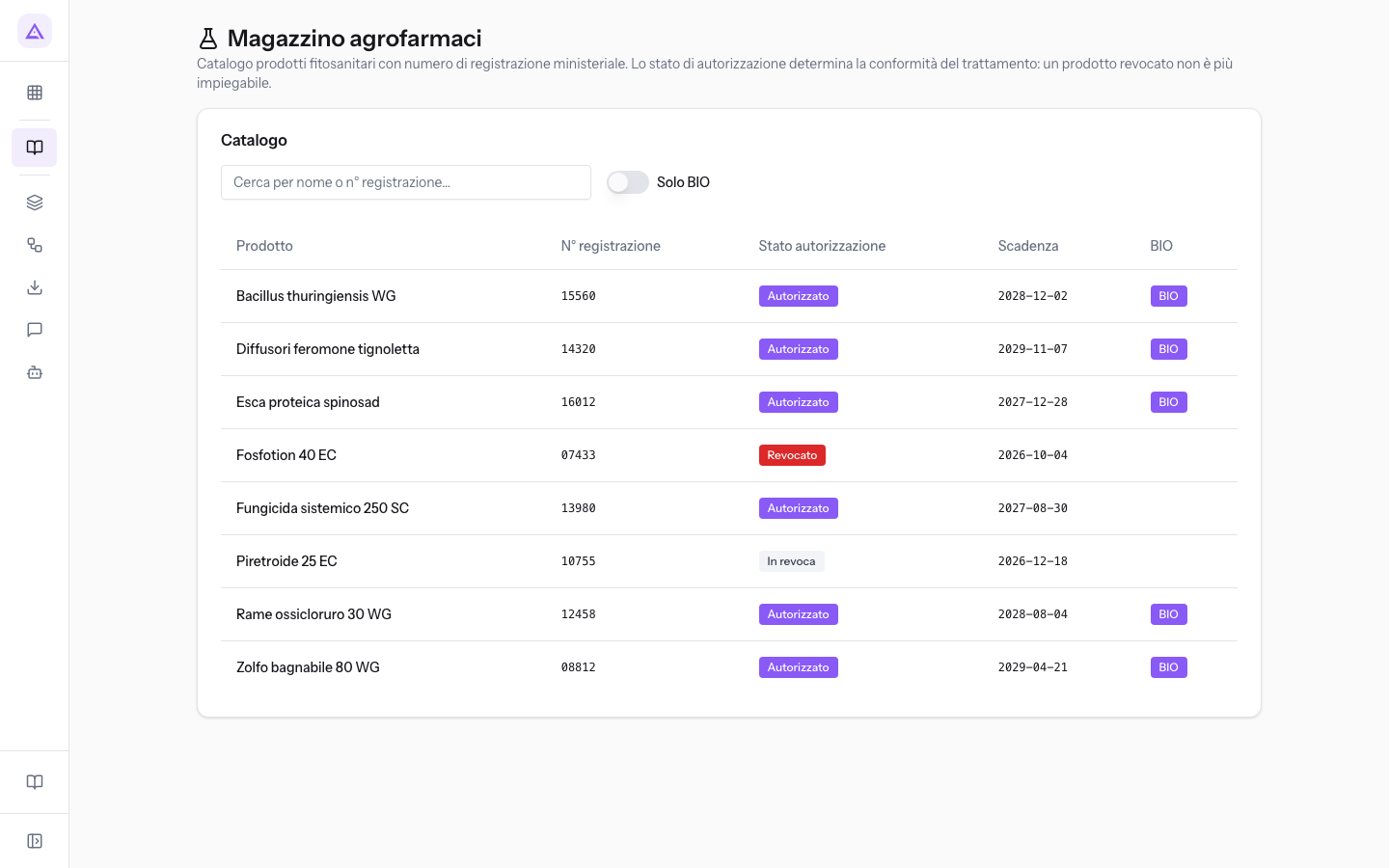
The Catalogo panel columns:
- Prodotto: the commercial name of the agrochemical.
- N° registrazione: the ministerial registration number. If missing, a dash appears.
- Stato autorizzazione: the product status, as a coloured label.
- Autorizzato: this status does not produce a revocation block when signing; other checks can still report findings.
- In revoca: the signing check shows a warning asking you to verify the stock-disposal deadline. In the demo, Piretroide 25 EC is in revoca.
- Revocato: the check blocks signing a treatment that uses this product. In the demo, Fosfotion 40 EC is revoked.
- Scadenza: the authorisation expiry date.
- BIO: the BIO label appears on products approved for organic farming.
The authorisation status and expiry date come from the product record in the Products module. The check reads the product’s current stored status and compares its expiry date with the operation date. It does not reconstruct authorisation history.
How the status of an agrochemical affects treatments
The authorisation status takes effect when an operation is signed.
- If the treatment uses a Revocato product, signing is blocked until you correct it.
- If it uses an In revoca product, signing shows a warning and the register manager decides whether to sign.
- If the authorisation has expired on the date of the operation, signing shows a warning.
- If the product is revoked after signing, the operation remains signed and Controllo annuale flags it. In the demo, this is the spring treatment on the orchard with Fosfotion 40 EC.
Reading the Annual check
The Annual check is a read-only dashboard for farm compliance. It is calculated when you open the page. There is no year selector: operation counts cover the retained records, and expiry dates are compared with today.
- Open Controllo annuale from the QdC menu.
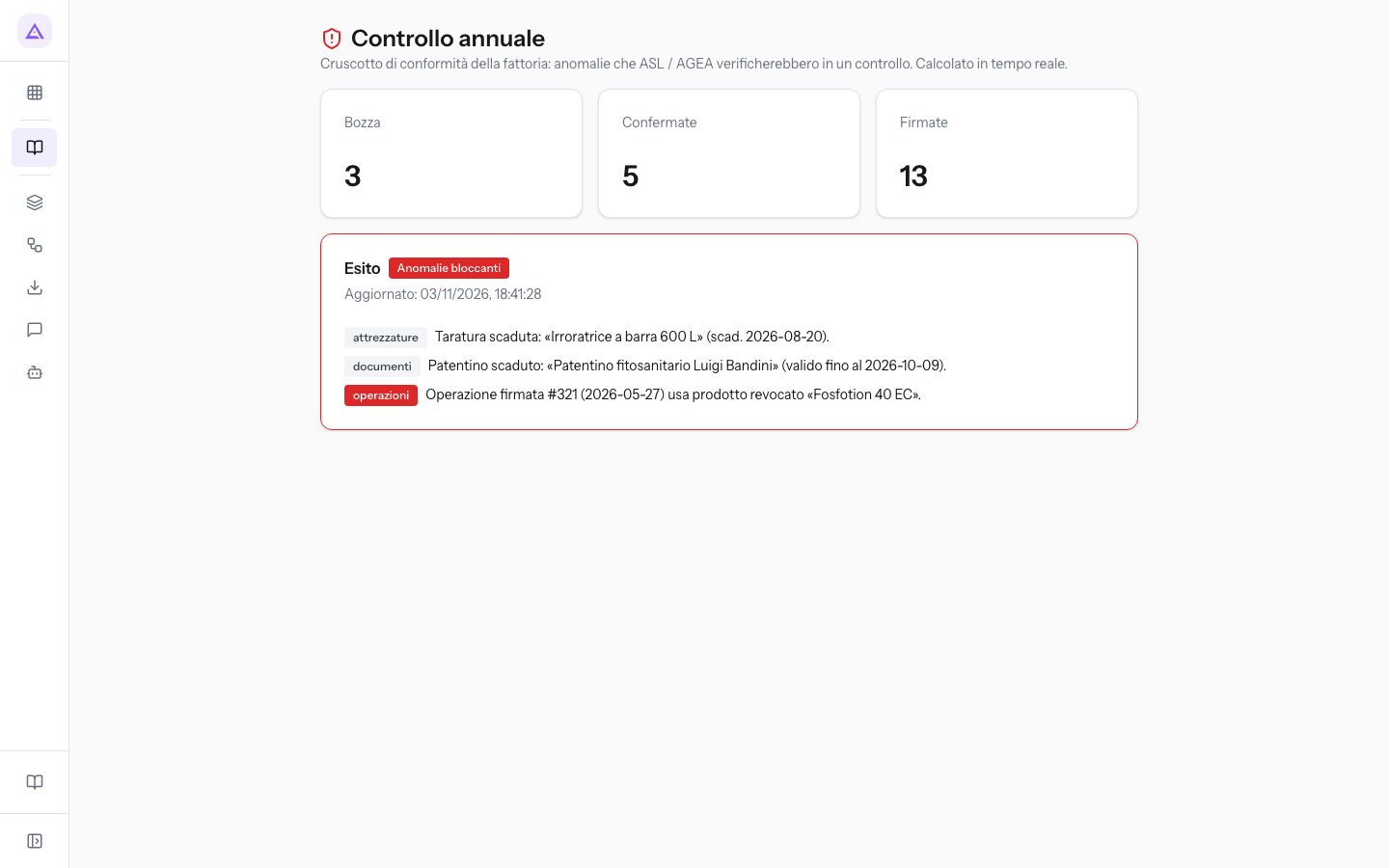
The page shows:
- Bozza, Confermate, Firmate: the number of register operations in each status. Deleted operations are not counted. In the demo, the counts are 3, 5 and 13.
- Esito: the overall judgement, with the date and time of calculation after Aggiornato:.
- Conforme: none of the implemented checks found a blocking anomaly. Warnings may remain; this result covers those checks, rather than every requirement an inspection could assess.
- Anomalie bloccanti: there is at least one operation signed with a revoked product. The panel has a red border.
- The anomalies: one row per anomaly, with the area in a label and a message. Red labels are blocking anomalies, grey ones are warnings. When there are no anomalies, Nessuna anomalia rilevata. appears.
Resolving Annual check anomalies
The Annual check flags three types of anomaly. Check each value on its source page, then reopen the dashboard. Some historical findings remain after renewal, as explained below.
Expired calibration (equipment)
It appears for each piece of equipment whose calibration expiry has passed. The message cites the equipment name and expiry date. It is a warning: it does not change the Esito. In the demo, it concerns the Irroratrice a barra 600 L.
- On the Equipment page of the QdC, open the piece of equipment indicated in the message.
- Record the new functional check with the new calibration expiry date.
Note: the check only considers equipment with a category. Equipment without a category is not verified. Calibrations that are expiring but not yet expired do not appear.
Expired licence (documents)
It appears for each document of type patentino (certificate of authorisation to use agrochemicals) whose end-of-validity date has passed. The message cites the document description and the date. It is a warning: it does not change the Esito. In the demo, it concerns the patentino of Luigi Bandini.
- Open the Documents page of the QdC.
- Upload the renewed licence with its new expiry date and retain the previous certificate as a historical document.
The check lists every licence document with an expired date; it does not recognise that a newer document replaces an older one. The old warning can therefore remain after renewal. Do not change the historical certificate’s dates to hide it. Ask the person responsible for the register to review the retained documents when distinguishing historical findings from renewals still needed.
Note: the check only reads documents with the patentino type. A patentino uploaded with a different document type is not verified.
Operation signed with a revoked product (operations)
It appears for every Firmata operation that uses a product that is today Revocato. The message cites the date of the operation and the product. It is the only blocking anomaly: it brings the Esito to Anomalie bloccanti. In the demo, this is the treatment signed on the orchard with Fosfotion 40 EC, revoked after the treatment.
A signed operation cannot be modified or deleted, and there is no step backwards: the anomaly remains as evidence in the register.
Important: to avoid creating new anomalies of this type, check the product status in Magazzino agrofarmaci before recording a treatment.
See it on your company, not on a slide deck.
In 30 minutes we map the software you use today.We show you how much work and how much margin Archimedes gives back.
Show me on my business →What industry are you in?
One tap — it lets us prepare the demo around your world.
What tools do you use today?
Pick the ones you recognise — or just type them. It helps us show you how they migrate.
Last step: your details.
We reply within one working day — and right after, if you like, you pick the demo slot yourself.
We couldn't send your request. Try again, or write to us at [email protected].
By sending, you agree to your data being processed so we can get back to you about the demo. Privacy notice.
Preview form — nothing is sent from this page.
Want to schedule the demo now?
Your call: book the slot you prefer yourself, or we'll call you to arrange it.
Live availability, 30 minutes, instant confirmation. The calendar opens in a new tab.
Lock in your slot ↗We'll get back to you within one working day — and we'll join the call already knowing your world.
The calendar is open in another tab: pick a slot and the demo is booked. Can't see it? Reopen it ↗
Preview page: nothing was sent.
Our calendar is live: take the slot that suits you and the demo is booked. 30 minutes, instant confirmation, no waiting.
Lock in your slot ↗