Field record book (QdC)
All modules
Define intervention thresholds
Field record book (QdC) · 11 of 15 · 6 min read
An intervention threshold indicates, for a group of plots and for a period, the number of captures of a pest beyond which treatment is justified. It serves as evidence of integrated pest management and for SQNPI: the compliance check of a treatment looks for a threshold that covers it.
Note: these screens currently use Italian interface labels. The instructions preserve the names shown on screen; the screenshots show the same controls.
Threshold list
The Soglie d'intervento page shows the areas with their capture thresholds by pest. The subtitle summarises it: once the threshold is exceeded, treatment is justified (SQNPI / integrated pest management evidence).
Before you start: thresholds are created and edited by the Responsabile compilazione registro or the Manager QdC. The Utente QdC can only view them.
- To find a threshold, type part of the name in the Cerca per nome area… field. By typing
Vignetiyou find the vineyard threshold. - Click a row or Apri soglia to open the record.
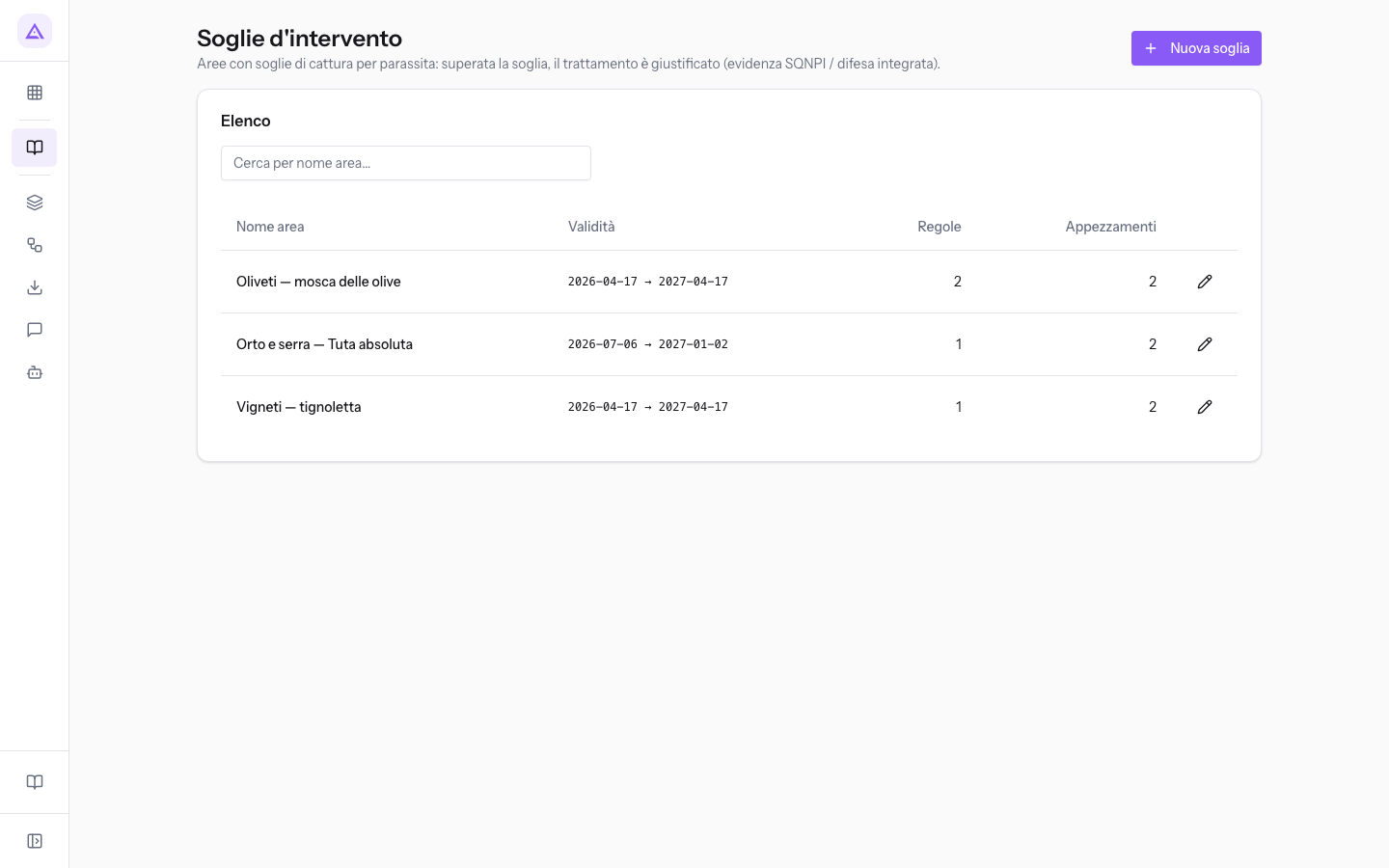
The list columns:
- Nome area: the name of the threshold.
- Validità: the period during which the threshold is valid.
- Regole: the threshold's pest rules.
- Appezzamenti: the plots to which the threshold applies.
Create a threshold
Create a threshold for each group of plots with the same crop and the same pests to monitor, such as olive groves or vineyards.
- In the list, click Nuova soglia. The Nuova soglia d'intervento record opens.
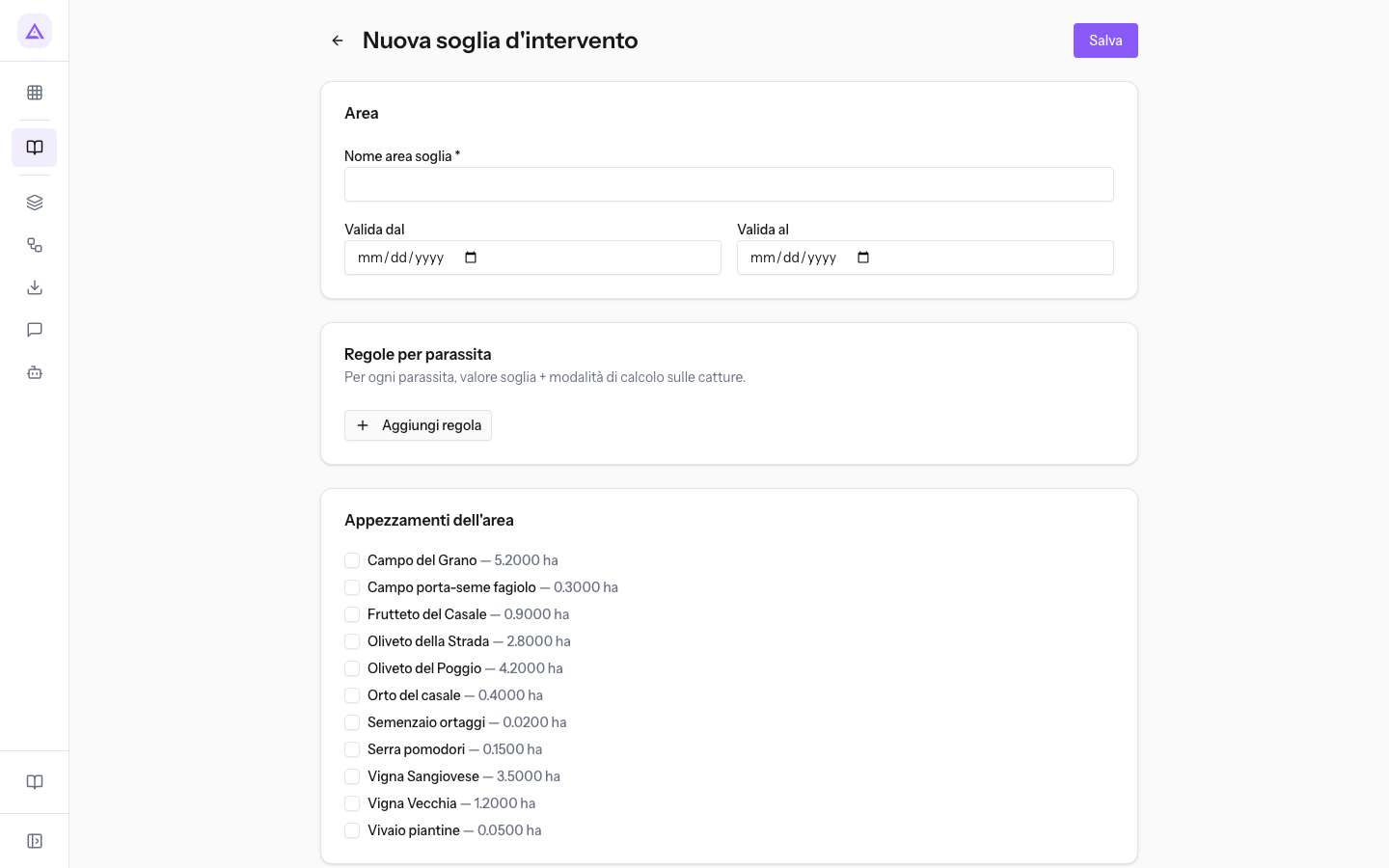
- In the Area section, type the Nome area soglia and enter the validity period in Valida dal and Valida al.
- In the Regole per parassita section, add a rule for each pest, as described in the following section.
- In the Appezzamenti dell'area section, select the checkboxes for the plots to which the threshold applies.
- Click Salva. The Soglia salvata message appears and you return to the list.
The fields in the Area section:
- Nome area soglia: the name with which the threshold appears in the list, such as
Oliveti — mosca delle olive. The field is required: without a name, saving stops with the Il nome area è obbligatorio message. - Valida dal: the date from which the threshold is valid. If left blank, the threshold is valid without a start limit.
- Valida al: the date until which the threshold is valid. If left blank, the threshold is valid without an end limit.
The Appezzamenti dell'area section lists all the farm's plots, each with a checkbox, name, and area in hectares, such as Oliveto del Poggio — 4.2000 ha. A plot without the checkbox selected is not covered by the threshold.
Tip: give the threshold a name that indicates the area and the main pest, such as
Oliveti — mosca delle olive: it is the name you search for in the list.
Add pest rules
Each rule specifies, for a pest, the threshold value and the calculation method for captures. A threshold can have multiple rules, one per pest.
- In the Regole per parassita section, click Aggiungi regola. A row appears with the Parassita, Valore soglia, and Modalità fields.
- In the Cerca parassita field, type at least 2 characters of the name and press Enter or the magnifying glass button. With fewer than 2 characters the Digita almeno 2 caratteri message appears.
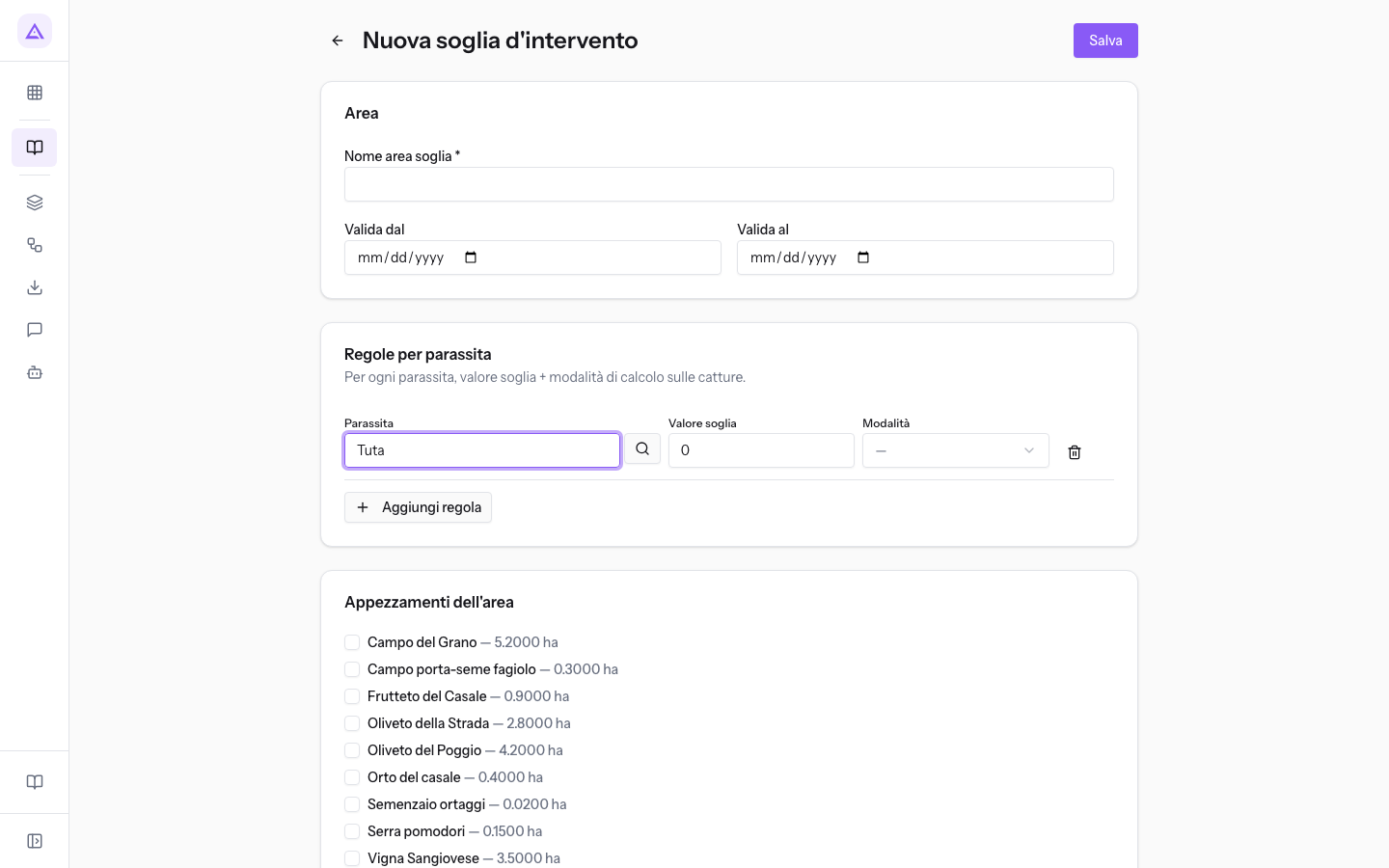
- Choose the pest from the results. Below the field, Selezionato: appears with the chosen name. If no pest matches, the list shows Nessun risultato.
- Enter the Valore soglia and choose the Modalità.
The fields of a rule:
- Parassita: the pest to which the rule refers, searched in the pest catalogue. Next to the name, results show the EPPO code, when available. The field is required.
- Valore soglia: the capture value beyond which intervention is required. Accepts numbers with two decimal places and starts at
0. - Modalità: how captures to be compared with the threshold value are calculated. The field is required.
- media catture/trappole: the average of captures across traps.
- somma delle catture/trappole: the sum of captures from the traps.
- su almeno una trappola: the value referring to at least one trap.
To remove a rule, click the trash icon at the end of its row.
Important: a rule without a selected pest or without a calculation method blocks saving with the Ogni regola deve avere un parassita selezionato e una modalità di calcolo message. Complete the row or delete it.
Edit or delete a threshold
The record of a saved threshold is titled Soglia: followed by the area name and has the same sections as the new record, plus the Elimina button.
- In the list, open the threshold, such as
Oliveti — mosca delle olive.
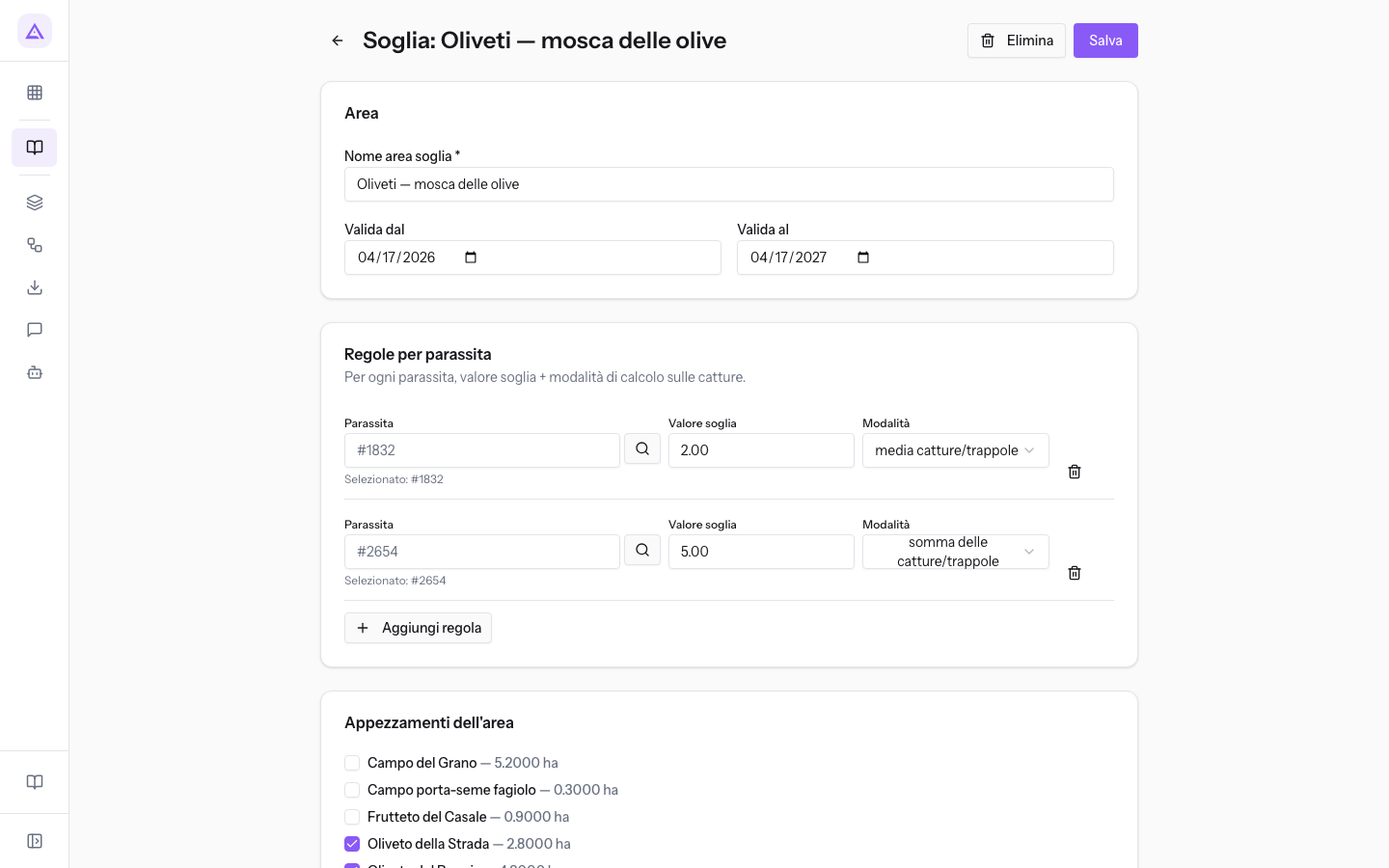
- Edit the fields, rules, or plots and click Salva.
- To delete the threshold, click Elimina and confirm the Eliminare questa soglia? prompt. The Soglia eliminata message appears.
In the demo, the Oliveti — mosca delle olive threshold is valid from 2026-04-17 to 2027-04-17, covers Oliveto della Strada and Oliveto del Poggio, and has two rules: one with Valore soglia 2.00 in media catture/trappole and one with 5.00 in somma delle catture/trappole.
Note: thresholds are evaluated at the date of the treatment. Shortening the validity period or removing a plot may cause unsigned treatments to lose their justification.
How the threshold justifies a treatment
Before signing, the compliance check verifies for each target pest of a treatment that a threshold exists to justify it.
A treatment is justified when a threshold meets all three conditions at once:
- it is valid at the date of the treatment, meaning the date falls between Valida dal and Valida al;
- it covers at least one of the treatment's plots;
- it has a rule for the target pest of the treatment.
If no threshold meets all three conditions, the operation's compliance section shows a warning. The warning does not block signing: the decision lies with the farm record manager. The check verifies that the rule exists; it does not compare the threshold value with captures. The confirmation and signing cycle is described in the article «Confermare e firmare le operazioni del registro».
In the demo, the treatment with protein bait on the olive groves is justified by the Oliveti — mosca delle olive threshold.
Tip: if a treatment shows the threshold warning, check that the area threshold has a rule for that pest, that its period includes the treatment date, and that the plot is selected in Appezzamenti dell'area.
See it on your company, not on a slide deck.
In 30 minutes we map the software you use today.We show you how much work and how much margin Archimedes gives back.
Show me on my business →What industry are you in?
One tap — it lets us prepare the demo around your world.
What tools do you use today?
Pick the ones you recognise — or just type them. It helps us show you how they migrate.
Last step: your details.
We reply within one working day — and right after, if you like, you pick the demo slot yourself.
We couldn't send your request. Try again, or write to us at [email protected].
By sending, you agree to your data being processed so we can get back to you about the demo. Privacy notice.
Preview form — nothing is sent from this page.
Want to schedule the demo now?
Your call: book the slot you prefer yourself, or we'll call you to arrange it.
Live availability, 30 minutes, instant confirmation. The calendar opens in a new tab.
Lock in your slot ↗We'll get back to you within one working day — and we'll join the call already knowing your world.
The calendar is open in another tab: pick a slot and the demo is booked. Can't see it? Reopen it ↗
Preview page: nothing was sent.
Our calendar is live: take the slot that suits you and the demo is booked. 30 minutes, instant confirmation, no waiting.
Lock in your slot ↗