Field record book (QdC)
All modules
Record equipment and calibration details
Field record book (QdC) · 6 of 15 · 5 min read
On the Attrezzature page you record the company's agricultural machines and implements and their calibration data (the functional inspection). From here you monitor calibration deadlines and prepare the data that the treatment register uses for compliance checks.
Note: these screens currently use Italian interface labels. The instructions preserve the names shown on screen; the screenshots show the same controls.
Why calibration matters
Legislative Decree 150/2012, art. 12, makes calibration of sprayers and herbicide booms mandatory. Without a current calibration, every treatment carried out with that machine is non-compliant.
When an operation uses a piece of equipment with a missing or expired calibration, the compliance check shows a warning. The warning does not block signing: it is up to the person responsible for the log. Controllo annuale lists calibrations that have expired as of today. It does not apply a reporting-year filter.
Note: the form shows a typical calibration period of 5 years. Always enter the expiry date shown on the certificate.
The equipment list
The Attrezzature page of the QdC shows equipment in name order.
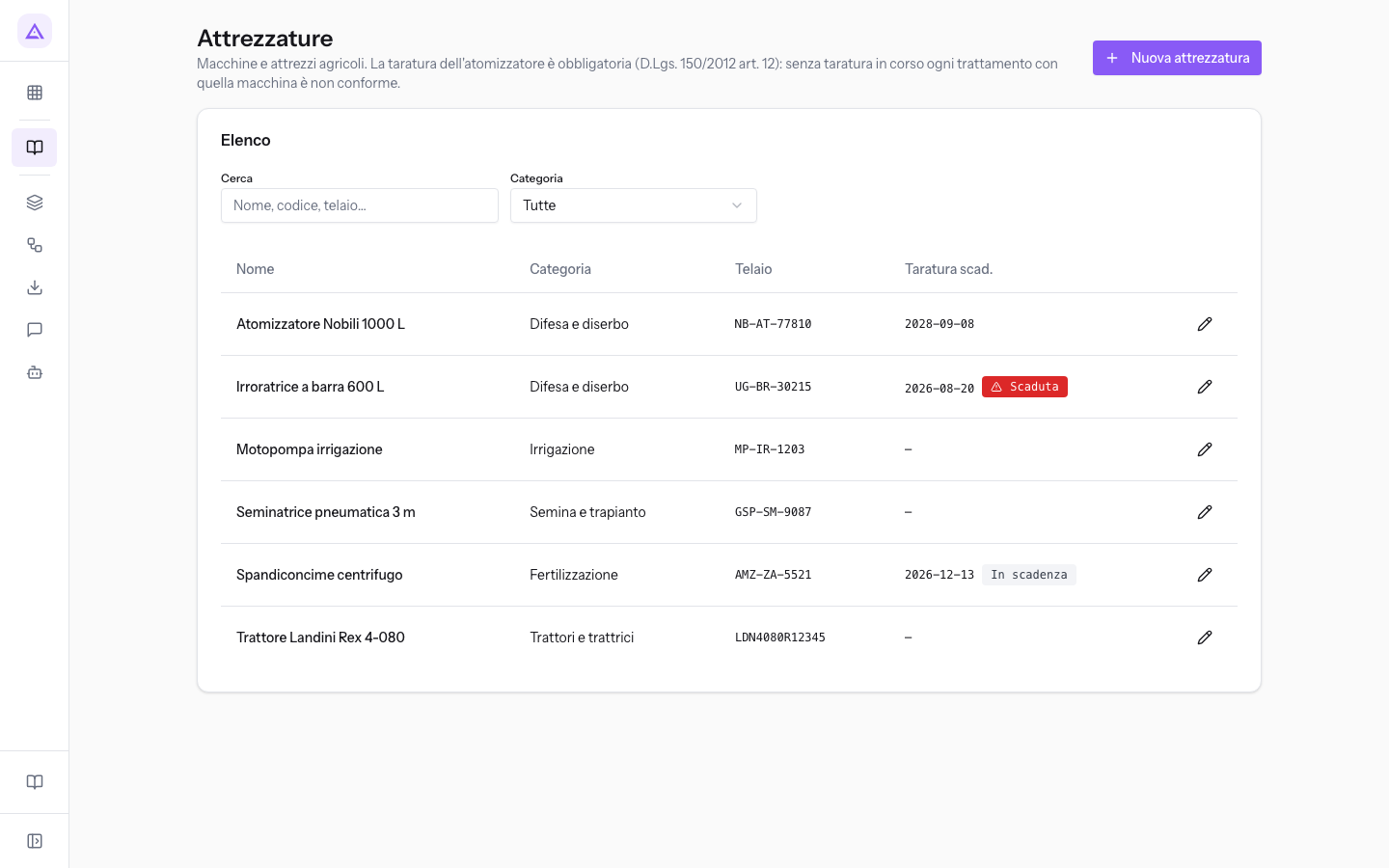
At the top you find two filters:
- Cerca: searches by name, code and chassis number.
- Categoria: shows only equipment in one category. With Tutte you see the entire list.
The list columns:
- Nome: the name of the equipment.
- Categoria: the category chosen in the form.
- Telaio: the chassis number or serial number.
- Taratura scad.: the calibration expiry date, with a badge when attention is needed.
- Scaduta: the expiry has already passed. The Irroratrice a barra 600 L, with expiry 2026-08-20, shows this badge.
- In scadenza: the calibration expires within 90 days.
- No badge: the calibration expires in more than 90 days or the date has not been entered.
To open an equipment form click on the row or the Apri attrezzatura button on the right.
Important: the list only shows equipment with a category. Each equipment record is also an accounting asset: a fixed asset without a category does not appear on this page and cannot be opened from here. Always choose the Categoria.
Recording equipment
Record each machine used in the field with its calibration details. Checks read these details for operations that already have equipment linked; the current operation form has no field for adding that link.
- In the list press Nuova attrezzatura.
- Fill in the Identificazione section and choose the Categoria.
- If the equipment has a calibration, fill in the Taratura / controllo funzionale section.
- If you have chosen the Difesa e diserbo category, fill in the Parametri atomizzatore section.
- Click Salva.
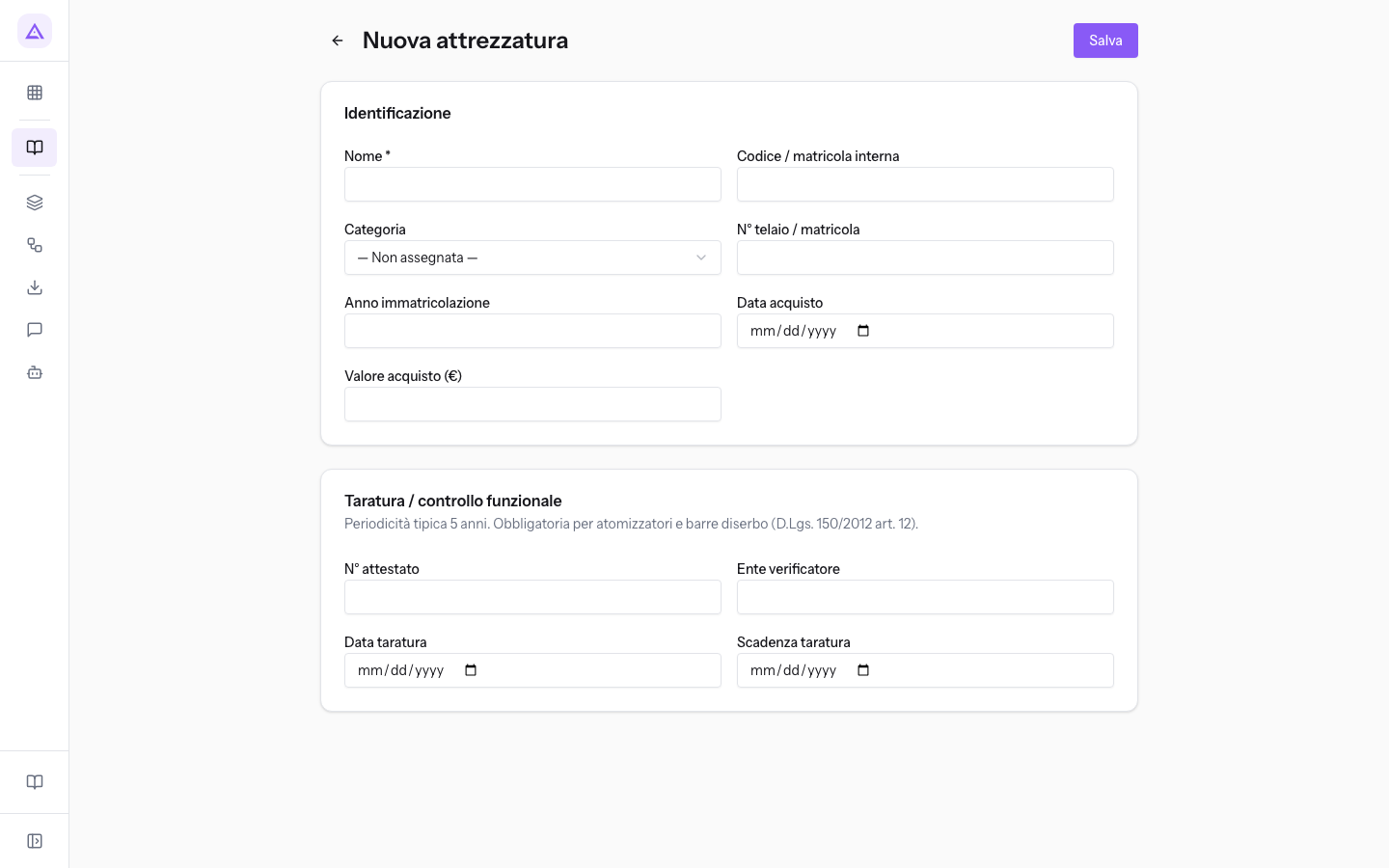
After saving you return to the list.
Identification
- Nome: the name of the equipment, such as Trattore Landini Rex 4-080. The field is required.
- Codice / matricola interna: the code the company uses for the equipment.
- Categoria: the type of machine. The initial value is — Non assegnata —. It must always be chosen, otherwise the equipment does not appear in the list. The options:
- Difesa e diserbo: sprayers, field sprayers and booms. It is the only category that shows the Parametri atomizzatore section.
- Fertilizzazione, Fienagione, Irrigazione, Lavorazione del terreno, Manutenzione piante, Mietitrebbie e trince semoventi, Motori, Motrici, Raccolta ortive e tabacco, Raccolta piante arboree, Ruote e pneumatici, Semina e trapianto, Strumenti di rilevamento, Trasporto e movimentazione, Trattori e trattrici, Zootecnia.
- N° telaio / matricola: the chassis number or manufacturer serial number. It can be searched from the list.
- Anno immatricolazione: the year, as a number.
- Data acquisto: the purchase date. If left blank, the current date is used when creating.
- Valore acquisto (€): the purchase cost. If left blank, 0 is recorded.
Calibration / functional inspection
Enter the calibration certificate data here. The section reminds you that calibration is mandatory for sprayers and herbicide booms.
- N° attestato: the certificate number, such as TOS-2019-03390.
- Ente verificatore: the centre that carried out the inspection.
- Data taratura: the date of the inspection.
- Scadenza taratura: the date on which the calibration expires. This date determines the Scaduta and In scadenza badges in the list and the checks on operations.
Sprayer parameters
The section appears only when the Categoria is Difesa e diserbo.
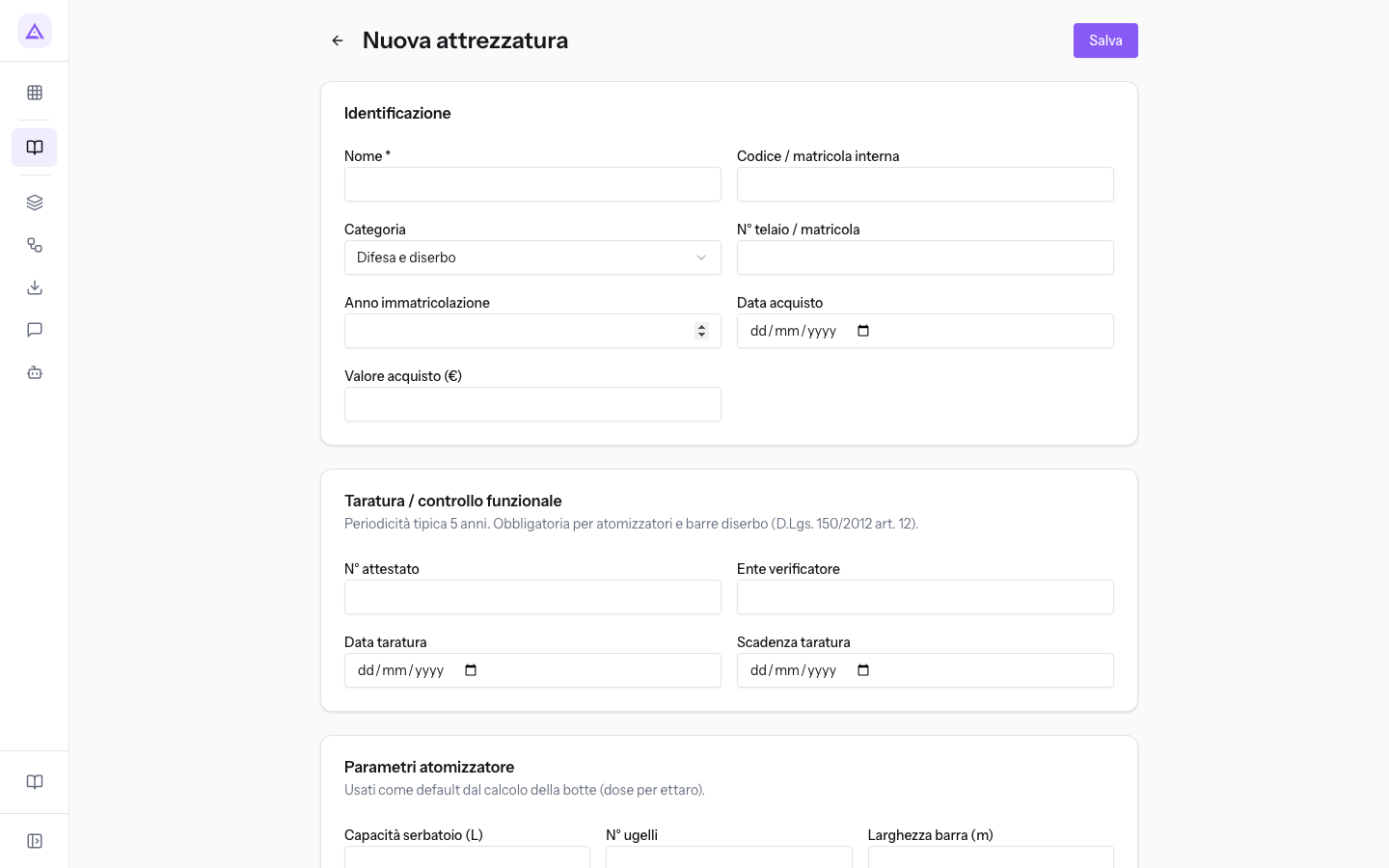
- Capacità serbatoio (L): the tank capacity in litres, such as 1000 for the Atomizzatore Nobili 1000 L.
- N° ugelli: the number of nozzles.
- Larghezza barra (m): the boom width in metres.
Updating equipment calibration
After a new functional inspection update the form, so that the list badge and the warnings on operations reflect the new expiry date.
- In the list search for the equipment in Cerca and open it with Apri attrezzatura.
- In the Taratura / controllo funzionale section replace N° attestato, Ente verificatore, Data taratura and Scadenza taratura with the details from the new certificate.
- Click Salva to save the calibration details.
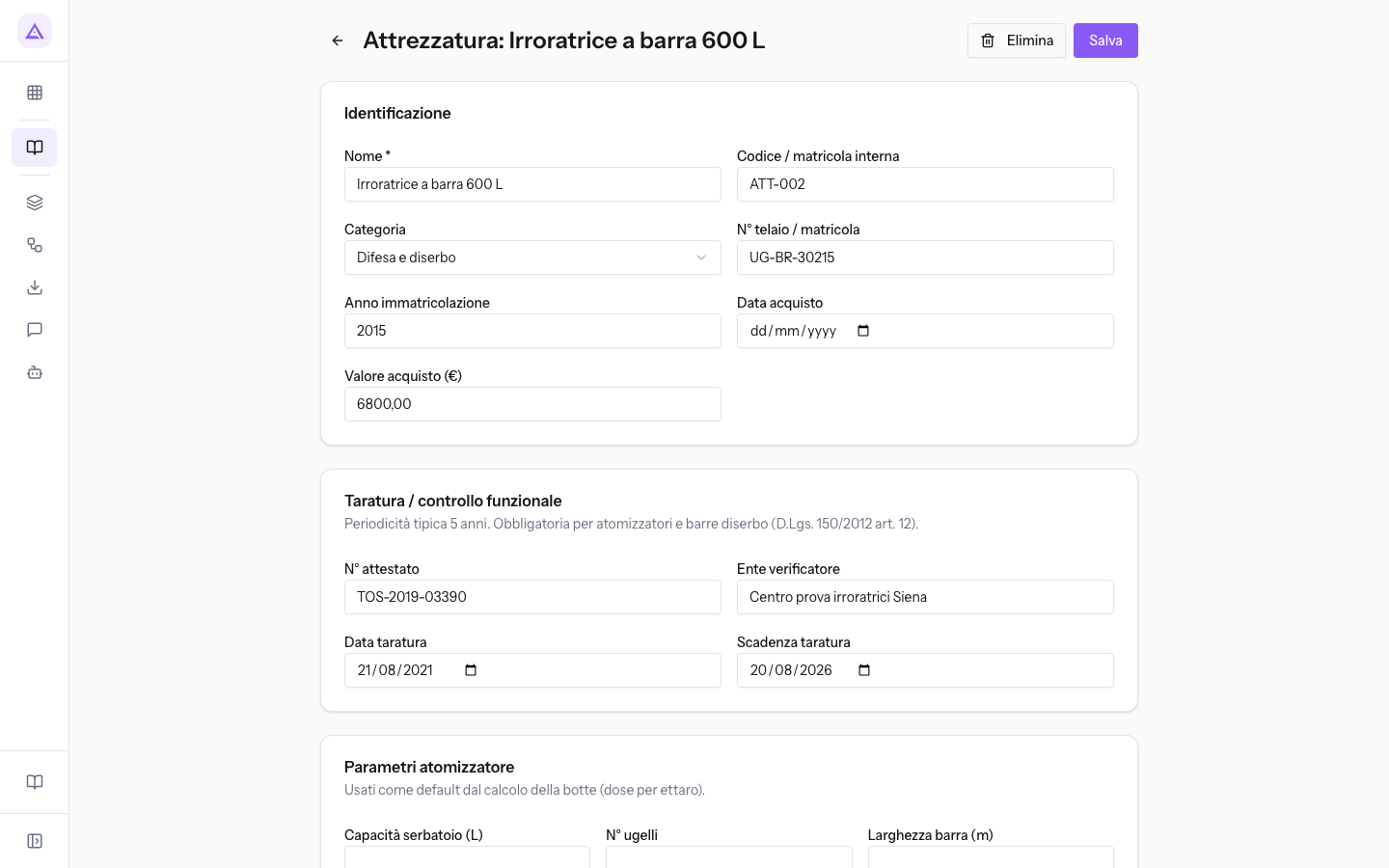
The form for an existing piece of equipment has the Elimina and Salva buttons. Elimina asks for confirmation before deleting the equipment.
Tip: also keep the calibration certificate among the QdC documents, with the type functional inspection certificate.
See it on your company, not on a slide deck.
In 30 minutes we map the software you use today.We show you how much work and how much margin Archimedes gives back.
Show me on my business →What industry are you in?
One tap — it lets us prepare the demo around your world.
What tools do you use today?
Pick the ones you recognise — or just type them. It helps us show you how they migrate.
Last step: your details.
We reply within one working day — and right after, if you like, you pick the demo slot yourself.
We couldn't send your request. Try again, or write to us at [email protected].
By sending, you agree to your data being processed so we can get back to you about the demo. Privacy notice.
Preview form — nothing is sent from this page.
Want to schedule the demo now?
Your call: book the slot you prefer yourself, or we'll call you to arrange it.
Live availability, 30 minutes, instant confirmation. The calendar opens in a new tab.
Lock in your slot ↗We'll get back to you within one working day — and we'll join the call already knowing your world.
The calendar is open in another tab: pick a slot and the demo is booked. Can't see it? Reopen it ↗
Preview page: nothing was sent.
Our calendar is live: take the slot that suits you and the demo is booked. 30 minutes, instant confirmation, no waiting.
Lock in your slot ↗