Field record book (QdC)
All modules
Manage plots
Field record book (QdC) · 4 of 15 · 6 min read
Plots are the farm's production units: the QdC operations are logged against them. From the Plots page you create and edit a plot with its varieties, crop cycles, and pest management practices. From the Crop Rotations page you consult the crop history of each plot.
Note: these screens currently use Italian interface labels. The instructions preserve the names shown on screen; the screenshots show the same controls.
The Plots List
Plots is the first item in the module. The subtitle describes it as: «Unità produttive della fattoria — il cuore del QdC».
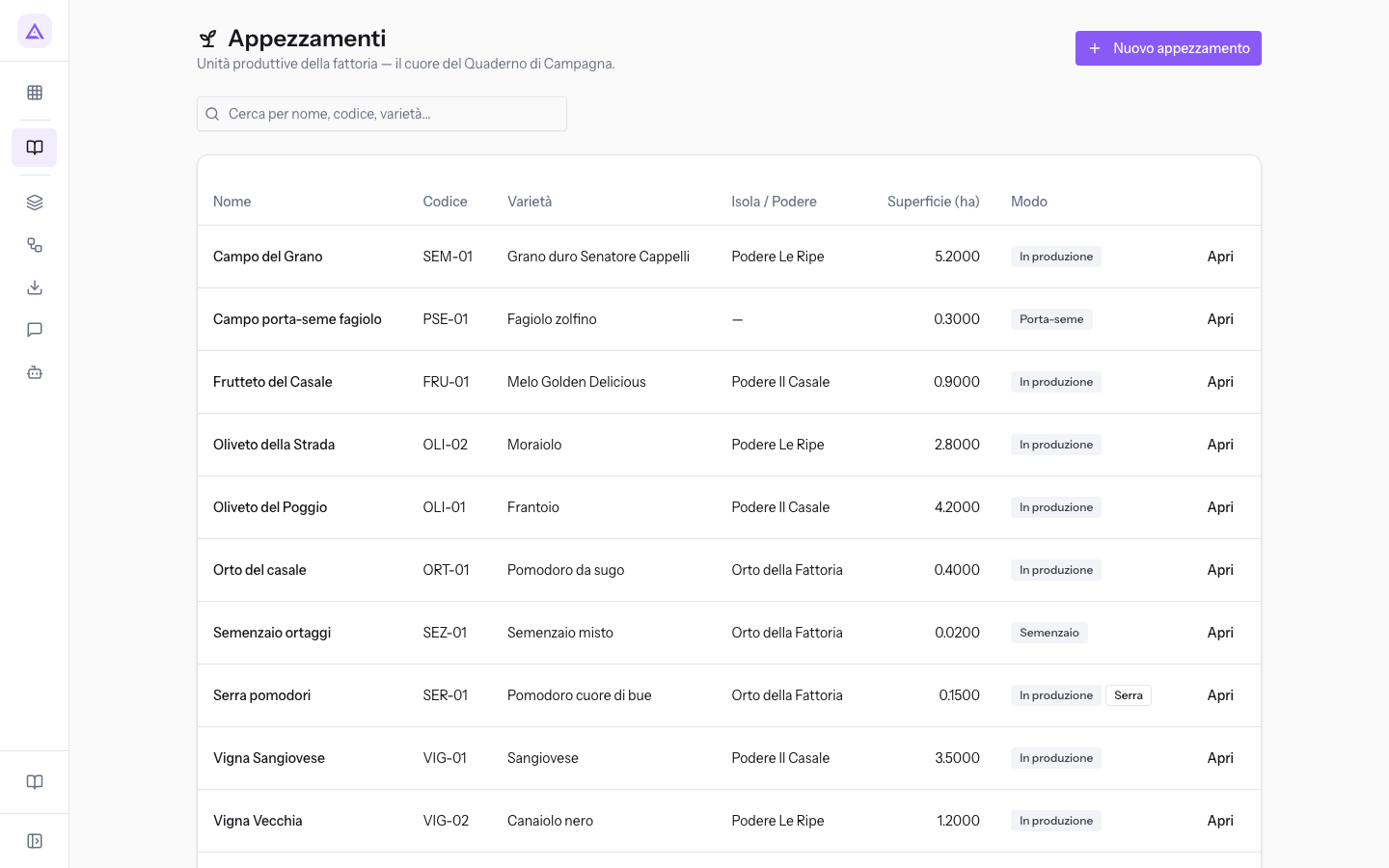
The list has these columns:
- Nome: the name of the plot, such as Campo del Grano.
- Codice: the internal code, such as
SEM-01. - Varietà: the main variety.
- Isola / Podere: the farm body to which the plot belongs.
- Superficie (ha): the area in hectares.
- Modo: the cultivation mode (In production, Nursery, Seedbed, Seed-bearing). Greenhouse plots also have the Greenhouse badge.
To find a plot, type part of the name, code, or variety in the Cerca per nome, codice, varietà… field. To open the record, click on a row or on Apri.
Creating a plot
Before you start: plots are created and edited by the Responsabile compilazione registro or the Manager QdC. The Utente QdC can only view them.
- On the Plots page click Nuovo appezzamento. The blank record opens.
- Fill in the sections described below. Only Nome appezzamento and Superficie (ha) are required.
- Click Salva to return to the plot list. Also save after changing varieties, crop cycles or pest-management practices.
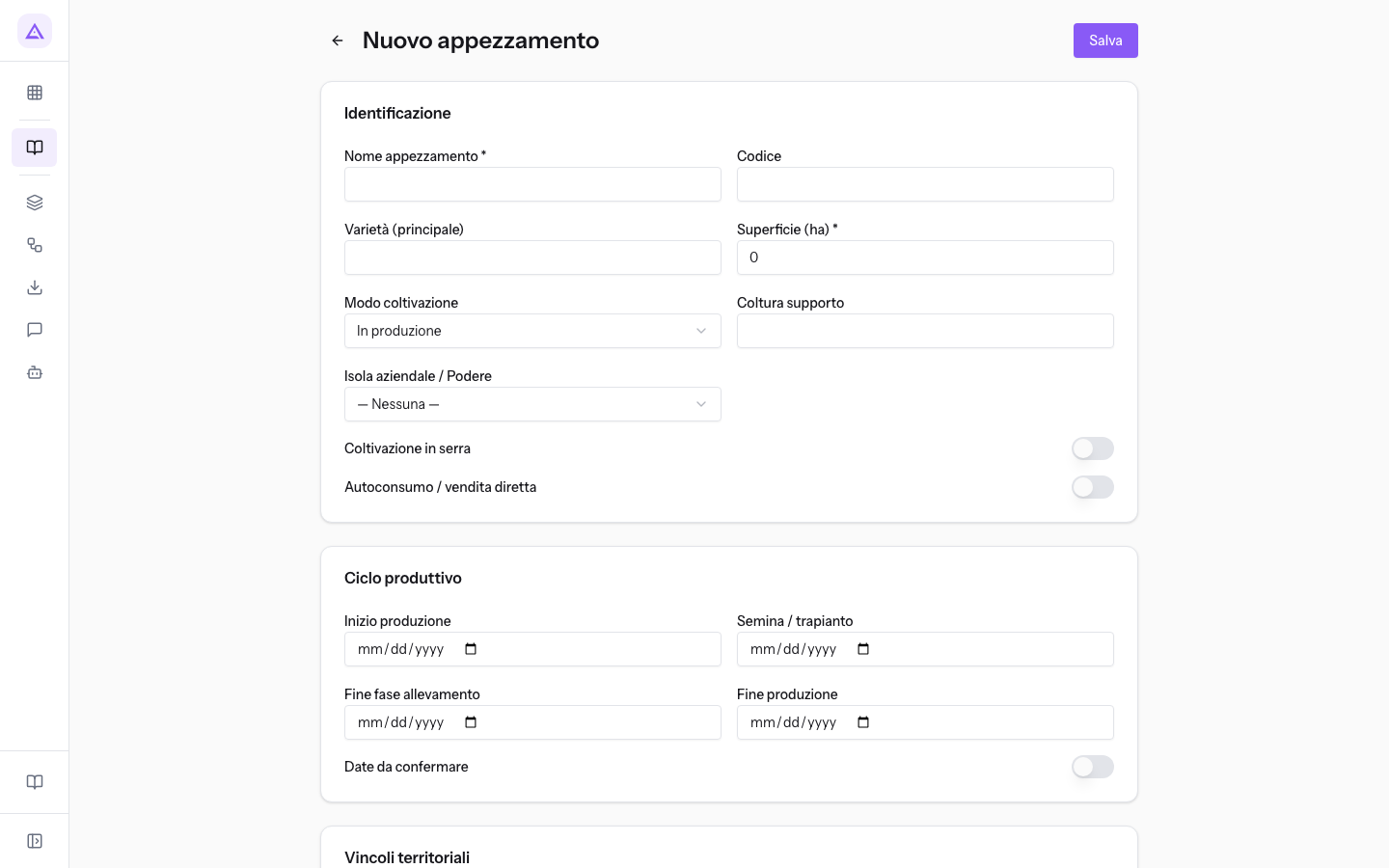
To edit a plot, open its record from the list. The record title shows the name, such as «Appezzamento: Oliveto del Poggio».
Identification
The Identificazione section contains the data that identifies the plot.
- Nome appezzamento: the name of the plot. The field is required.
- Codice: a short internal code, such as
OLI-01for the Oliveto del Poggio. - Varietà (principale): the prevailing variety. This is the one that appears in the Varietà column of the list.
- Superficie (ha): the area in hectares. The field is required and starts at 0.
- Modo coltivazione: the type of production. The initial value is In production.
- In production: the crop that produces the harvest, such as the Oliveto del Poggio.
- Nursery: the plot where seedlings are raised, such as the Vivaio piantine.
- Seedbed: the plot where seedlings to be transplanted are sown, such as the Semenzaio ortaggi.
- Seed-bearing: the crop that produces seed, such as the Campo porta-seme fagiolo.
- Coltura supporto: the crop support, in free text. Vivaio piantine has
sistemi fuori terra: alveoli, Serra pomodori hasserra fredda. - Isola aziendale / Podere: the farm body of the plot. The initial value is — Nessuna —, which remains for a plot outside any farm body such as the Campo porta-seme fagiolo. Farm bodies are recorded in Register estates and cadastral parcels.
- Coltivazione in serra: enable this for a greenhouse crop, such as Serra pomodori.
- Autoconsumo / vendita diretta: enable this when the product is for own consumption or direct sale. In the demo it is enabled for Serra pomodori and Vivaio piantine.
Production cycle
The Ciclo produttivo section indicates the dates of the crop's life on the plot.
- Inizio produzione: the date on which the plot enters production.
- Semina / trapianto: the sowing or transplanting date. For the Oliveto del Poggio it is
2016-11-05. - Fine fase allevamento: the date on which the nursery phase ends, used for example in Vivaio piantine.
- Fine produzione: the date on which production ends.
- Date da confermare: enable this when the dates are planned but not yet certain. In the demo it is enabled on Serra pomodori.
Territorial constraints and CAP commitments
The Vincoli territoriali section indicates the protected zones in which the plot falls. Each constraint is a toggle, off for a new plot.
- Zona Fitosanitari: the plot falls within a zone with phytosanitary product restrictions.
- Zona Ecologica: the plot falls within an ecological zone. In the demo it is enabled on Oliveto del Poggio.
- Convenzione Ramsar: the plot falls within a Ramsar Convention wetland.
- Direttiva Habitat: the plot falls within a Habitat Directive site.
The Impegni PAC (PSN 2023-2027) section records the commitments made on the plot:
- Impegno SRA19 A1: enable this if the plot has the SRA19 action A1 commitment.
- Impegno SRA19 A2: enable this if the plot has the SRA19 action A2 commitment. In the demo the Vigna Vecchia has both commitments.
Varieties
The Varietà section divides the plot's area among the cultivated varieties. Use it when the plot has more than one variety.
- Click Aggiungi varietà to add a row.
- Fill in the row:
- Varietà: the variety name.
- Superficie (ha): the hectares occupied by that variety.
The Oliveto del Poggio, at 4.2 ha, has two rows: Frantoio on 2.6 ha and Leccino on 1.6 ha.
Crop cycles
The Cicli colturali section records, year by year, the flowering and harvest. These cycles make up the Crop Rotations page.
- Click Aggiungi ciclo to add a year.
- Fill in the row:
- Anno: the year of the cycle.
- Fioritura da: the start date of flowering.
- Fioritura a: the end date of flowering.
- Raccolta: the harvest date.
For the 2026 season the Oliveto del Poggio has flowering from 2026-05-18 to 2026-06-02 and the harvest on 2026-11-02.
Pest management practices
The Pratiche di difesa section indicates the pest management method of the plot and from when it applies. Each practice has a validity period: when the plot changes method, close the previous practice and add a new one.
- Click Aggiungi pratica to add a row.
- Fill in the row:
- Pratica: the pest management method. The initial value is —.
- Conventional.
- Integrated Production (SQNPI / regional specifications).
- Organic (EU Reg. 2018/848).
- Structured pest management.
- Valido da: the date from which the practice applies.
- Valido a: the end date. Leave it blank for the current practice.
- Pratica: the pest management method. The initial value is —.
The Vigna Vecchia has two rows: Conventional from 2016-11-05 to 2025-11-02 and Organic (EU Reg. 2018/848) from 2025-11-03, with no end date.
Notes and deletion
In the Note section write any information that has no dedicated field.
To delete a plot, open its record and click Elimina. The button appears only on the record of an already saved plot, not on that of a new plot.
Important: deleting records is reserved for the Manager QdC.
Crop Rotations
The Crop Rotations page is found in the Plans group in the menu. The subtitle describes it as: «Storia delle colture per appezzamento (vista derivata dai cicli colturali). Gli audit BIO/SQNPI la usano per verificare la rotazione.»
The page cannot be edited: it shows for each plot the years recorded in the Cicli colturali section of its record. To correct a year, edit the cycle in the plot's record.
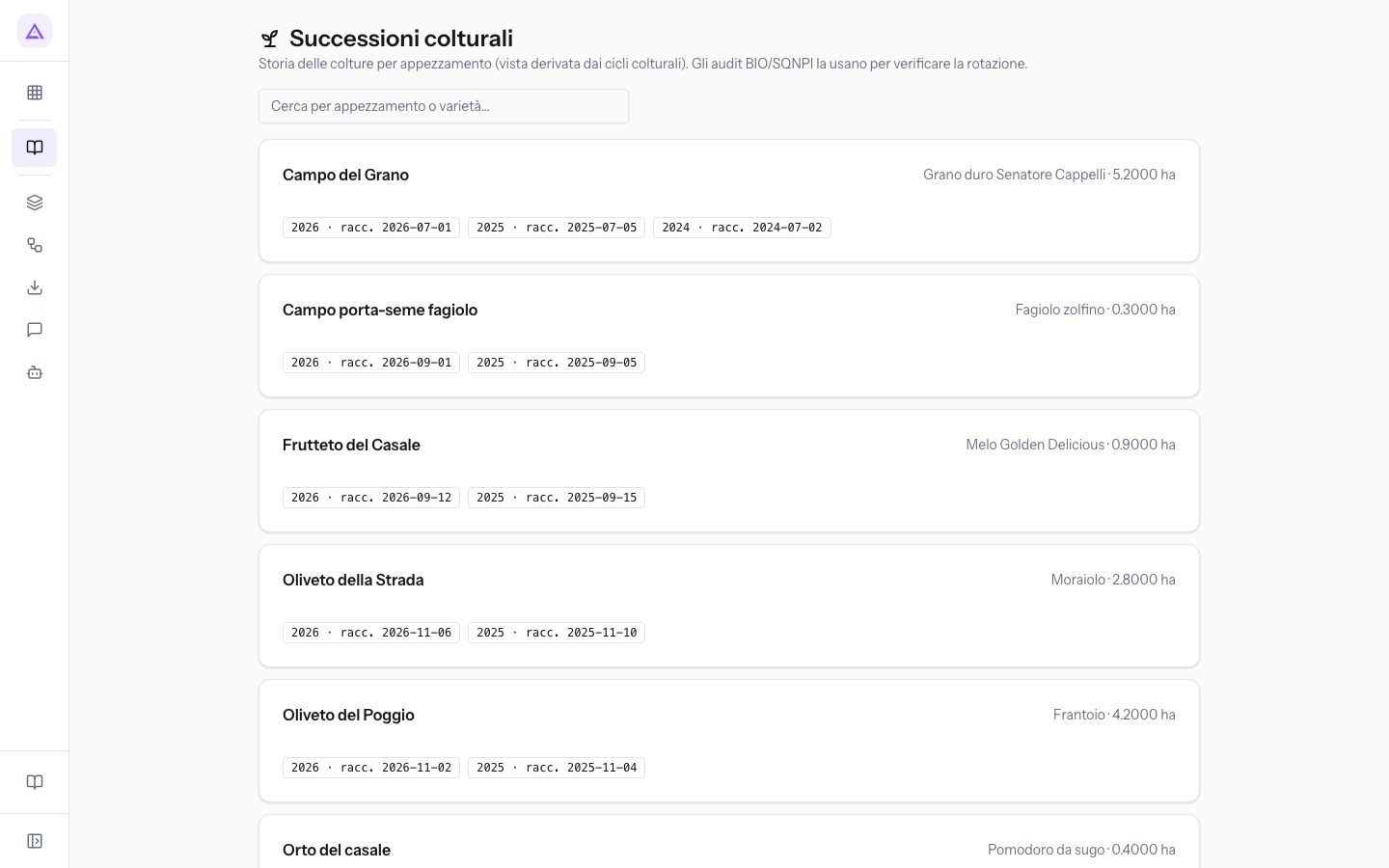
To find a plot, type the name or variety in the Cerca per appezzamento o varietà… field. By typing Campo del Grano you see the history of the Senatore Cappelli durum wheat on that plot.
See it on your company, not on a slide deck.
In 30 minutes we map the software you use today.We show you how much work and how much margin Archimedes gives back.
Show me on my business →What industry are you in?
One tap — it lets us prepare the demo around your world.
What tools do you use today?
Pick the ones you recognise — or just type them. It helps us show you how they migrate.
Last step: your details.
We reply within one working day — and right after, if you like, you pick the demo slot yourself.
We couldn't send your request. Try again, or write to us at [email protected].
By sending, you agree to your data being processed so we can get back to you about the demo. Privacy notice.
Preview form — nothing is sent from this page.
Want to schedule the demo now?
Your call: book the slot you prefer yourself, or we'll call you to arrange it.
Live availability, 30 minutes, instant confirmation. The calendar opens in a new tab.
Lock in your slot ↗We'll get back to you within one working day — and we'll join the call already knowing your world.
The calendar is open in another tab: pick a slot and the demo is booked. Can't see it? Reopen it ↗
Preview page: nothing was sent.
Our calendar is live: take the slot that suits you and the demo is booked. 30 minutes, instant confirmation, no waiting.
Lock in your slot ↗