Field record book (QdC)
All modules
Configure the farm in QdC
Field record book (QdC) · 2 of 15 · 6 min read
Before recording operations, specify who the farm holder is and who fills in the treatment register, then choose how the module should behave. You do this from two pages: Farm details and Settings.
Note: these screens currently use Italian interface labels. The instructions preserve the names shown on screen; the screenshots show the same controls.
Farm details
The Anagrafica azienda page records the farm’s legal identity and the details of its holder, an individual. It has three tabs: Titolare, Azienda and Responsabili. Titolare and Responsabili each have their own save button. Azienda currently displays only a notice.
- The holder is the farm's legal representative. Their name appears in the header of the treatment register required by Legislative Decree 150/2012.
- The person responsible for the register is the employee who signs the phytosanitary register. They can be a different person from the holder: in the demo the holder is Mario Rossi and the person responsible is Paolo Marchetti.
The Azienda tab currently shows only a notice: business name, VAT number and registered office cannot be edited from this page.
Enter the holder's details
The Titolare tab contains the Dati del titolare box. It opens first when you enter the page.
- Open the Anagrafica azienda menu item and stay on the Titolare tab.
- Fill in the fields in the Dati del titolare box.
- Click Salva titolare. If Cognome e nome is empty, the holder is not saved and an error message appears.
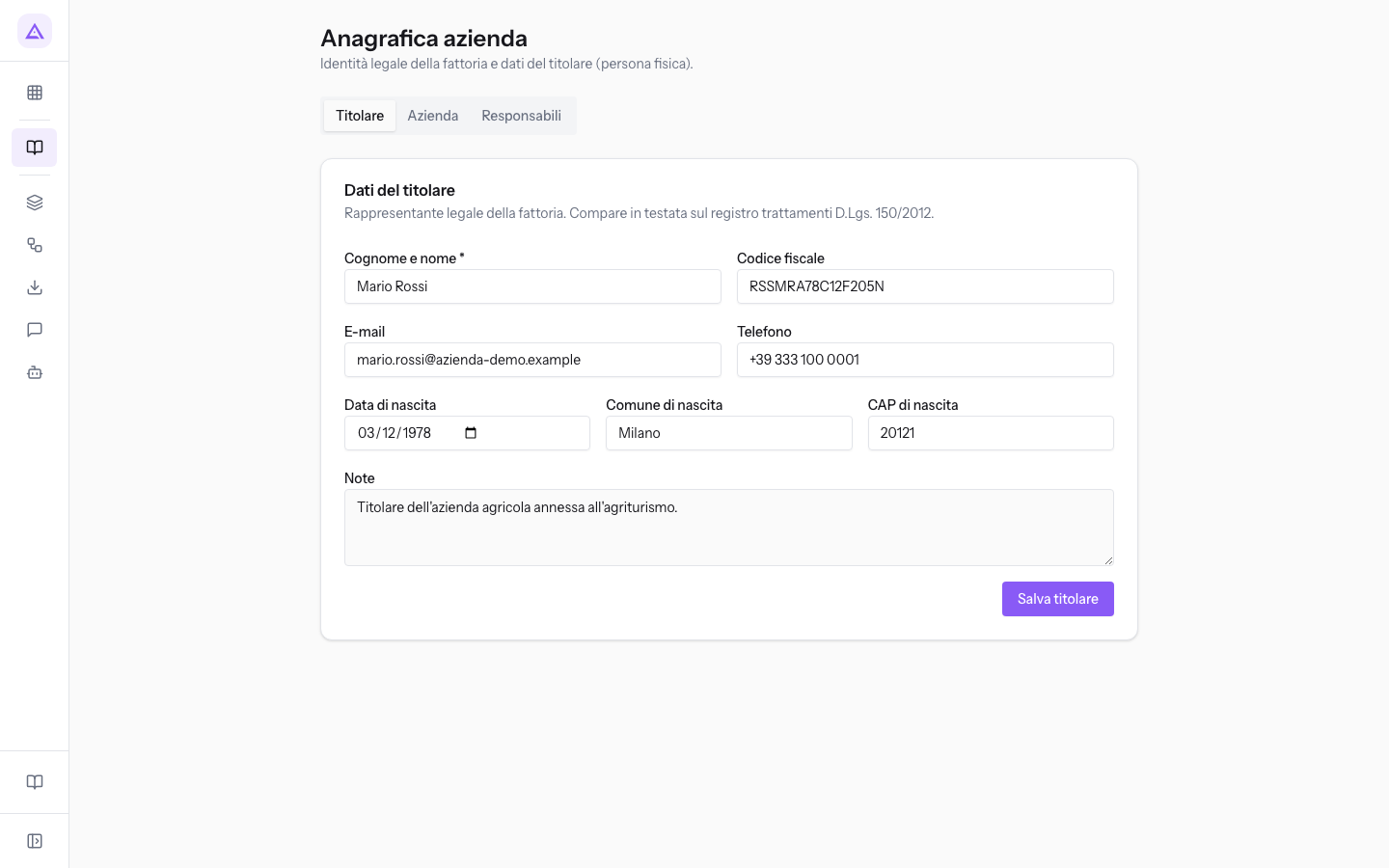
The box's fields:
- Cognome e nome: the holder's name, such as Mario Rossi. The field is required.
- Codice fiscale: the holder's tax code, such as RSSMRA78C12F205N. Accepts a maximum of 16 characters and converts letters to uppercase.
- E-mail: the holder's email address.
- Telefono: the holder's phone number.
- Data di nascita: the holder's date of birth.
- Comune di nascita: the place of birth, such as Milano.
- CAP di nascita: the postcode of the place of birth, a maximum of 10 characters.
- Note: free text.
Specify the person responsible for the register
The Responsabili tab contains the Responsabile compilazione registro box. Here you choose the operator who signs the phytosanitary register required by Legislative Decree 150/2012.
- Open the Responsabili tab.
- In the Responsabile registro field choose the employee, such as Paolo Marchetti.
- Click Salva responsabile.
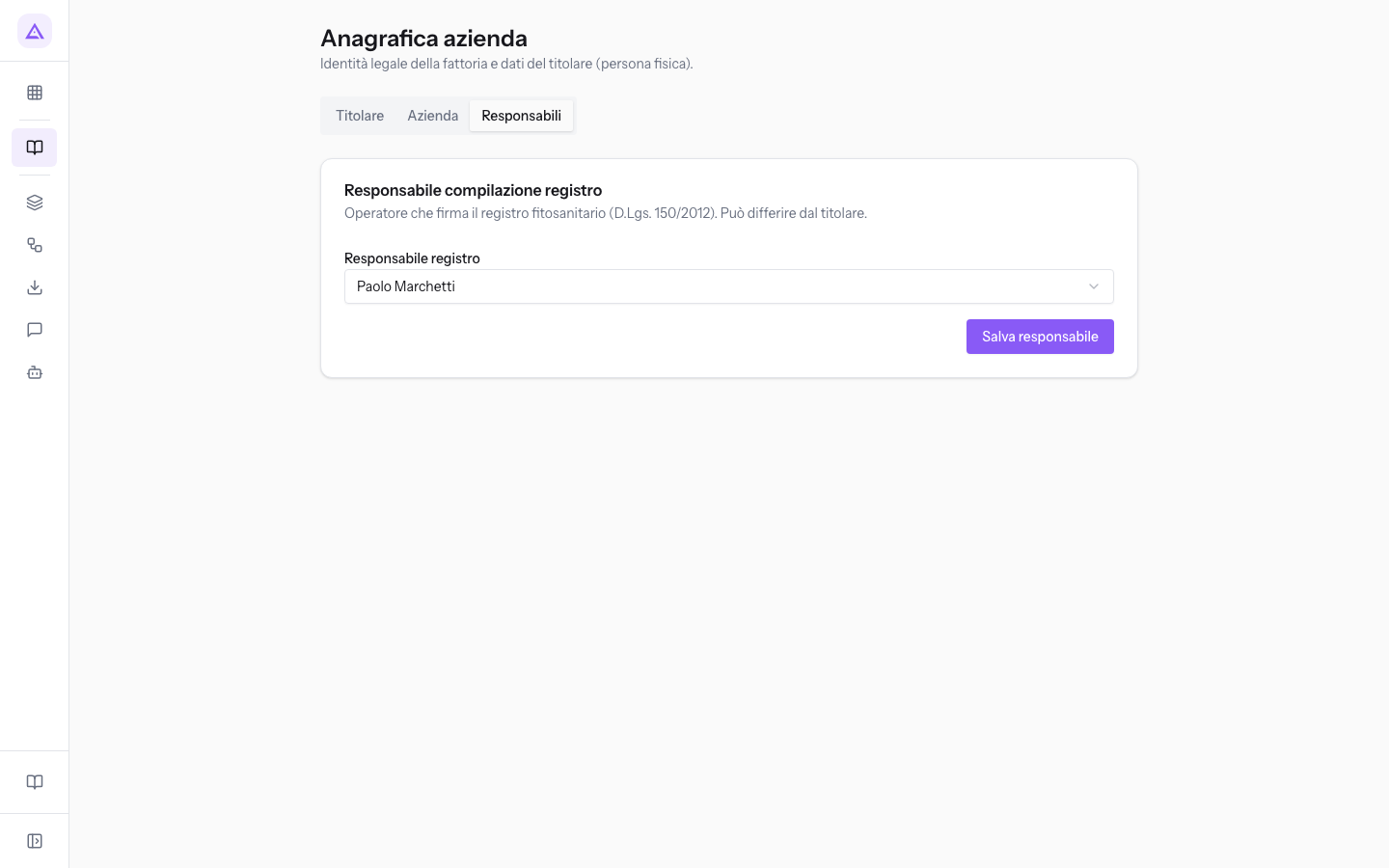
- Responsabile registro: the employee responsible for filling in the treatment register. The options are — Non assegnato — and the organisation's employees. The field is not required.
Note: who can confirm and sign operations depends on module permissions. The Responsabile compilazione registro or Manager QdC permission is required to sign. For signing see Confirm and sign register operations.
QdC Settings
The Impostazioni page has the title Impostazioni QdC and contains the module configuration for this farm. Each organisation has a single settings page.
Before you start: the Impostazioni item appears only to users with the Manager QdC permission.
- Open Impostazioni from the QdC menu.
- Edit the settings in the boxes.
- Click Salva. Before any changes are made, Salva and Annulla are not active. Annulla resets all fields to the saved values.
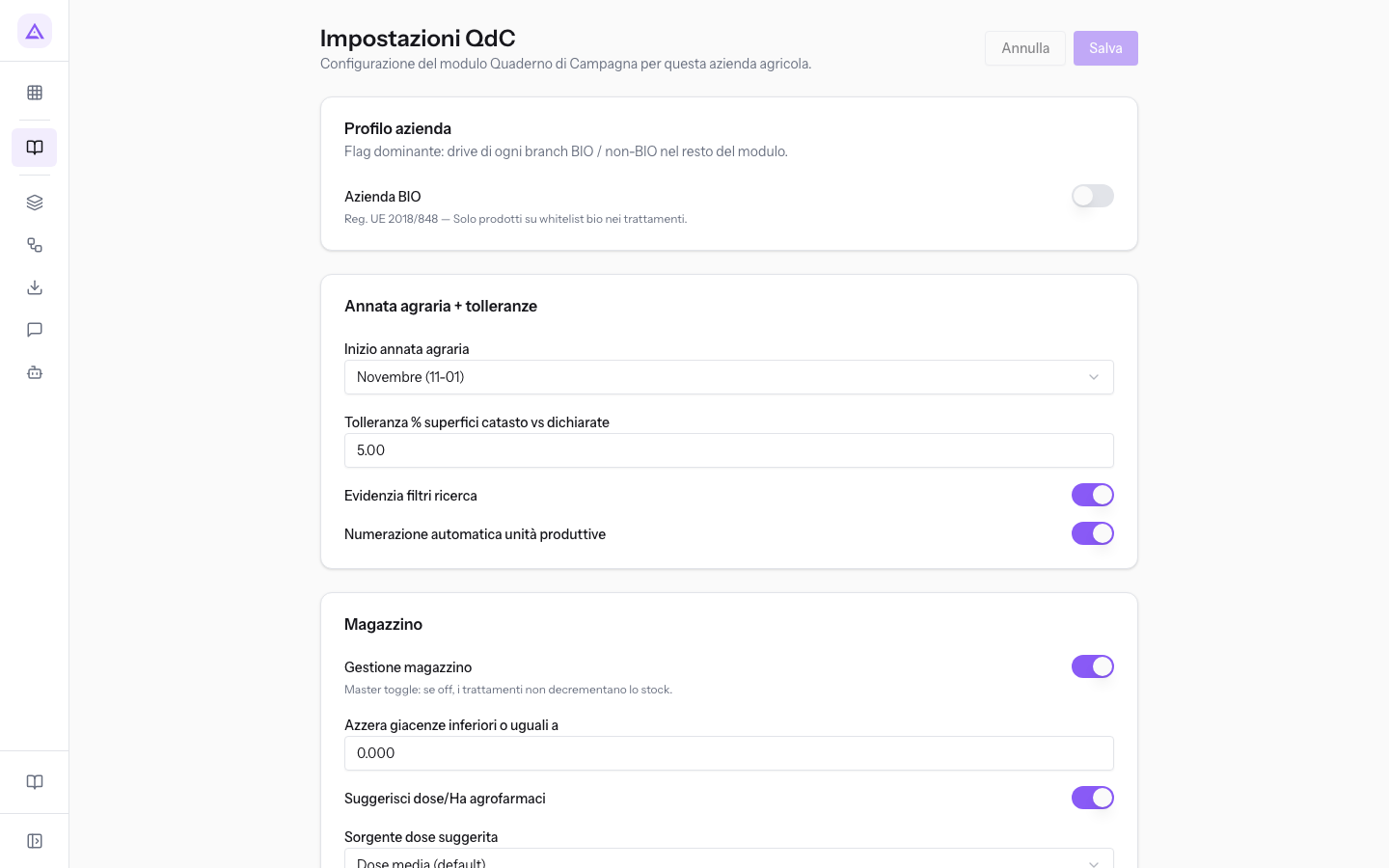
The sections below describe the boxes in the order they appear on the page.
Farm profile
The Profilo azienda section stores the Azienda BIO choice. Its help text refers to organic farming, but in this version the setting does not automatically restrict products in operations.
- Azienda BIO: records the farm’s organic profile in the configuration. Saving this setting does not certify the farm or verify that a treatment’s products are permitted for organic use.
Agricultural year and tolerances
The Annata agraria + tolleranze box sets the start day of the agricultural year and some registry rules.
- Inizio annata agraria: the day from which the agricultural year starts.
- Anno solare (01-01): the year coincides with the calendar year. Choose it if the crops follow the calendar year.
- Luglio (07-01): the year starts on 1 July.
- Agosto (08-01): the year starts on 1 August.
- Novembre (11-01): the year starts on 1 November. Choose it if the cycle begins with autumn sowings, such as those of Campo del Grano. In the demo this is the chosen value.
- Tolleranza % superfici catasto vs dichiarate: a percentage between 0 and 100 indicating how much the cadastral areas can differ from the declared ones. Accepts decimals.
- Evidenzia filtri ricerca: toggle.
- Numerazione automatica unità produttive: toggle. The name refers to the automatic numbering of plot codes. For plots see Manage plots.
Stock settings
The Magazzino section stores stock and dose preferences. In this version, these settings do not activate stock movements, automatic balance adjustments or dose suggestions in the operation form.
- Gestione magazzino: stores the stock-management preference. Saving a treatment does not automatically deduct stock through this setting.
- Azzera giacenze inferiori o uguali a: stores a non-negative threshold with up to three decimal places. Entering it does not zero stock balances.
- Suggerisci dose/Ha agrofarmaci: stores the preference for dose suggestions; the current operation form does not display a suggestion generated by it.
- Sorgente dose suggerita: stores the choice of minimum, maximum or Dose media (default) dose. This choice does not replace checking the actual treatment dose.
Nitrates, CAP and BBCH stages
This section stores preferences concerning nitrates, CAP and BBCH. Enabling a setting does not establish that a check was performed; the current signing checks are described in Confirming and signing operations.
- Gestione Direttiva nitrati: the page cites Ministerial Decree 25/02/2016 and the limit of 170 kg of nitrogen per hectare per year in nitrate-vulnerable zones. Enable it if you have plots in a vulnerable zone, such as Campo del Grano.
- Gestione controlli PAC (SRA / Ecoschemi): toggle for CAP checks.
- Gestione Ecoschema 5A: toggle for Ecoschema 5A.
- Gestione SRA (PSN PAC 2023-2027): toggle for SRA interventions of the CAP Strategic Plan 2023-2027.
- Calcola NPK sul secco (reflui liquidi): toggle concerning the calculation of nitrogen, phosphorus and potassium in liquid effluents.
- Gestione fasi fenologiche BBCH: the page indicates that it is required by certain SQNPI production rules. Enable it if your production rules require it.
Field operation behaviour
The Comportamento operazioni di campo box concerns the operations form. To record an operation see Recording a field operation.
- Indica manualmente la superficie negli interventi: toggle.
- Mostra schede prescrizione/preparazione: toggle.
DDT
The DDT (Documenti di Trasporto) box concerns transport documents.
- Numerazione automatica DDT: toggle.
- Visualizza nota nei DDT: toggle.
- Testo nota DDT: the note text, on multiple lines.
Regulatory printouts
The Stampe regolatorie box collects the toggles concerning register printouts.
- Stampa volumi acqua: toggle.
- Stampa somma superfici: toggle.
- Stampa dettaglio superfici parziali (Buffer Zone): toggle.
- Stampa totali NPK/Ha: toggle.
- Intestazione SRA01 in stampa SQNPI: toggle.
See it on your company, not on a slide deck.
In 30 minutes we map the software you use today.We show you how much work and how much margin Archimedes gives back.
Show me on my business →What industry are you in?
One tap — it lets us prepare the demo around your world.
What tools do you use today?
Pick the ones you recognise — or just type them. It helps us show you how they migrate.
Last step: your details.
We reply within one working day — and right after, if you like, you pick the demo slot yourself.
We couldn't send your request. Try again, or write to us at [email protected].
By sending, you agree to your data being processed so we can get back to you about the demo. Privacy notice.
Preview form — nothing is sent from this page.
Want to schedule the demo now?
Your call: book the slot you prefer yourself, or we'll call you to arrange it.
Live availability, 30 minutes, instant confirmation. The calendar opens in a new tab.
Lock in your slot ↗We'll get back to you within one working day — and we'll join the call already knowing your world.
The calendar is open in another tab: pick a slot and the demo is booked. Can't see it? Reopen it ↗
Preview page: nothing was sent.
Our calendar is live: take the slot that suits you and the demo is booked. 30 minutes, instant confirmation, no waiting.
Lock in your slot ↗