Field record book (QdC)
All modules
Record operators, suppliers and contractors
Field record book (QdC) · 5 of 15 · 7 min read
The QdC keeps three separate registries for those who work on the plots and for those who supply inputs. Here you register the people who work in the field, the companies from which you buy inputs, and the businesses that carry out work on behalf of the farm.
Note: these screens currently use Italian interface labels. The instructions preserve the names shown on screen; the screenshots show the same controls.
Which registry to use
Each registry has a different purpose. Choose based on who carries out the work or supplies the material.
- If it is a natural person who works in the field and signs the treatment register, register them in Operatori.
- If it is a company from which you buy pesticides, fertilisers, or seeds, register it in Fornitori.
- If it is an external business that carries out treatments, harvesting, or soil work on behalf of the farm, register it in Contoterzisti.
- If a business carries out work and also sells inputs, register it in Contoterzisti and enable È anche fornitore: Agromeccanica Berardenga S.n.c. is registered this way.
Before you begin: the Utente QdC can read the registries but cannot modify them. Creating or modifying operators, suppliers, and contractors requires a higher permission level, such as that of the Manager QdC.
Operators
The Operatori list contains the natural persons who carry out work in the field. They are the ones who appear as signatories on the treatment register.
In the QdC — Quaderno di Campagna menu, open Operatori. The list shows all active employees of the farm, including those who do not work in the field. At the top there is the Cerca per nome, email, ruolo… search.
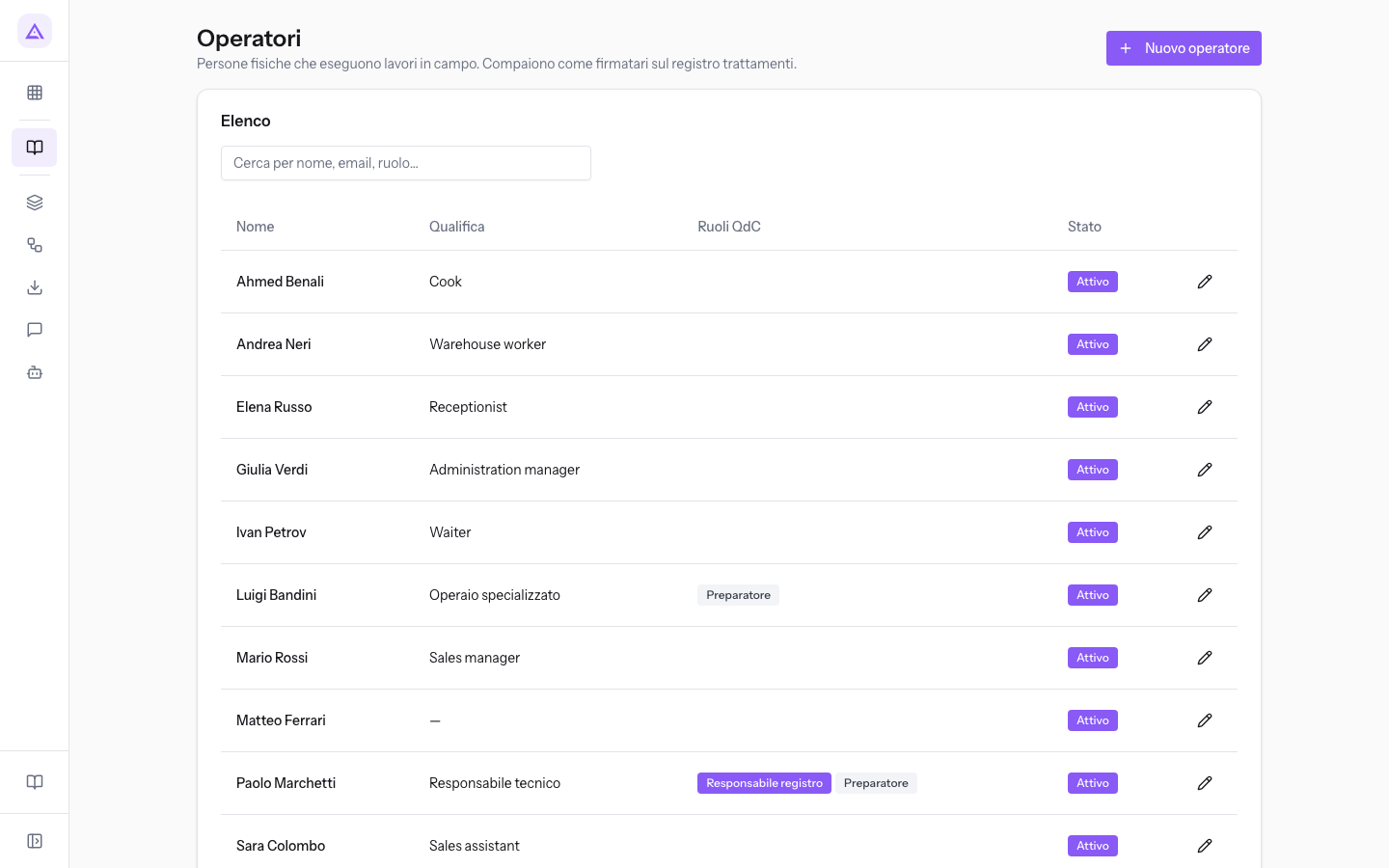
The list columns are:
- Nome: the operator's surname and first name.
- Qualifica: the contract qualification, such as Responsabile tecnico for Paolo Marchetti.
- Ruoli QdC: the roles required by the register, i.e. register manager and preparer.
- Stato: indicates whether the operator is active.
Register an operator
The operator record contains the person's details and the roles assigned to them by law in the register.
- Click Nuovo operatore for a new operator, or click a row in the list to open an existing operator.
- Fill in the Identificazione panel.
- In the Ruoli regolatori (D.Lgs. 150/2012) panel, enable the roles the person holds.
- Click Salva to return to the operator list.
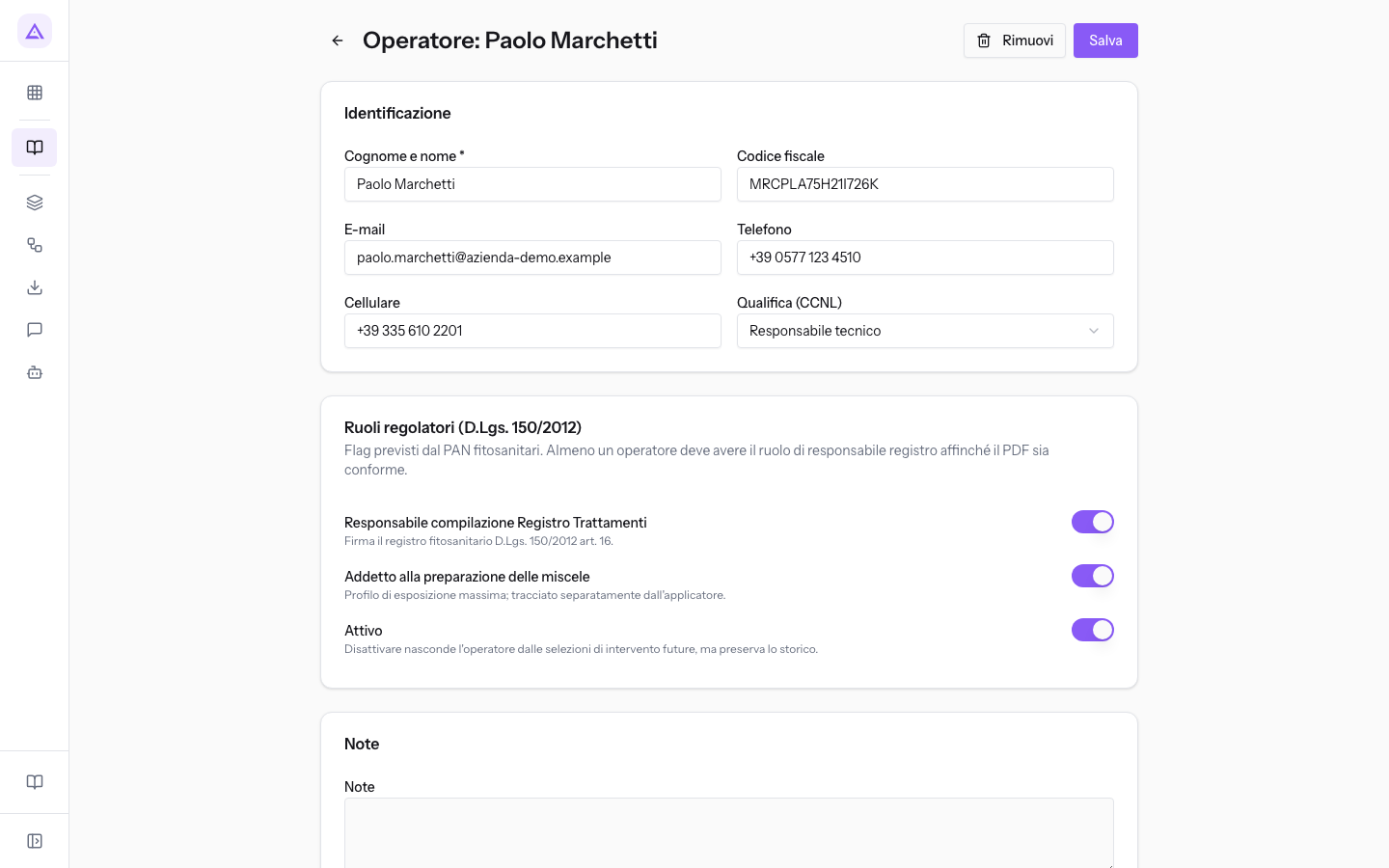
Fields in the Identificazione panel:
- Cognome e nome: the person's name. The field is required.
- Codice fiscale: the operator's tax code, such as MRCPLA75H21I726K for Paolo Marchetti.
- E-mail: the email address.
- Telefono: the landline number.
- Cellulare: the mobile number.
- Qualifica (CCNL): the contract qualification. The initial value is — Nessuna qualifica —. The available choices are the farm's qualifications, including Responsabile tecnico, Operaio specializzato, and Operaio qualificato.
Fields in the Ruoli regolatori (D.Lgs. 150/2012) panel:
- Responsabile compilazione Registro Trattamenti: enable it for the person who is legally responsible for the treatment register. In the demo it is enabled for Paolo Marchetti.
- Addetto alla preparazione delle miscele: enable it for those who prepare the product mixtures to be applied. In the demo it is enabled for Paolo Marchetti and Luigi Bandini.
- Attivo: indicates whether the operator is in service. On a new operator it is already enabled.
The Note field accepts free-form notes.
Note: the register manager who appears in printouts is also indicated on the Anagrafica azienda page, under the Responsabili tab.
Vendors
The Fornitori list contains the companies from which the farm purchases inputs: pesticides, fertilisers, seeds, and other agricultural inputs. The supplier's qualification matters for SQNPI compliance.
In the QdC — Quaderno di Campagna menu, open Fornitori. Search for a supplier with Cerca per ragione sociale, P.IVA… or narrow the list with the Qualifica filter, which starts at Tutte le qualifiche.
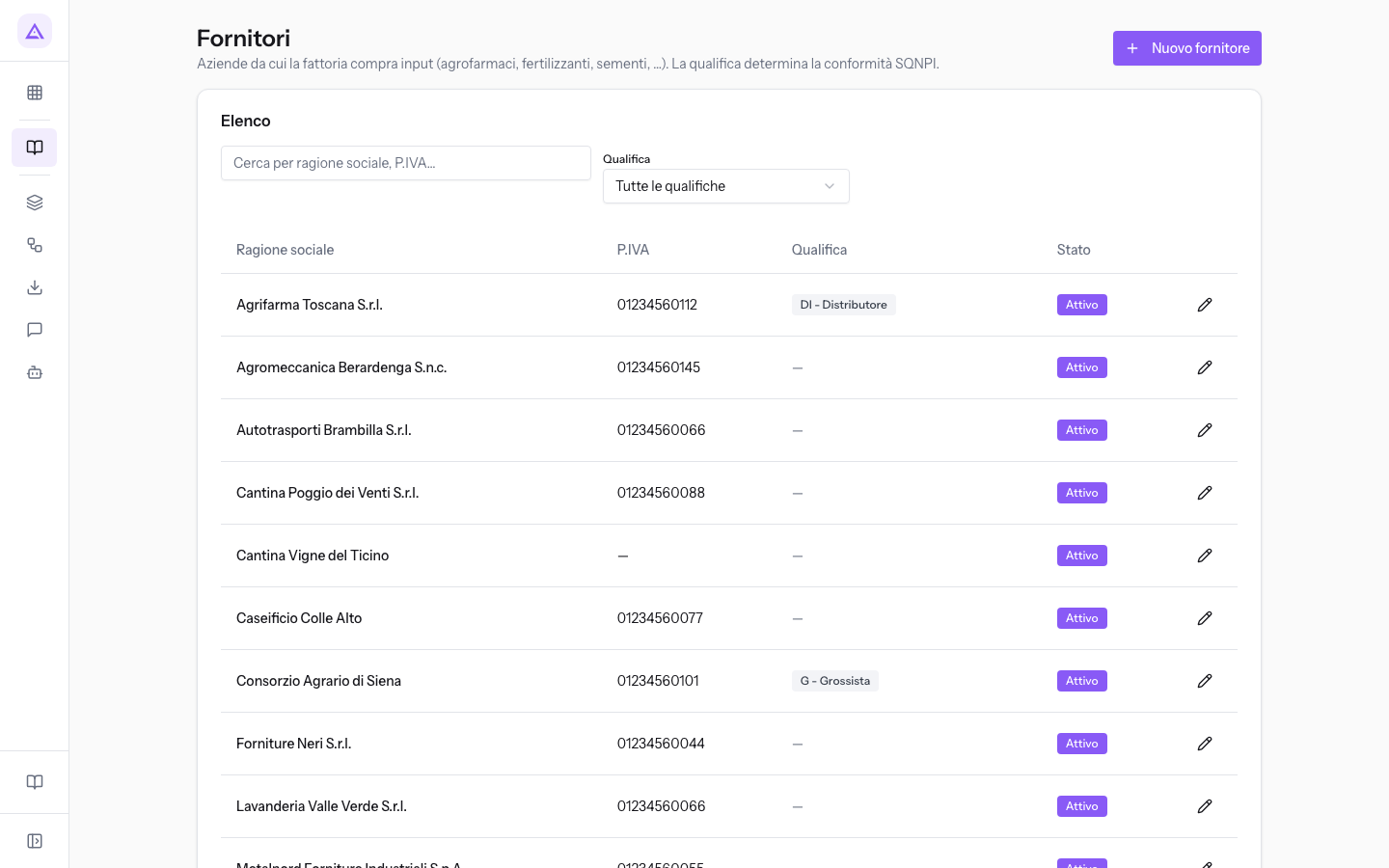
The list columns are Ragione sociale, P.IVA, Qualifica, and Stato. A supplier is inactive when it is deactivated or when the Attivo fino al date has passed: Sementi Valdelsa S.r.l. has the Attivo toggle on but the Attivo fino al date has passed, so it is no longer active.
Register a supplier
The supplier record contains the company's details, its qualification in the supply chain, and the period during which it is active.
- Click Nuovo fornitore, or click a row in the list to open an existing supplier.
- Fill in the Identità legale panel.
- In Qualifica supply-chain, choose the supplier's Qualifica.
- If the relationship with the supplier has an expiry date, enter it in Attivo fino al.
- Click Salva to return to the supplier list.
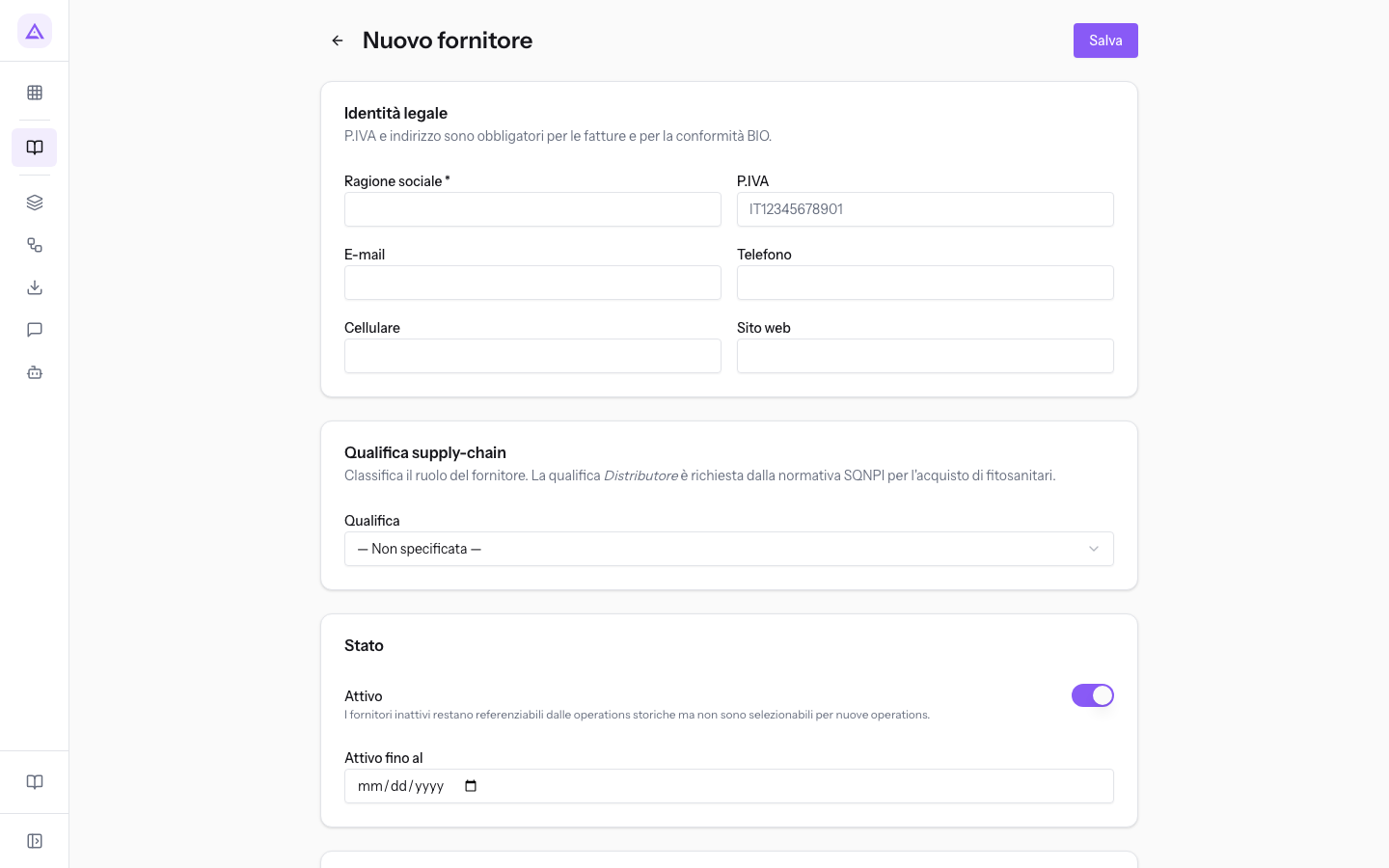
Fields in the Identità legale panel:
- Ragione sociale: the company's name. The field is required.
- P.IVA: the VAT number. The screen indicates it as required for invoices and BIO compliance.
- E-mail, Telefono, Cellulare, Sito web: the company's contact details.
Qualifica field: the supplier's position in the supply chain. The initial value is — Non specificata —.
- DI - Distributore: a distributor, such as Agrifarma Toscana S.r.l.
- G - Grossista: a wholesaler, such as Consorzio Agrario di Siena.
- PA - Produttore Agricolo: another agricultural company that sells its own products.
Status fields:
- Attivo: indicates whether you still purchase from this supplier. On a new supplier it is already enabled. Turn it off when you stop buying from the supplier.
- Attivo fino al: the date after which the supplier is no longer active, even if the Attivo toggle remains on.
The Note field accepts free-form notes. For an already-registered supplier, the record also has the Elimina button.
Tip: for a supplier you have stopped working with, use Attivo or Attivo fino al instead of Elimina, so the supplier remains in the registry with inactive status.
Contractors
The Contoterzisti list contains the external businesses that carry out treatments, harvesting, and soil work on behalf of the farm. They are distinct from operators, who are natural persons.
In the QdC — Quaderno di Campagna menu, open Contoterzisti. Search for a contractor with Cerca per ragione sociale, P.IVA, titolare patentino….
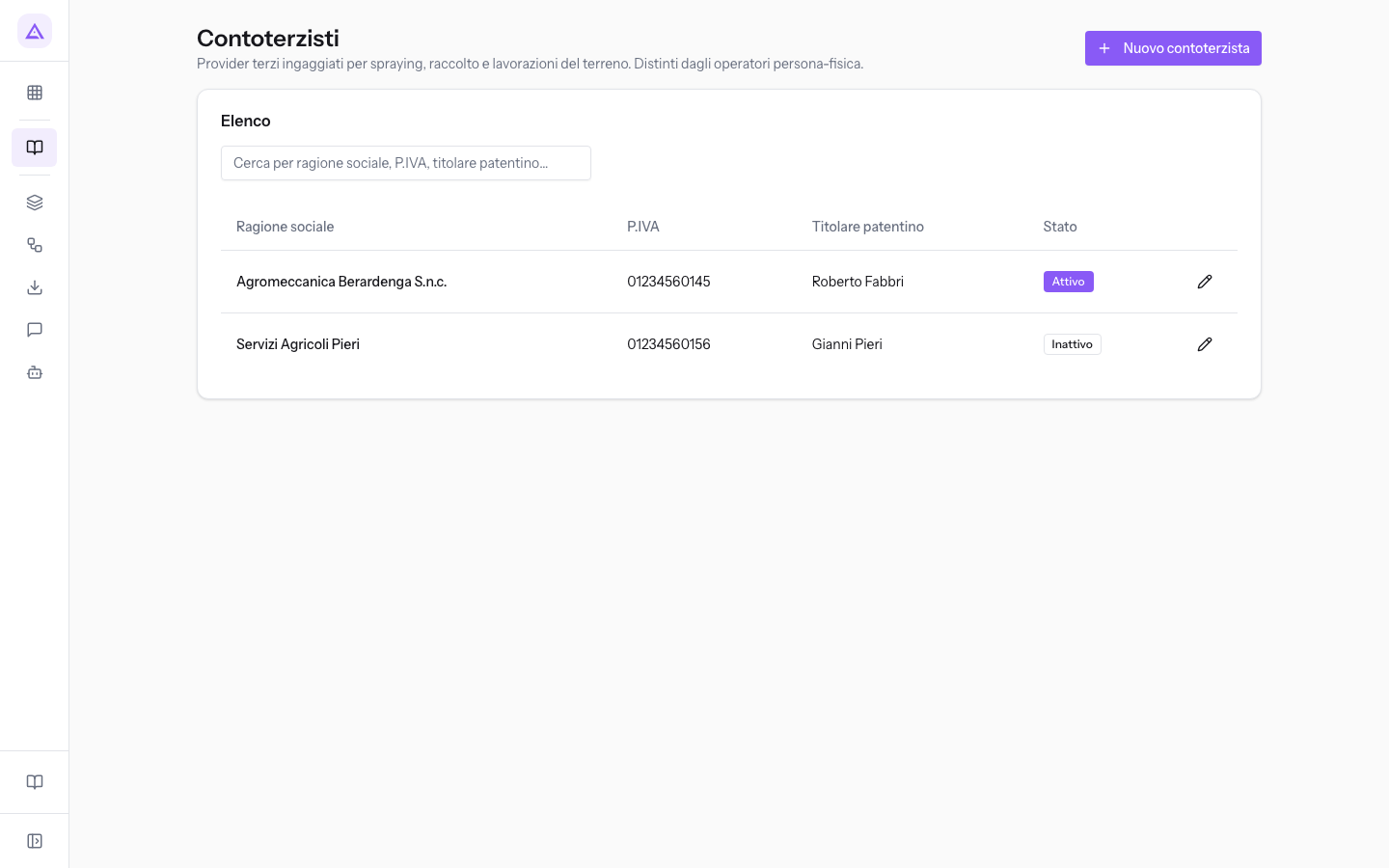
The list columns are Ragione sociale, P.IVA, Titolare patentino, and Stato. As with suppliers, a contractor whose Attivo fino al date has passed is no longer active: this is the case for Servizi Agricoli Pieri.
Register a contractor
The contractor record contains the business's details, the Chamber of Commerce registration, the holder of the phytosanitary licence, and the status.
- Click Nuovo contoterzista, or click a row in the list to open an existing contractor.
- Fill in the Identità legale panel and the Camera di Commercio panel.
- Indicate who holds the phytosanitary licence in Titolare patentino (nome e cognome).
- If the business also sells inputs to you, enable È anche fornitore.
- Click Salva to return to the contractor list.
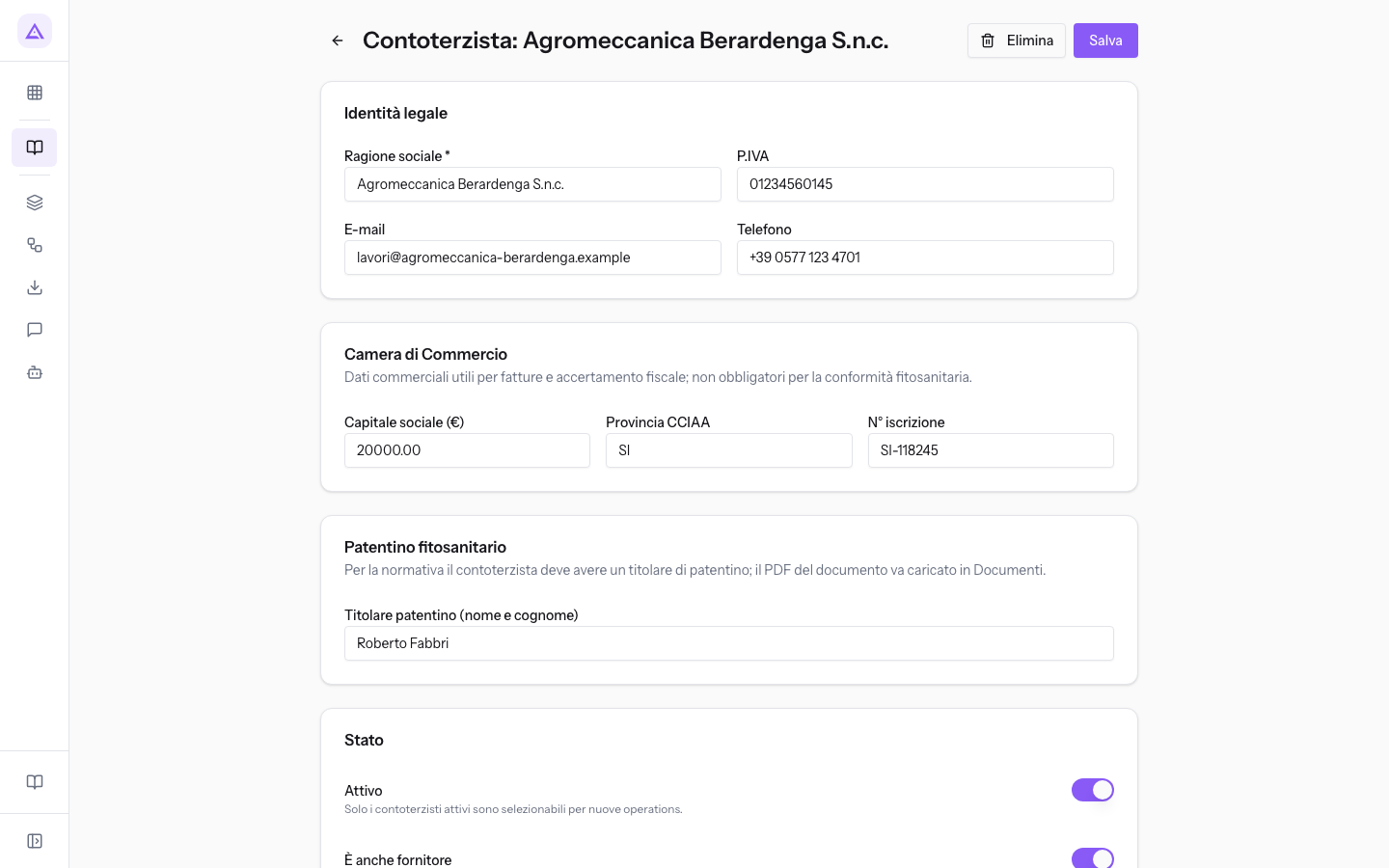
Fields in the Identità legale panel:
- Ragione sociale: the business's name. The field is required.
- P.IVA: the VAT number.
- E-mail, Telefono: the business's contact details.
The fields in the Camera di Commercio panel are used for invoices and tax verification. They are not required for phytosanitary compliance.
- Capitale sociale (€): the business's share capital.
- Provincia CCIAA: the province code of the Chamber of Commerce, such as SI.
- N° iscrizione: the registration number, such as SI-118245 for Agromeccanica Berardenga S.n.c.
Licence and status fields:
- Titolare patentino (nome e cognome): the person within the business who holds the phytosanitary licence, such as Roberto Fabbri for Agromeccanica Berardenga S.n.c.
- Attivo: indicates whether the business still works for the farm. On a new contractor it is already enabled.
- È anche fornitore: indicates that the business also sells inputs to the farm. On a new contractor it is off.
- Attivo fino al: the date after which the contractor is no longer active.
The Note field accepts free-form notes. For an already-registered contractor, the record also has the Elimina button.
See it on your company, not on a slide deck.
In 30 minutes we map the software you use today.We show you how much work and how much margin Archimedes gives back.
Show me on my business →What industry are you in?
One tap — it lets us prepare the demo around your world.
What tools do you use today?
Pick the ones you recognise — or just type them. It helps us show you how they migrate.
Last step: your details.
We reply within one working day — and right after, if you like, you pick the demo slot yourself.
We couldn't send your request. Try again, or write to us at [email protected].
By sending, you agree to your data being processed so we can get back to you about the demo. Privacy notice.
Preview form — nothing is sent from this page.
Want to schedule the demo now?
Your call: book the slot you prefer yourself, or we'll call you to arrange it.
Live availability, 30 minutes, instant confirmation. The calendar opens in a new tab.
Lock in your slot ↗We'll get back to you within one working day — and we'll join the call already knowing your world.
The calendar is open in another tab: pick a slot and the demo is booked. Can't see it? Reopen it ↗
Preview page: nothing was sent.
Our calendar is live: take the slot that suits you and the demo is booked. 30 minutes, instant confirmation, no waiting.
Lock in your slot ↗