Field record book (QdC)
All modules
Archive farm documents
Field record book (QdC) · 13 of 15 · 5 min read
The Documenti page of the QdC archives the documents that ASL and AGEA may request during an inspection: pesticide licences, soil analyses, input invoices, calibration certificates. From here you upload a document with its type and validity, search for it, download it, edit its details, and delete it.
Documents uploaded here are stored in the company's Documents.
Note: these screens currently use Italian interface labels. The instructions preserve the names shown on screen; the screenshots show the same controls.
Why type and validity matter
The document type and validity dates allow you to search for documents and know which ones are still current. When the Validità al date has passed, the Archive shows the Scaduto badge next to the dates.
- If the document has an expiry date, such as a pesticide licence or a functional inspection, fill in Validità al with the date shown on the document.
- If the document does not expire, such as an invoice or land registry maps, leave Validità al blank: the document will never appear as expired.
An expired pesticide licence appears among the anomalies in the Annual check: you can see it in Verify compliance: agrochemicals and annual check. In the demo this is the case of Patentino fitosanitario Luigi Bandini, valid until 2026-10-09.
Uploading a document
The Carica nuovo documento box accepts PDF files, images, and Office files up to 100 MB.
- In the File field, choose the file from your computer.
- Enter the Descrizione under which the document will appear in the Archive, for example Analisi del terreno — Campo del Grano.
- Choose the Tipo documento.
- Enter the Validità dal and Validità al dates, if the document has a validity period.
- Enable Includi nei bundle di tracciabilità (SQNPI / BIO) if the document serves as evidence for SQNPI or organic certification.
- Press Carica. The Documento caricato message appears and the box clears for the next document.
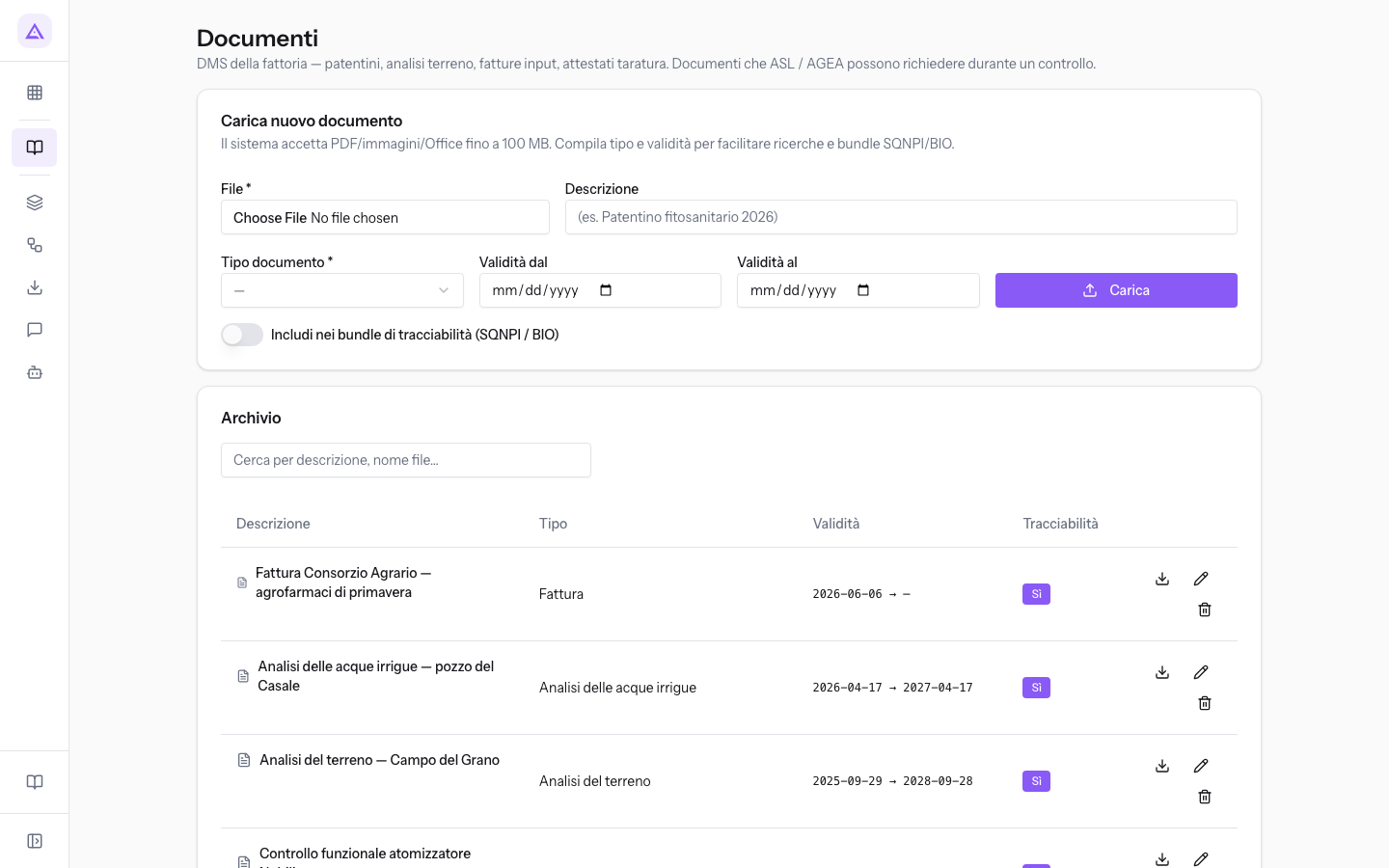
The box's fields:
- File: the file to archive. The field is required: without a file the Seleziona un file message appears.
- Descrizione: the document name in the Archive. If left blank, the system uses the filename.
- Tipo documento: the document category. The field is required: without a type the Seleziona il tipo documento message appears. The options are:
- Altro
- Analisi delle acque irrigue
- Analisi delle uve
- Analisi del terreno
- Analisi fogliare
- Bolla / Documento di trasporto
- Certificato di abilitazione uso agrofarmaci o patentino
- Certificato di controllo funzionale: the calibration certificate for a piece of equipment, such as Controllo funzionale atomizzatore Nobili. The calibration expiry is also recorded on the equipment, as explained in Record equipment and calibration details.
- Certificato di manutenzione
- Comunicazione
- Documento tecnico
- Fattura
- Mappali
- Protocollo - linee guida
- Tabella di taratura o regolazione
- Validità dal: the date from which the document is valid. The field is optional.
- Validità al: the date on which the document expires. The field is optional; after this date the Archive marks the document as Scaduto.
- Includi nei bundle di tracciabilità (SQNPI / BIO): marks the document as traceability evidence. Off by default; when on, the Archive shows Sì in the Tracciabilità column.
Browsing the Archive
The Archivio box lists the uploaded documents, one per row.
- To find a document, type part of the description or filename in the Cerca per descrizione, nome file… field. Typing Patentino finds the operators' pesticide licences.
The Archive's columns:
- Descrizione: the document name, for example Fattura Consorzio Agrario — agrofarmaci di primavera.
- Tipo: the document type chosen at upload.
- Validità: the start and end dates, with the Scaduto badge if the end date has passed. A dash indicates a blank date.
- Tracciabilità: shows Sì for documents included in traceability bundles.
To the right of each row there are three actions:
- Scarica: opens the file in a new browser tab, from which you can save it.
- Modifica metadata: opens the document record.
- Elimina: deletes the document after a confirmation.
Editing a document's details
The document record shows the file details and lets you correct the description, type, validity, and traceability without uploading the file again.
- In the document row, press Modifica metadata.
- Correct the fields and press Salva.
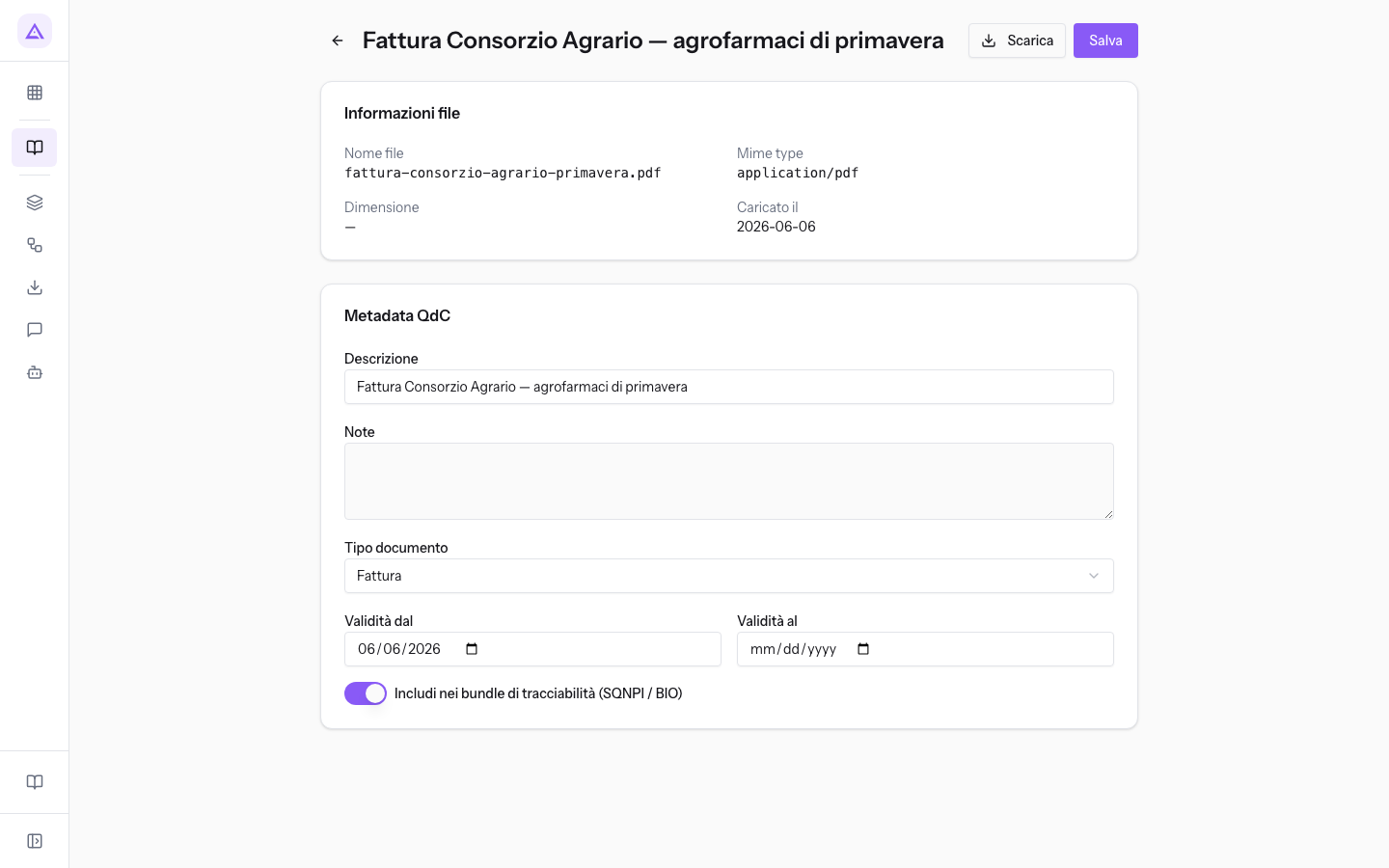
The Informazioni file box shows, in read-only mode, the Nome file, Dimensione, and Caricato il date. The Scarica button at the top downloads the file.
The editable fields:
- Descrizione: the document name in the Archive.
- Note: free text about the document. The field is present only in the record, not at upload.
- Tipo documento: the same options as at upload.
- Validità dal and Validità al: the validity period. For a renewed pesticide licence, upload the new document with its new dates. The old document remains in the archive and can still be flagged as expired by Controllo annuale, which does not automatically link renewals.
- Includi nei bundle di tracciabilità (SQNPI / BIO): the same toggle as at upload.
Deleting a document
Delete a document when it has been uploaded by mistake.
- In the document row, press Elimina.
- Confirm in the window asking whether to delete the document. The Documento eliminato message appears.
Important: an expired document remains proof of what was valid in the past. To replace it, upload the new document and leave the old one in the Archive.
See it on your company, not on a slide deck.
In 30 minutes we map the software you use today.We show you how much work and how much margin Archimedes gives back.
Show me on my business →What industry are you in?
One tap — it lets us prepare the demo around your world.
What tools do you use today?
Pick the ones you recognise — or just type them. It helps us show you how they migrate.
Last step: your details.
We reply within one working day — and right after, if you like, you pick the demo slot yourself.
We couldn't send your request. Try again, or write to us at [email protected].
By sending, you agree to your data being processed so we can get back to you about the demo. Privacy notice.
Preview form — nothing is sent from this page.
Want to schedule the demo now?
Your call: book the slot you prefer yourself, or we'll call you to arrange it.
Live availability, 30 minutes, instant confirmation. The calendar opens in a new tab.
Lock in your slot ↗We'll get back to you within one working day — and we'll join the call already knowing your world.
The calendar is open in another tab: pick a slot and the demo is booked. Can't see it? Reopen it ↗
Preview page: nothing was sent.
Our calendar is live: take the slot that suits you and the demo is booked. 30 minutes, instant confirmation, no waiting.
Lock in your slot ↗