Property management
All modules
Check compliance deadlines and collect the tourist tax
Property management · 11 of 18 · 6 min read
The Compliance due page lists the reservations that still have a stay-related obligation to complete, such as the guest register or the tourist tax. From the reservation page you follow the obligations of each stay, calculate the tourist tax and mark it as collected.
How obligations and the tourist tax work
Each reservation has its own obligations, each with a deadline. As long as an obligation stays open, the reservation appears on the Compliance due page.
The tourist tax is calculated with the property's rules: a rate per person per night, a maximum number of taxable nights, an age below which guests are exempt, and the exemption reasons provided by the municipality. The tax goes on the bill as a separate line, outside the VAT scope.
- If the municipality applies the tax, turn on The Comune levies a tourist tax and set the rules on the property page.
- If the municipality does not apply it, turn off the same switch.
- If a guest is entitled to an exemption, for example because they reside in the municipality, choose the reason on the reservation, next to their name.
Note: notifications to the police headquarters (Alloggiati Web) and ISTAT statistics are not described in this manual: they require an external service.
Setting the tourist tax rules
The rules are set once per property and apply to all its reservations.
Before you start: the Properties entry is visible only to users in the PMS Manager group.
- In PMS › Properties open the property and then the Tourist tax tab.
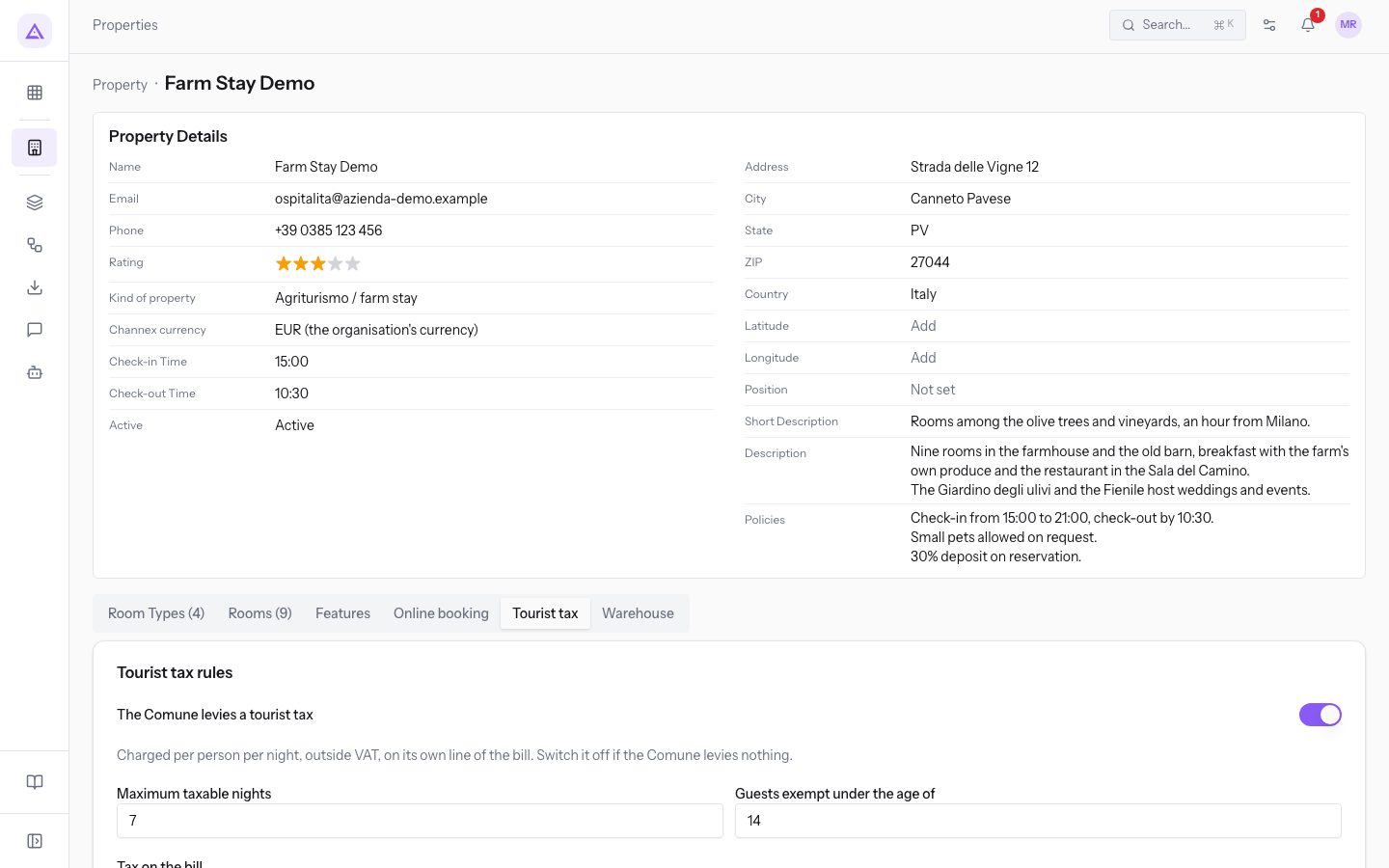
- Fill in the fields in the Tourist tax rules section.
- Press Save rules.
The fields of the tab:
- The Comune levies a tourist tax: turns on the tax calculation for the property's reservations.
- Tax on the bill: how the tax line on the bill is treated.
- No tax (the line stays untaxed): the line has no taxes. This is the demo value.
- VAT 0%: VAT at 0% applies to the line.
- Maximum taxable nights: beyond this number of nights the tax does not apply. In the demo,
7. - Guests exempt under the age of: the age below which the guest does not pay. In the demo,
14. - Rate per person per night: one or more rates, each with the fields:
- Name: the name of the rate. The field is required.
- Season from and Season to: the period in which the rate applies. They are optional.
- Amount: the amount per person per night. The field is required.
- With Add rate you add another rate; with Remove rate you remove it.
- Exemption reasons: the reasons for which the municipality's regulation exempts a guest. Staff choose one per guest on the reservation. Each reason has the fields:
- Code: a short code. The field is required.
- Reason: the text staff choose on the reservation, for example
Residents of the municipalityorTour bus drivers. The field is required. - Active: only active reasons can be chosen.
- With Add reason you add a reason; with Remove reason you remove it.
- Notes: a free note about the property, such as the reference to the municipal regulation.
Checking deadlines that are coming up
The Compliance due page shows all reservations with an obligation still open, ordered by the nearest deadline.
- Open PMS › Compliance.
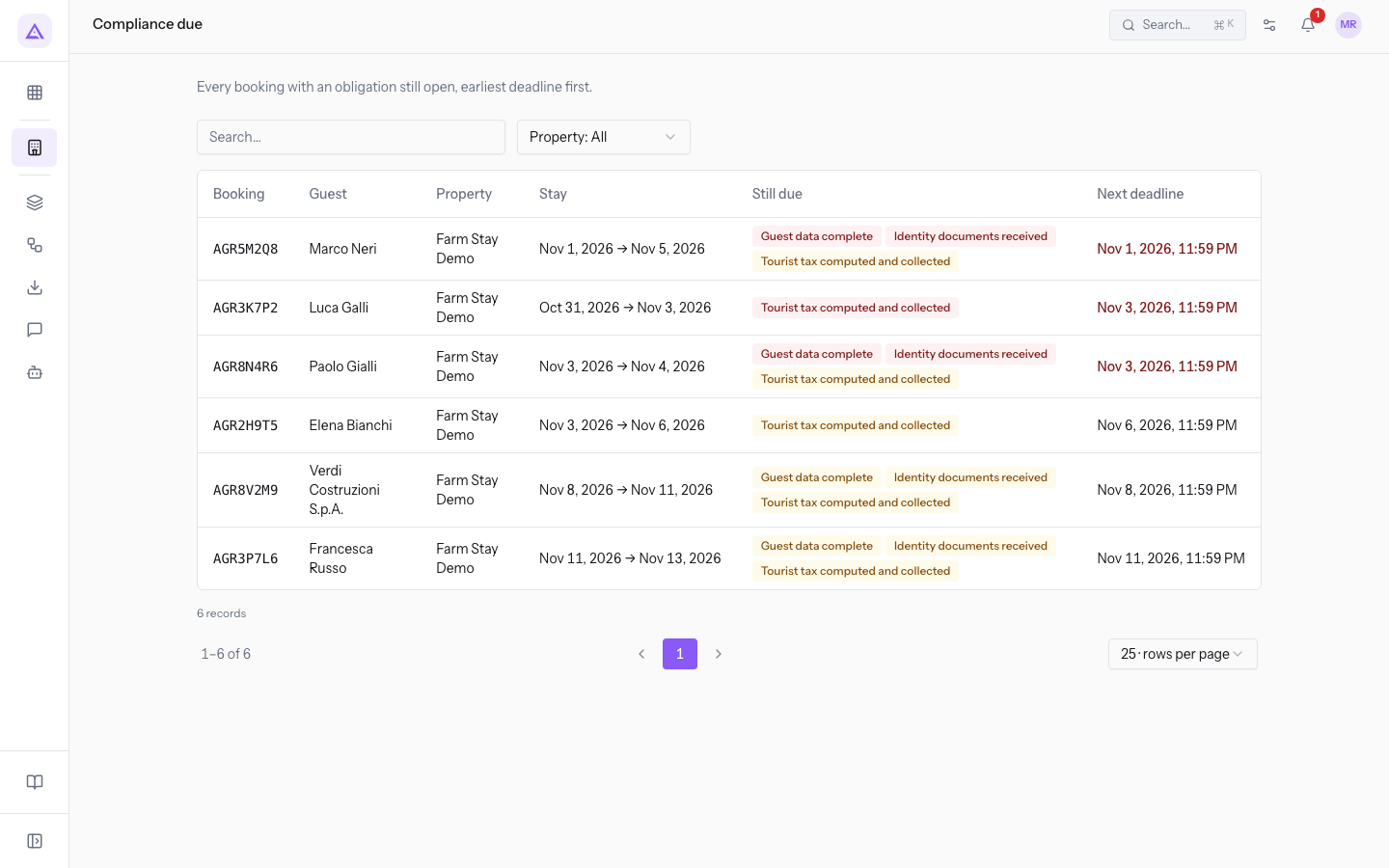
- To see a single property, use the filter that opens on Property: All, which shows all properties.
- To find a reservation, type in the Search… field.
- Press a reservation's code to open it.
The columns of the list:
- Booking: the confirmation code.
- Guest: the guest of the reservation.
- Property: the property of the stay.
- Stay: the dates of the stay.
- Still due: the obligations still open.
- Next deadline: the nearest deadline among the open obligations. A deadline already passed is shown in red.
In the demo the first row is AGR5M2Q8 for Mark Nelson, with the guest register and the document overdue; next is AGR3K7P2 for Luke Gallagher, with the tourist tax to collect; AGR8N4R6 for Paul Gale has the guest register to complete by today.
When no reservation has open obligations, the page shows Nothing is due. Every booking is up to date.
The reservation's Compliance panel
On a reservation page the Compliance panel lists the stay's obligations with their status.
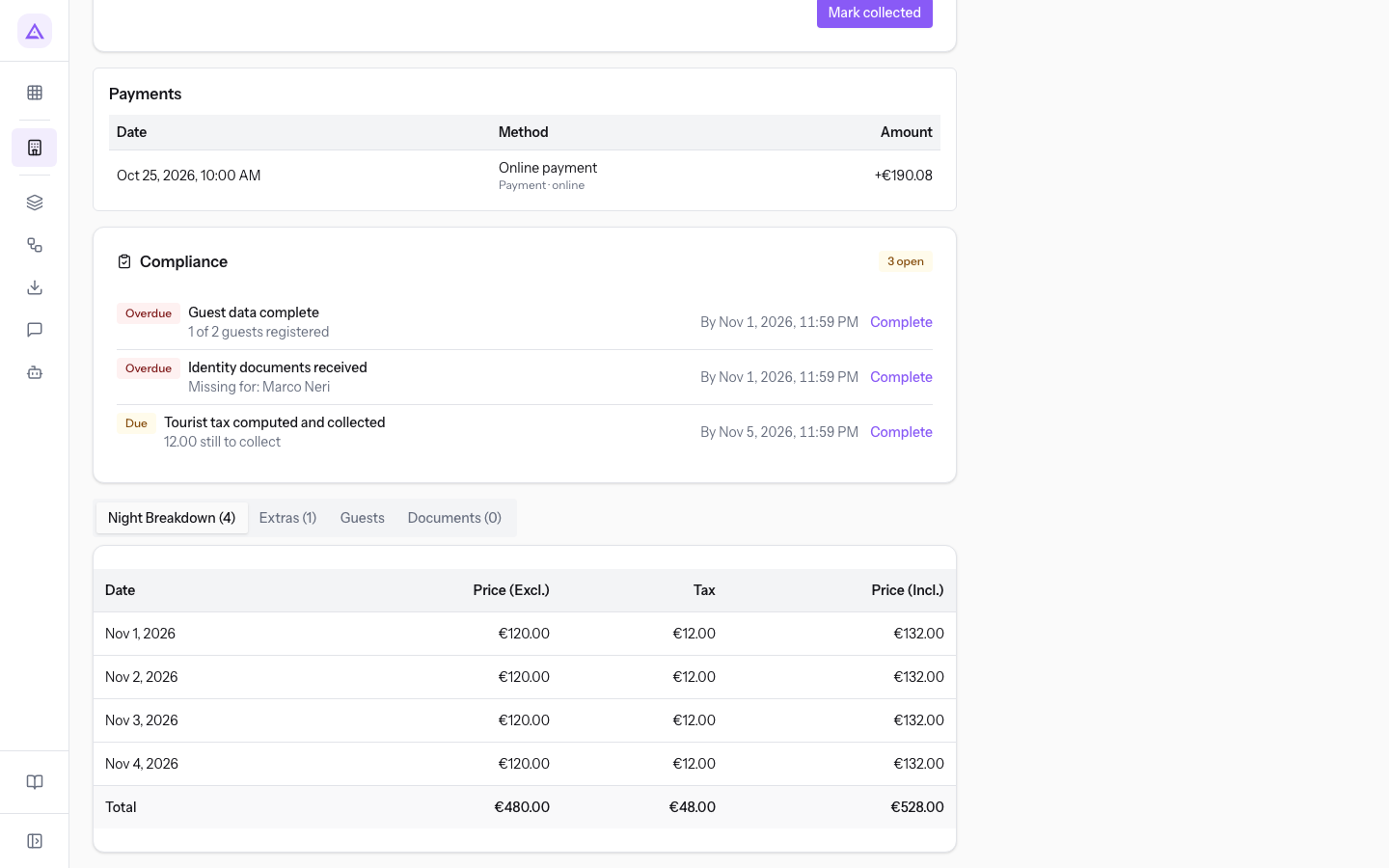
At the top the panel summarizes the situation:
- All done: no open obligations.
- The number followed by "open": the obligations still to complete.
Each obligation shows a status:
- Done: the obligation is completed.
- Due: the obligation is open.
- "By" followed by a date: the deadline of the open obligation.
- Overdue: the deadline has passed and the obligation is still open.
Next to the open obligations there is the Complete link, which takes you to the point where the obligation is completed.
The guest register is completed in the reservation's Guests tab, with each guest's details and document.
Calculating and collecting the tourist tax
The Tourist tax panel on the reservation page shows the calculation for each guest and whether the tax has already been collected.
- Open the reservation from PMS › Bookings or from the Compliance due page.
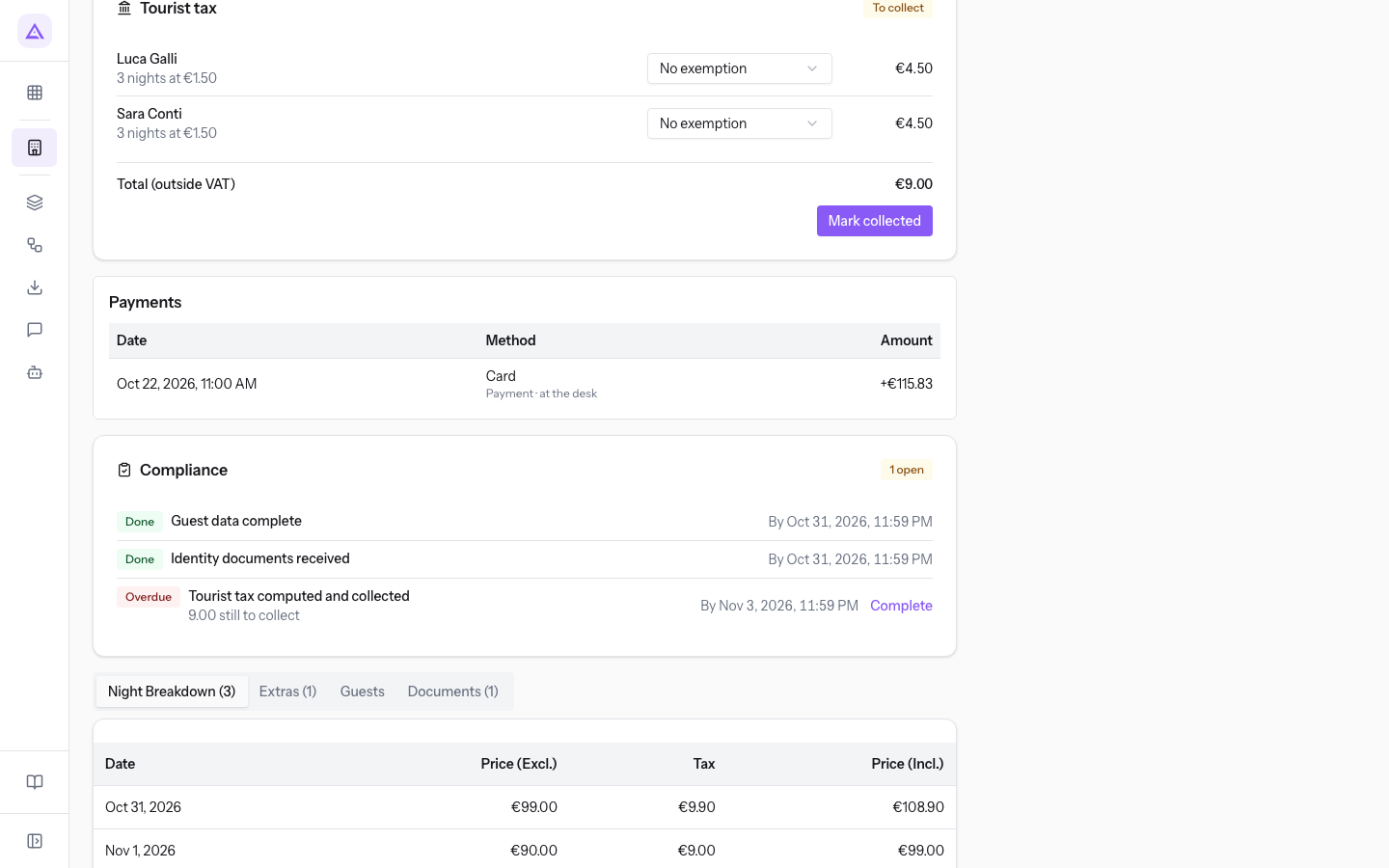
- If a guest is exempt, choose the reason in the exemption field next to their name. The options are No exemption and the property's active reasons, in the demo Residents of the municipality and Tour bus drivers.
- Check the Total (outside VAT) and collect the amount from the guest.
- Press Mark collected.
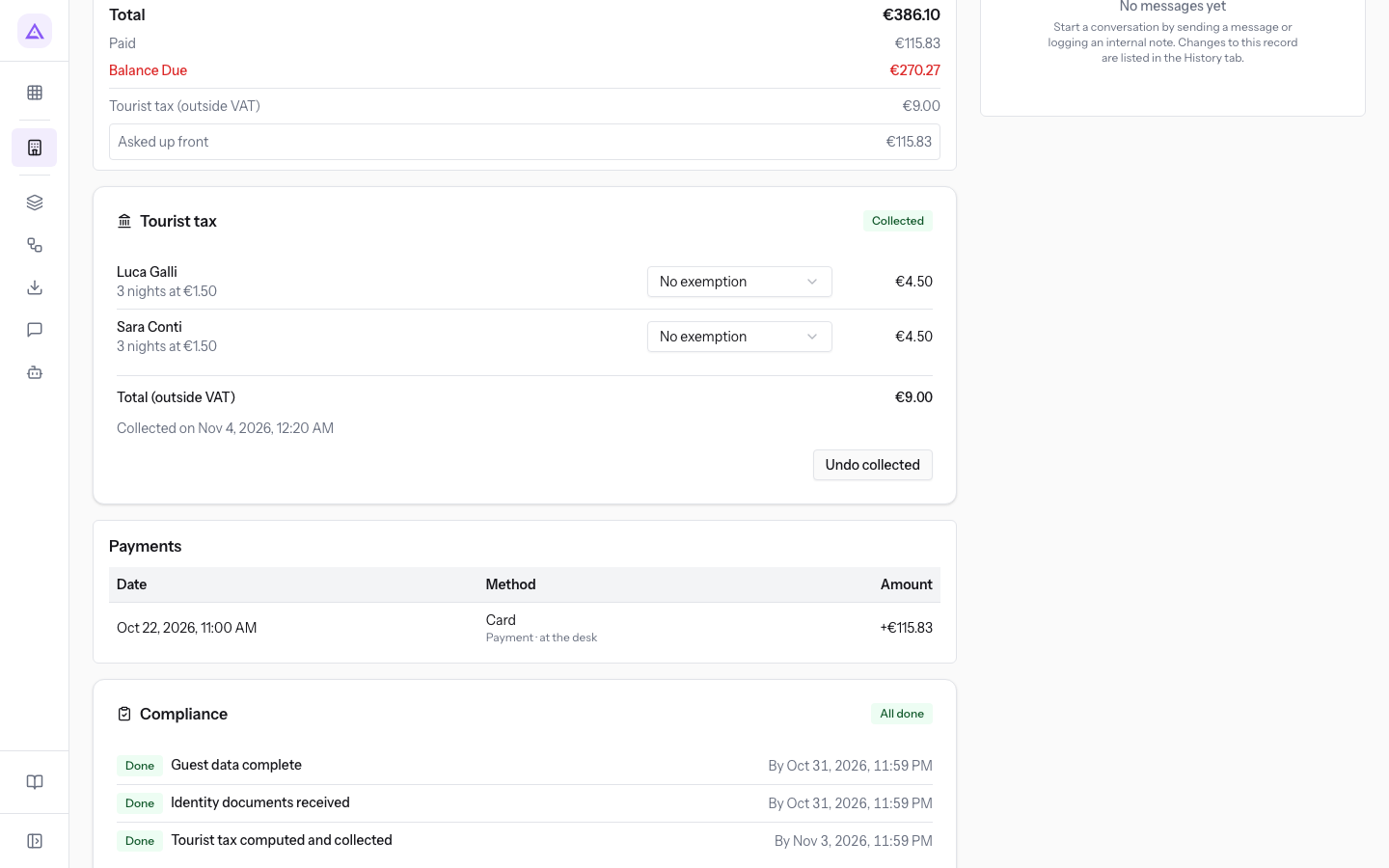
For AGR3K7P2 the calculation is 2 guests for 3 nights at €1.50: €9.00.
The items in the panel:
- The number of nights followed by "nights at" and the rate: each guest's taxable nights and the rate applied.
- "Exempt:" followed by the reason: the guest does not pay, for the chosen reason or because they are younger than the age set in the rules. For example Emma Conti, a minor, on reservation
AGR1Q5S3. - Guest not registered yet (taxable adult): an adult expected by the reservation is not yet in the guest register; the calculation counts them as subject to the tax.
- Total (outside VAT): the tax amount for the whole reservation.
- To collect: the tax has not yet been collected.
- "Collected on" followed by the date: the tax was marked as collected on that day.
Tip: if you marked the tax as collected by mistake, press Undo collected: the tax goes back to to-collect.
The tax also appears on the stay's sale order, in the Tourist tax (outside VAT) line.
See it on your company, not on a slide deck.
In 30 minutes we map the software you use today.We show you how much work and how much margin Archimedes gives back.
Show me on my business →What industry are you in?
One tap — it lets us prepare the demo around your world.
What tools do you use today?
Pick the ones you recognise — or just type them. It helps us show you how they migrate.
Last step: your details.
We reply within one working day — and right after, if you like, you pick the demo slot yourself.
We couldn't send your request. Try again, or write to us at [email protected].
By sending, you agree to your data being processed so we can get back to you about the demo. Privacy notice.
Preview form — nothing is sent from this page.
Want to schedule the demo now?
Your call: book the slot you prefer yourself, or we'll call you to arrange it.
Live availability, 30 minutes, instant confirmation. The calendar opens in a new tab.
Lock in your slot ↗We'll get back to you within one working day — and we'll join the call already knowing your world.
The calendar is open in another tab: pick a slot and the demo is booked. Can't see it? Reopen it ↗
Preview page: nothing was sent.
Our calendar is live: take the slot that suits you and the demo is booked. 30 minutes, instant confirmation, no waiting.
Lock in your slot ↗