Transport
All modules
Logistic families: how a product travels
Transport · 6 of 18 · 7 min read
A logistic family describes how a type of product is packaged and loaded: the dimensions and weight of the package, how many items it contains, whether it can be stacked, whether it can be rotated on the loading floor, and what equipment the vehicle must have. Upright metal cabinet and Lamp carton are two families.
What a logistic family is for
Products receive their package profile from the family they are linked to. From this profile, Archimedes derives the packages for each line of a transport order. From the packages, it then calculates the order's load and the trip's load plan.
- If several products travel in the same packaging, create a family and link it to all of them.
- If a product has different packaging from its family, enter its dimensions on the product record: they take precedence over the family's.
- If a product has neither a family nor its own dimensions, the order flags it and the product is excluded from the load plan.
The Transport User group can also create and edit families; only Transport Manager can delete them.
Viewing logistic families
Families are managed in a tab in the module settings.
Open Transport › Settings and click the Logistic families tab.
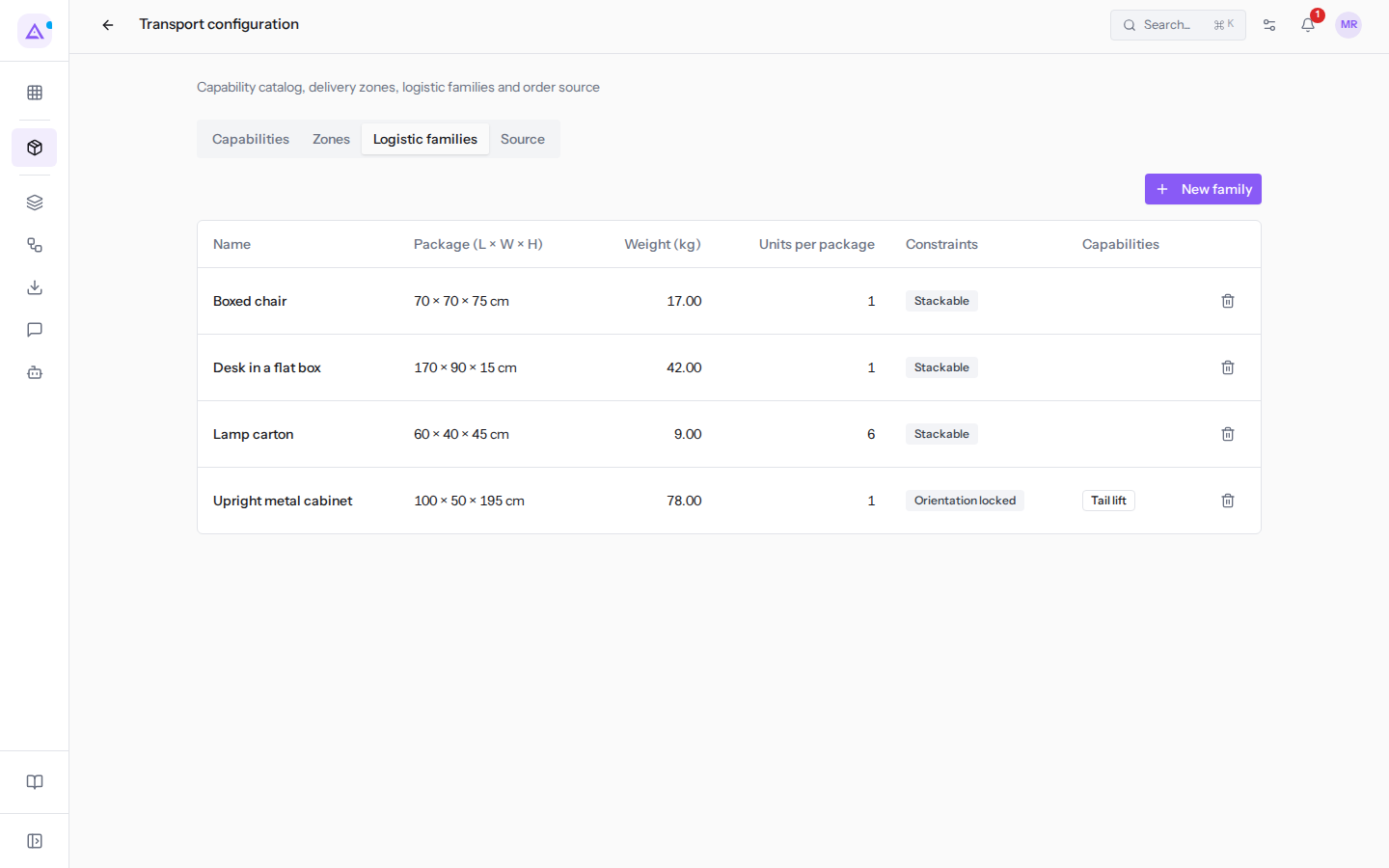
For each family, the list shows the package dimensions in Package (L × W × H), the Weight (kg), the Units per package, the Constraints (Stackable, Orientation locked), and the required Capabilities. This way you can check at a glance how a product travels: Upright metal cabinet is the only non-stackable family and the only one that requires the Tail lift.
Creating a logistic family
Create a family for each different way goods are packaged.
- In Transport › Settings, open the Logistic families tab.
- Click New family. The New family window opens.
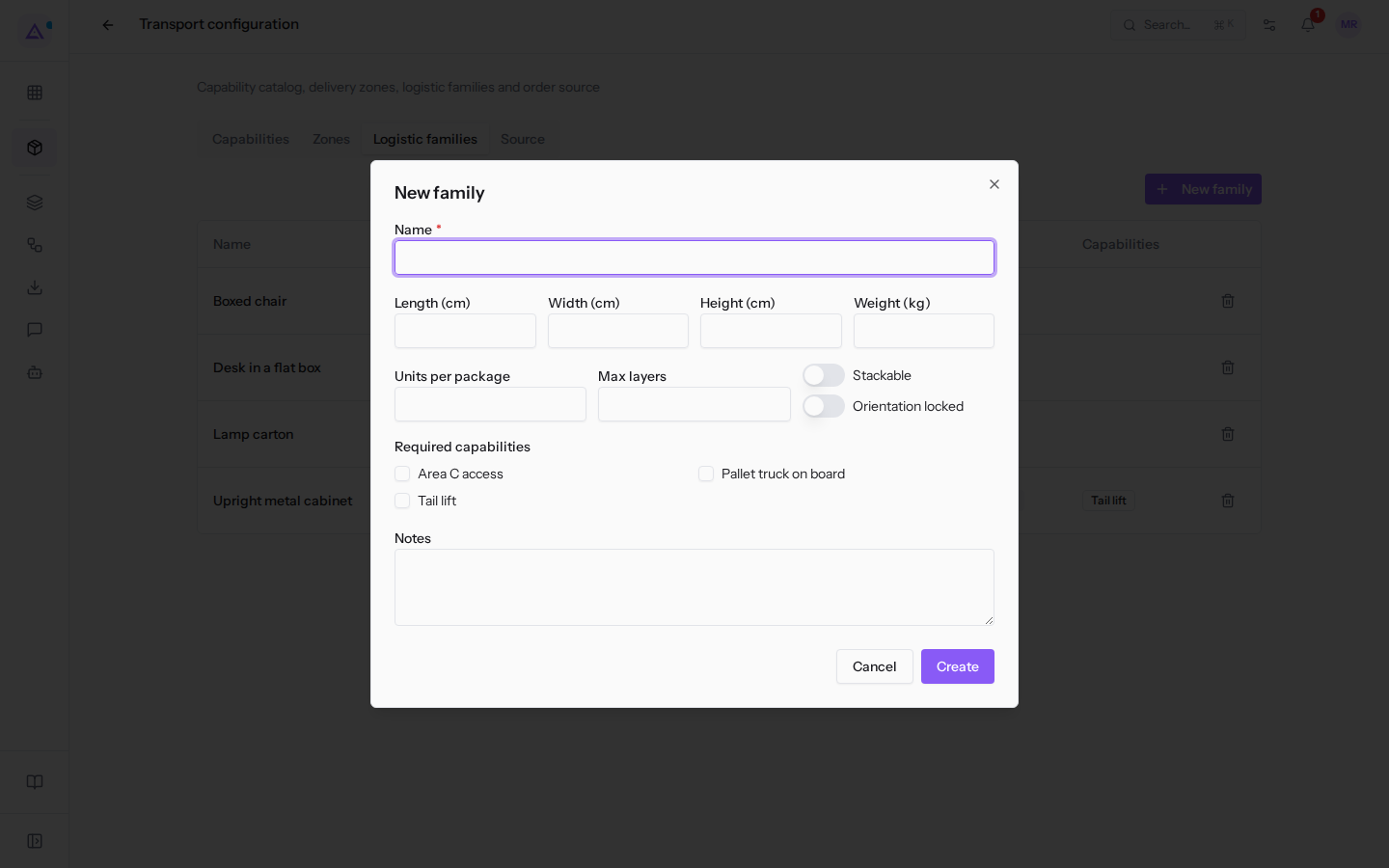
- Fill in the fields described in "The fields of a family" below.
- Click Create. Then link the family to products, as explained in "Linking a family to a product".
The fields of a family
All fields except Name are optional. However, length, width, height, and weight are all four needed to place the package in the load plan: if one is missing, the profile is incomplete.
- Name: the name of the family, for example
Lamp carton. This field is required. - Length (cm), Width (cm), Height (cm): the external dimensions of the package in centimeters;
Upright metal cabinetmeasures 100 × 50 × 195. In the list, width appears as W in Package (L × W × H). - Weight (kg): the weight of a full package, in kilograms; a
Lamp cartonweighs 9 kg. The sum of package weights gives the order's load and counts against the vehicle's Payload (kg). The list shows the weight with a decimal point, such as9.00. - Units per package: how many items fit in one package. If left blank, it defaults to 1. The number of packages for a line is the quantity divided by the items per package.
- Example:
Lamp cartonholds 6 items. 12 lamps give 2 packages. - When the division has a remainder, Archimedes adds a partial package. The partial package has the same dimensions as a full package and a weight proportional to the items. So 14 lamps give 2 full packages of 9 kg and 1 package of 2 lamps weighing 3 kg.
- Example:
- Stackable: the load plan stacks packages of the same product on top of each other. Packages of different products are never stacked together. If left off, each package occupies its own place on the floor:
Lamp cartonis stackable,Upright metal cabinetis not. - Max layers: how many packages of the same product can be stacked.
Lamp cartongoes up to 4. If left blank, the only limit is the cargo bay height. - Orientation locked: the load plan does not rotate the package 90° on the floor, so it always loads it with the length running along the length of the cargo bay. No package is ever laid on its side: the height always remains the height.
Upright metal cabinethas a locked orientation. - Required capabilities: the equipment the vehicle must have to carry these products, chosen from the catalog in the Capabilities tab: Area C access, Tail lift, Pallet truck on board.
Upright metal cabinetrequires Tail lift.- If the vehicle of a trip does not have a required capability, the trip shows the Missing capabilities: the Brambilla rigid truck for Verdi Costruzioni S.p.A. does not have the Tail lift needed for the cabinets.
- Notes: free text for the planner. For
Upright metal cabinetit is "Travels upright, never lying down: the doors bend."
Editing a logistic family
A change to the family applies to all linked products that do not have their own values.
- In Transport › Settings, open the Logistic families tab.
- Click the family's row, such as
Upright metal cabinet. The Edit window opens with the same fields as when creating.
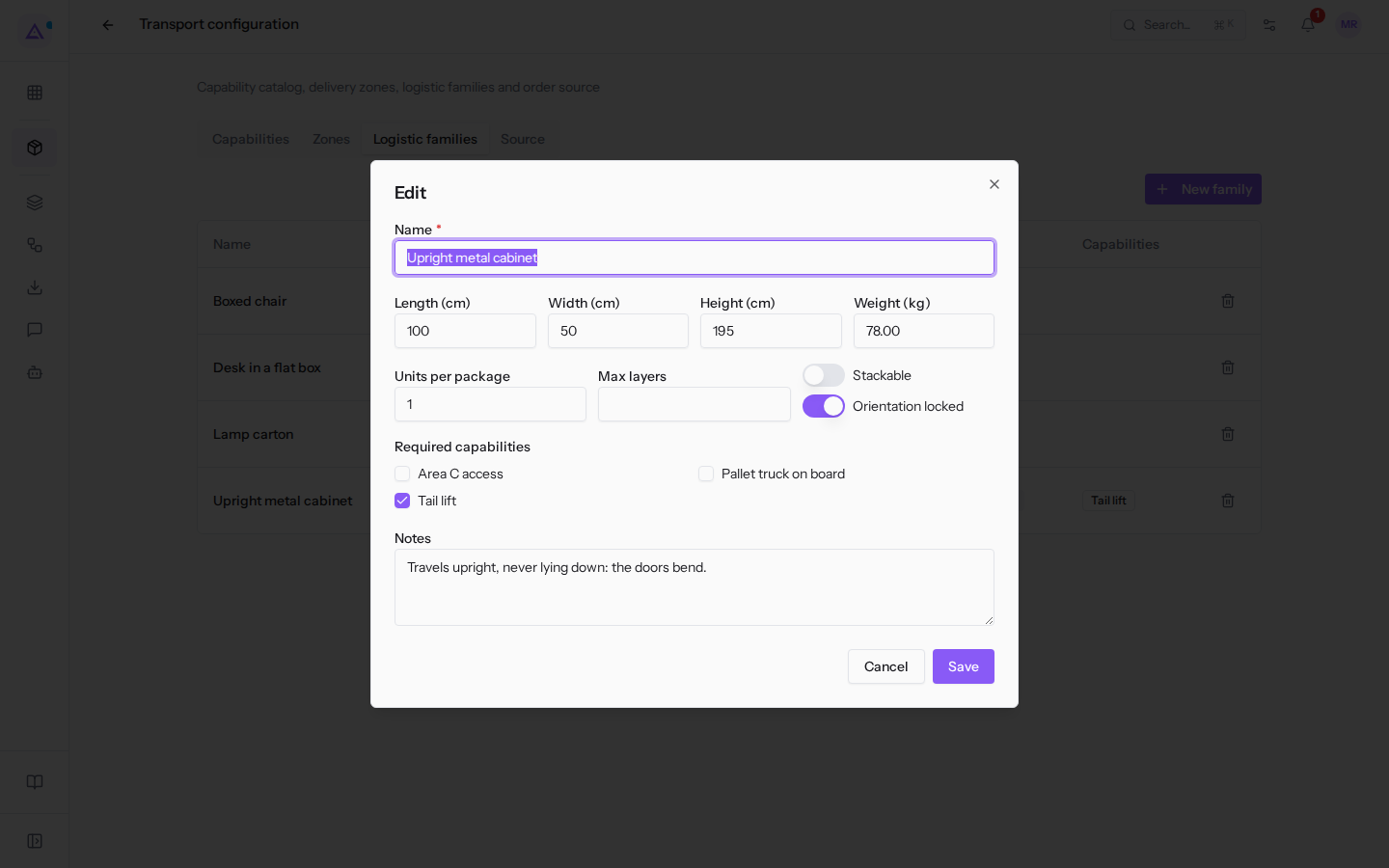
- Edit the fields and click Save.
Important: load plans that have already been calculated do not update automatically, and editing a family does not trigger the plan to recompute notice: the notice only appears when the trip itself changes. After changing the dimensions, weight, or constraints of a family, open the draft or confirmed trips that carry those products and click Recompute in the load plan.
Deleting a logistic family
Delete a family you no longer use.
- In Transport › Settings, open the Logistic families tab.
- Click the bin icon on the family's row.
- Confirm the Delete this logistic family? prompt.
Before deleting a family, link its products to another family or enter their dimensions on the product record: the deleted family will no longer appear in the list or among the product's choices.
Linking a family to a product
The family is assigned on the product record, in the Logistics section added by the Transport module. The family is chosen in Logistic family; the individual product's values go in Package length (cm), Package width (cm), Package height (cm), Package weight (kg), Units per package, Stackable, Max stack layers, and Orientation locked.
Each value entered on the product takes precedence over the family's. Each value left blank is taken from the family.
- Example: a product linked to
Lamp cartonwith no values of its own inherits the dimensions, weight, and 6 items per package. - If a product has a different weight from the family, enter only the weight on the product: the dimensions remain those of the family.
Products without a profile and lines without a product
A transport order may have lines that Archimedes cannot convert into packages. These lines appear as warnings on the order and are excluded from the load plan.
- Incomplete logistic profile: the line's product has no family and no own dimensions, or at least one of length, width, height, and weight is missing. The order shows the warning
incomplete logistic profile: assign a family or dimensions. To resolve, link the product to a family or complete its dimensions. - Product not linked to the registry: the line does not correspond to any product in the catalog. The line is flagged as
product not linked to the registryand does not produce packages. This is the case for the Acoustic panels 120x60 line on orderORD-2026-0160from Verdi Costruzioni S.p.A. To resolve, have the order resent with the product code on the line: if the code does not exist yet, Archimedes creates the product itself and you then assign its family. The order is resent from the order management system.
Note: the other lines of the same order are still converted into packages. Only the flagged line is excluded.
See it on your company, not on a slide deck.
In 30 minutes we map the software you use today.We show you how much work and how much margin Archimedes gives back.
Show me on my business →What industry are you in?
One tap — it lets us prepare the demo around your world.
What tools do you use today?
Pick the ones you recognise — or just type them. It helps us show you how they migrate.
Last step: your details.
We reply within one working day — and right after, if you like, you pick the demo slot yourself.
We couldn't send your request. Try again, or write to us at [email protected].
By sending, you agree to your data being processed so we can get back to you about the demo. Privacy notice.
Preview form — nothing is sent from this page.
Want to schedule the demo now?
Your call: book the slot you prefer yourself, or we'll call you to arrange it.
Live availability, 30 minutes, instant confirmation. The calendar opens in a new tab.
Lock in your slot ↗We'll get back to you within one working day — and we'll join the call already knowing your world.
The calendar is open in another tab: pick a slot and the demo is booked. Can't see it? Reopen it ↗
Preview page: nothing was sent.
Our calendar is live: take the slot that suits you and the demo is booked. 30 minutes, instant confirmation, no waiting.
Lock in your slot ↗