Transport
All modules
How much transport costs: reports
Transport · 18 of 18 · 5 min read
The Cost report page shows how much you spend on deliveries over a period. The total is broken down by customer, by zone, and by month. It helps you see which customer is the most expensive to serve, which zone weighs most on the budget, and how much the subcontractor costs compared to your own vehicles.
What questions the report answers
Each section of the page answers a specific question.
- Which customer costs the most: the By customer table is sorted from highest to lowest cost.
- Which zone costs the most: the By zone table is also sorted in descending order by cost and shows the km attributed to each zone.
- Is the subcontractor or your own vehicle more cost-effective: the row below the totals compares trips, cost, and cost per km for owned vehicles and the subcontractor.
- How the month is going: the By month table lists trips, km, tonnes, and cost for each month, in chronological order.
Opening the report and choosing the period
The report is calculated on trips whose date falls within the chosen period.
- Open Transport › Reports.
- In the top right, in the two date fields separated by the → arrow, set the first and last date of the period. The report updates automatically when you change a date.
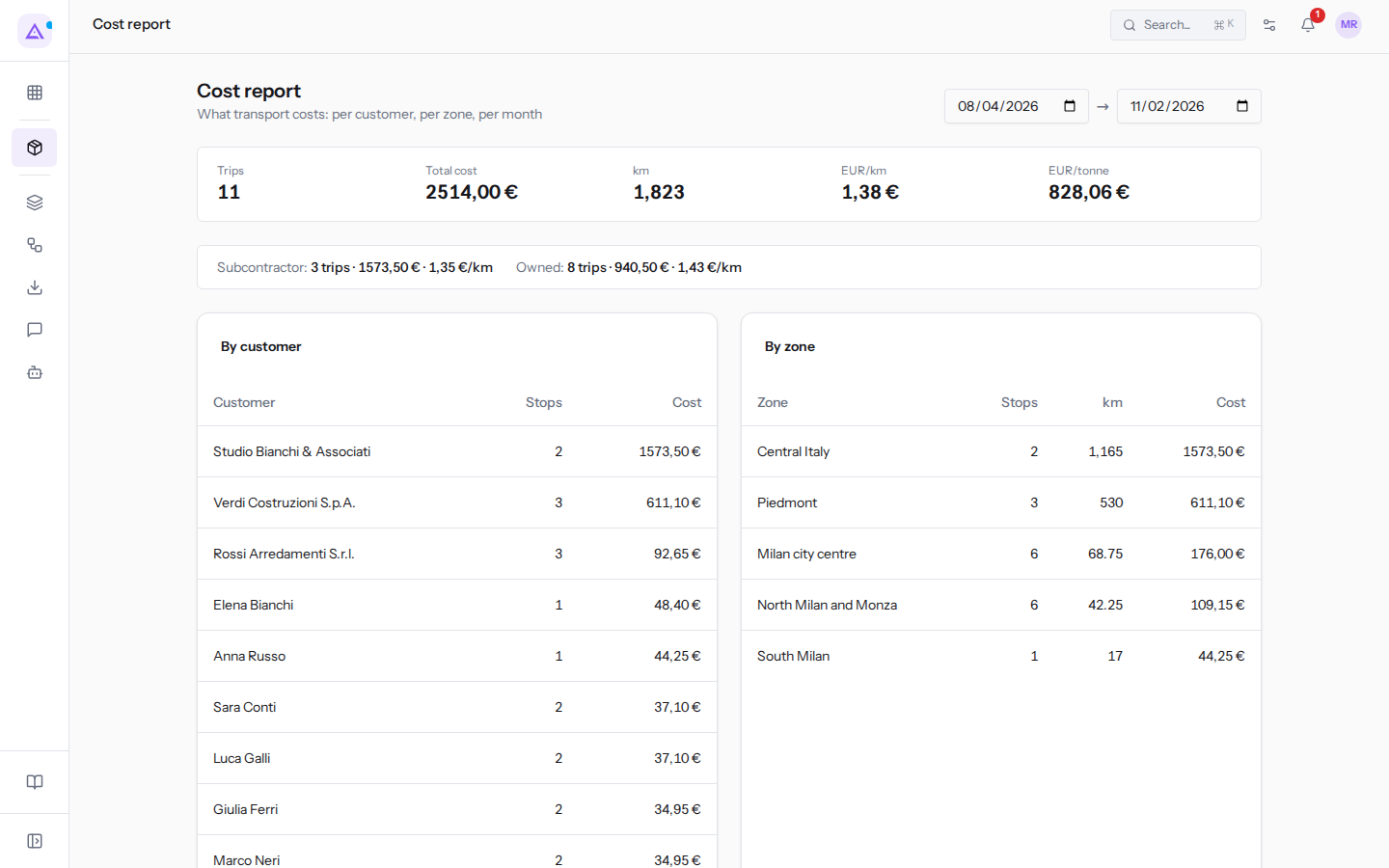
When you open the page, the period runs from 90 days ago to today: 08/04/2026 → 11/02/2026.
Note: the report counts trips in all statuses except cancelled ones. Today's trips that are still in progress are therefore included in the count, even if they do not yet have a cost.
Period totals
At the top there are five values that summarise the period.
- Trips: the number of trips in the period (
11). - Total cost: the sum of the trip costs (
2514,00 €). km: the sum of the trip kilometers (1,823).EUR/km: the total cost divided by the km (1,38 €). If the km are zero, the value is a dash.EUR/tonne: the total cost divided by the tonnes transported (828,06 €). If there are no tonnes, the value is a dash.
Below the totals there is a row that splits trips between Subcontractor and Owned, with the number of trips, cost, and cost per km: in the base period Subcontractor: 3 trips · 1573,50 € · 1,35 €/km and Owned: 8 trips · 940,50 € · 1,43 €/km.
Read the comparison with caution: the subcontractor handles long trips, such as those to Rome, where each kilometer costs little; owned vehicles make city rounds with many stops, where the cost per km rises. The comparison is only meaningful for similar routes.
The tables by customer, by zone, and by month
The three tables break down the same costs in different ways.
- By customer: one row per customer, with the number of stops and the attributed cost. The customer name is that of the stop.
- By zone: one row per delivery zone, with the number of stops, km, and attributed cost. Stops without a zone are grouped in a row with the dash
—. - By month: one row per month, with the number of trips, km, tonnes, and cost. The month is written as year-month, for example 2026-08, 2026-09, 2026-10, 2026-11.
How costs are attributed
At the bottom of the page a note summarises the attribution rule: the cost and km of a trip are divided equally among its stops, and each stop's share goes to its customer and zone. The tonnes come from the calculated load plans.
In practice:
- A stop costs the same as the other stops on the same trip, regardless of the weight unloaded or the distance from the yard.
- A long trip with few stops gives each stop a high share. A city round with many stops gives low shares.
- For each trip, only the last calculated load plan counts. A trip without a load plan adds no tonnes.
- Tonnes are visible only in the By month table and within
EUR/tonne: they have no field in the totals and are not broken down by customer or zone.
In the base period Studio Bianchi & Associati, in Rome, has 2 stops for 1,573.50 €, in the Central Italy zone with 1,165 km. Rossi Arredamenti S.r.l., in Milan, has 3 stops for 92.65 €. A stop in Rome costs about 25 times a stop in Milan: this is the figure to keep in mind when pricing delivery to a distant customer.
Trips without a cost
The report uses the cost recorded on the trip. A trip without a cost is counted as a trip with zero cost.
- The trip is still included in the Trips count, and its km and tonnes remain in the totals.
- Its stops receive a cost share of zero. This means
EUR/tonneappears lower than the actual value, and so doesEUR/kmif the trip already has kilometers.
Today's three trips do not yet have a cost: the 2026-11 row of the By month table shows 3 trips with a cost of 0.00 €. Their tonnes come from their latest load plans, which are recomputed every time a trip is opened, so the tonnes and EUR/t can change from one visit to the next. When you assign the trips a cost, the report will update.
Important: to have reliable reports, assign a cost to every trip before departure: from Departed on you can no longer type it, and can only replace it with the estimate through Use as cost. How to estimate and enter the cost is explained in Route and cost of a trip.
See it on your company, not on a slide deck.
In 30 minutes we map the software you use today.We show you how much work and how much margin Archimedes gives back.
Show me on my business →What industry are you in?
One tap — it lets us prepare the demo around your world.
What tools do you use today?
Pick the ones you recognise — or just type them. It helps us show you how they migrate.
Last step: your details.
We reply within one working day — and right after, if you like, you pick the demo slot yourself.
We couldn't send your request. Try again, or write to us at [email protected].
By sending, you agree to your data being processed so we can get back to you about the demo. Privacy notice.
Preview form — nothing is sent from this page.
Want to schedule the demo now?
Your call: book the slot you prefer yourself, or we'll call you to arrange it.
Live availability, 30 minutes, instant confirmation. The calendar opens in a new tab.
Lock in your slot ↗We'll get back to you within one working day — and we'll join the call already knowing your world.
The calendar is open in another tab: pick a slot and the demo is booked. Can't see it? Reopen it ↗
Preview page: nothing was sent.
Our calendar is live: take the slot that suits you and the demo is booked. 30 minutes, instant confirmation, no waiting.
Lock in your slot ↗